OpenAI Product Design Plugin: How Codex Enables End-to-End Transformation from Concept to Interactive Prototype
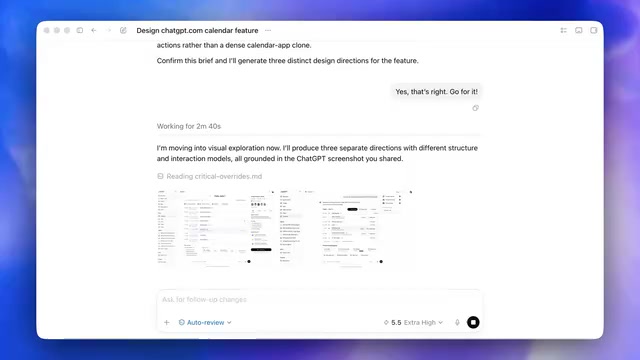
OpenAI's design plugin uses Codex to turn ideas into interactive, shareable prototypes in minutes.
OpenAI unveiled a product design plugin that leverages Codex to create a seamless workflow from initial concept to interactive prototype. It auto-generates visual directions, builds coded prototypes with self-testing, exports to Figma with full context, and publishes shareable interactive sites—dramatically accelerating product design iteration and team collaboration.
Overview
OpenAI recently showcased a brand-new plugin designed for product designers that transforms one of the biggest challenges in design work—converting ideas into shareable prototypes—into a seamless, end-to-end workflow. This means Codex's capabilities now extend far beyond writing code; it's redefining how product design collaboration works.
From Concept to Prototype: A Complete AI-Assisted Design Process
Understanding Requirements and Auto-Generating Visual Directions
In the demo, a designer used "design a new calendar feature for ChatGPT" as an example to showcase the entire workflow. Upon starting, the model first asks a few clarifying questions to understand the design intent, and designers can also provide reference files as a visual brief.
Once the direction is fully understood, the model automatically generates three different visual approaches. Designers can review each one, compare options, and ultimately select the most satisfying approach to move forward with. This process compresses what traditionally might take hours or even days of brainstorming and initial sketching into just a few minutes.
Codex Auto-Generates Interactive Prototype Code
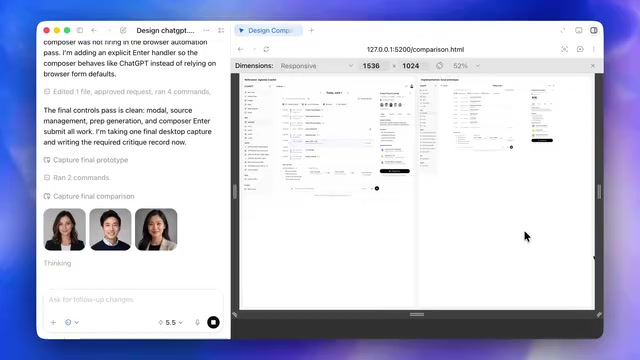
After selecting a visual direction, the model converts the static design into an interactive code prototype. During this process, Codex not only generates the interface code but also automatically creates supporting images and asset resources needed for the experience.
Even more impressive is that the model self-tests the prototype before delivery—checking adaptation across different screen sizes and even comparing reference images against the local prototype to ensure visual quality in the final result. This "self-review" mechanism significantly reduces the number of manual revision cycles.
A Truly Interactive Prototype Experience
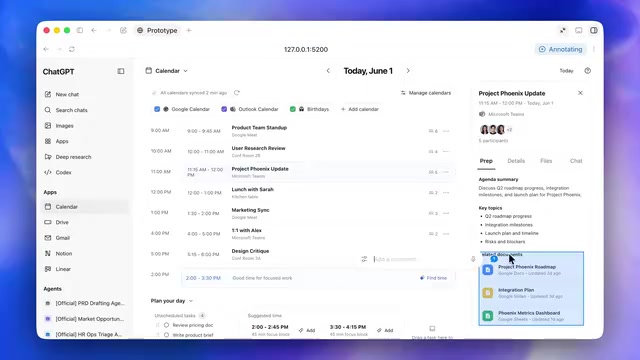
The generated prototype is far from a simple static page. Designers can open the prototype in full screen and perform real interactions: clicking various elements, toggling feature switches, and scrolling through content to get an intuitive feel for the actual user experience of the calendar feature.
If further optimization is needed, designers can annotate specific parts of the prototype directly, provide modification feedback, and the model will iterate and update accordingly.
Seamless Integration with Team Collaboration and Design Delivery
One-Click Export to Figma for Continued Editing
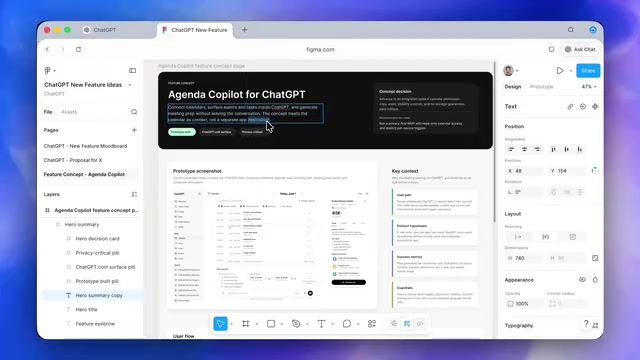
Once the prototype design is satisfactory, the plugin supports directly importing the work into Figma. It can be sent to an existing Figma artboard or generate an entirely new file.
The key point is that what's imported into Figma isn't just a screenshot. It brings in the complete functional context, including:
- Prototype screenshots
- Background descriptions of user stories
- Review notes for the feature itself
This means team members can continue editing and refining in Figma rather than starting from scratch to understand the design intent.
Publishing as a Shareable Interactive Website via Sites
The final step leverages OpenAI's new "Sites" feature to publish the prototype as an interactive website. The entire team can access it via a link, browse different elements, and personally experience how the feature would actually feel within ChatGPT.
This solves a long-standing pain point in product design: how to help non-design team members (such as engineers, product managers, and executives) quickly understand and experience design proposals.
Profound Impact on Product Design Workflows
The significance of this plugin lies not just in improving efficiency, but in redefining the designer's role. In traditional workflows, designers need to constantly switch between tools and contexts across ideation, visual design, prototyping, and team communication. Now, all of this is integrated into a unified AI-driven workflow.
For companies and design teams, this means:
- Faster product iteration: The cycle from concept to experienceable prototype is dramatically shortened
- Lower communication costs: Interactive prototypes generate more accurate feedback than static design mockups
- Higher design quality: Designers can devote more energy to creativity and decision-making rather than execution
One notable detail: this also marks the expansion of AI coding capabilities from pure software development into the product design domain. Codex's ability to generate code, combined with its understanding of design intent, has created an entirely new product category.
Conclusion
The OpenAI product design plugin demonstrates the enormous potential of AI in creative workflows. It's not about replacing designers—it's about automating tedious execution work so designers can focus on the decision-making that truly requires human judgment. As tools like these mature, the barrier to entry for product design will gradually lower while the ceiling for design quality actually rises—this is the perfect example of AI empowering creative professionals.
Related articles

Claude Code for Test Development in Practice: An AI Programming Workflow That Doubles Your Efficiency
A practical guide to Claude Code for test development: auto-generating test scripts, Plan Mode workflows, MCP + Playwright integration, and Subagent parallel tasks to build systematic AI-assisted workflows.

Hermes Agent Hands-On Review: An AI Efficiency Revolution for Indie Game Developers
Indie game developer reviews Hermes Agent vs OpenClaude: intelligent context compression, real-time Memory, remote control via Telegram, and practical use cases in game dev, social media, and email.

Vibe Coding Beginner's Guide: Tool Selection Across Three Categories with Practical Examples
A comprehensive guide to Vibe Coding's three tool categories: Agent frameworks, CLI Coding, and IDE tools, with practical examples including Snake game and data analysis workbench.