Six AI Coding Tools Compared: Claude Code and Cursor Lead the Pack
A comprehensive comparison of six leading AI coding tools, with Claude Code and Cursor emerging as the top tier.
This article provides an in-depth comparison of six major AI coding tools in 2026, divided into AI-IDE tools (Cursor, Trae) and AI-Agent tools (Claude Code, Codex, Qoder, CodeBuddy). Claude Code leads with superior large project comprehension and autonomous coding capabilities, while Cursor excels as the most polished AI IDE for daily development. The article offers recommended tool combinations for different scenarios, from beginners to enterprise teams.
Introduction: Two Camps of AI Coding Tools
By 2026, the AI coding tools market has formed a clear landscape. Looking at the six leading tools in the first tier, they can be broadly divided into two categories:
- AI-IDE Tools: Represented by Cursor and Trae, these offer graphical interfaces, are easy to pick up, and are suitable for everyday development
- AI-Agent Autonomous Coding Tools: Represented by Claude Code, Codex, Qoder, and CodeBuddy, these can autonomously complete complex tasks
AI-IDE tools essentially embed large language models into traditional integrated development environments, with code completion, inline editing, and conversational interaction as their core interaction modes—developers always maintain direct control over the code. AI-Agent autonomous coding tools, on the other hand, are designed around an Agent architecture with complete perception-planning-execution loop capabilities: they can autonomously read project files, understand context, formulate modification plans, execute code changes, run tests to verify results, and even automatically rollback and retry upon failure. This paradigm difference determines the applicable boundaries of each category—the former suits incremental development requiring fine-grained control, while the latter suits batch tasks where goals can be clearly described.
Many developers struggle with which one to choose, but the core consideration should be your development scenario and personal needs. This article will analyze the characteristics, strengths, and weaknesses of each of these six tools, and provide recommended combinations for different scenarios.
Claude Code and Cursor: First-Tier Capabilities Analyzed
Claude Code: The AI Agent Most Like a Senior Programmer
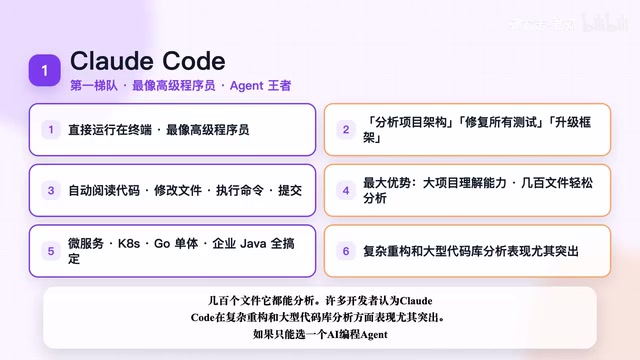
Claude Code runs directly in the terminal. You can issue complex instructions in natural language, such as "analyze the entire project architecture," "fix all test failures," or "upgrade Next.js to the latest version," and it will autonomously read code, modify files, execute commands, run tests, and even commit code.
Claude Code's terminal-native interaction approach is no accident. The terminal environment gives the Agent direct access to the file system, shell command execution, git operations, and test suite execution—without needing to go through an IDE's API layer. Under the hood, it relies on Anthropic's Claude Sonnet/Opus models, leveraging an ultra-long context window (supporting 200K tokens) to achieve holistic understanding of large codebases. In practice, Claude Code first builds a mental model of the project through file tree analysis and key file reading, then formulates a step-by-step execution plan. Each step can invoke tools (read files, write files, execute commands, etc.), forming a workflow similar to that of a human programmer.
Core Advantage: Large project comprehension. Whether it's a microservices architecture, Kubernetes configurations, a Go monolith, or an enterprise Java project with hundreds of files, it can systematically analyze them all. Many developers report that Claude Code performs exceptionally well in complex refactoring and large codebase analysis.
If you could only choose one AI coding Agent, Claude Code deserves the top spot without question.
Cursor: The Best AI IDE for Daily Development
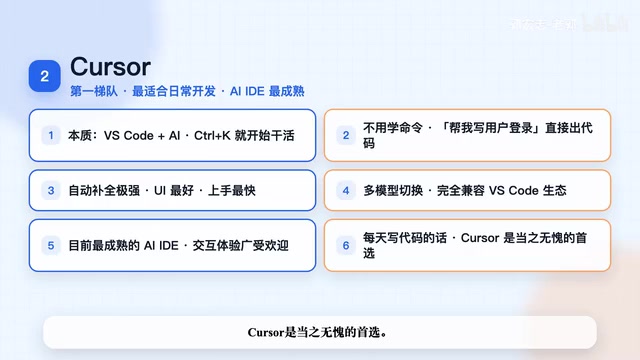
Cursor is essentially a deep fusion of VSCode + AI. You don't need to learn any command-line operations—just hit Ctrl+K and type "help me write a user login feature" to get started.
From a technical architecture perspective, Cursor is built on the Electron framework, forking VSCode's open-source code and deeply integrating an AI capability layer on top. Its core technologies include: AST (Abstract Syntax Tree)-based intelligent code completion, a Tab completion engine supporting multi-file context, and Composer multi-file editing functionality. Cursor supports multiple underlying models (Claude, GPT-4o, Gemini, etc.), allowing developers to flexibly switch based on task complexity. Since it's fully compatible with VSCode's Extension API, developers can seamlessly use tens of thousands of existing plugins, significantly reducing migration costs.
Cursor's advantages are very clear:
- Extremely strong auto-completion capabilities
- Best-in-class UI design
- Fastest onboarding speed
- Multi-model switching support
- Full compatibility with the VSCode plugin ecosystem
Cursor remains one of the most mature AI IDEs available, widely praised for its code completion and interactive development experience. If you write code every day, Cursor is the undisputed first choice.
Codex Cloud Automation: A Unique Position in the Second Tier
Codex: Toss Tasks to AI, Come Back to Collect Code
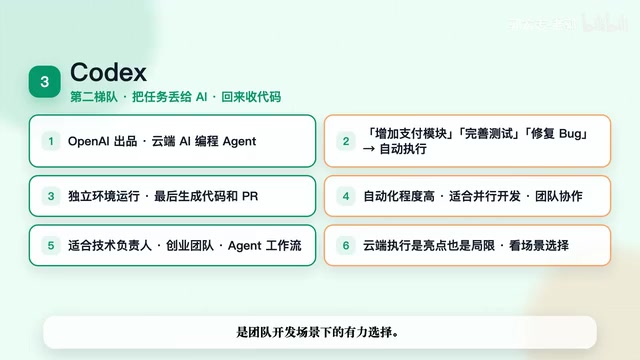
Codex comes from OpenAI and is a cloud-based AI coding Agent. Its biggest feature is its asynchronous work mode—you say "add a payment module," "improve unit tests," or "fix this bug," and Codex runs the task in an independent cloud environment, ultimately generating code and a Pull Request.
From an architectural standpoint, Codex takes a fundamentally different design approach from local Agents—each task executes in an isolated sandbox container in the cloud, with a complete Linux environment, network isolation, and resource limits. This design brings several key advantages: first, security—code runs in an isolated environment without affecting local or production environments; second, parallelism—multiple tasks can execute simultaneously in different containers; and third, auditability—every task's execution process has a complete record. Codex integrates through GitHub and delivers code in the form of Pull Requests, naturally fitting modern software teams' Code Review workflows. This asynchronous mode is particularly suited for management scenarios where AI is treated as a "junior developer" to whom tasks are assigned.
Codex's advantages:
- High degree of automation—no need to watch the screen waiting for results
- Suitable for parallel development of multiple tasks
- Naturally fits team collaboration scenarios
Particularly suitable for tech leads, startup teams, and AI Agent workflow scenarios. Recommended rating: four stars—a strong choice for team development scenarios.
Chinese AI Coding Tools: Trae, Qoder, and CodeBuddy
The core challenge facing Chinese AI coding tools is the gap between their underlying model capabilities and international top-tier levels. However, they have clear advantages in localization, compliance, and cost control. Deeply optimized for Chinese developers' usage habits and enterprise compliance requirements, these tools demonstrate irreplaceable value in specific scenarios.
Trae: A Chinese-Friendly AI IDE for Beginners
Trae's positioning is very clear—great Chinese language experience, generous free quotas, and easy onboarding. Backed by ByteDance's Doubao large model, Trae excels at understanding Chinese code comments and generating Chinese technical documentation. For developers who are accustomed to thinking and communicating in Chinese, communication efficiency is noticeably higher than with English-first tools. However, its Agent capabilities are weaker than Claude Code, and its large project comprehension is average. Suitable for students, AI coding beginners, and individual developers.
Qoder: A Chinese Explorer of the Agent Approach
Qoder focuses on the Agent route for automated fixing, automated coding, and code review. Its advantages include low cost, good Chinese support, and convenient enterprise private deployment. Qoder's private deployment approach meets the strict data security requirements of industries like finance and government, supporting operation within enterprise intranets without uploading code to public clouds—a rigid requirement for regulated industries. However, its plugin ecosystem and community scale are still relatively small and need time to grow.
CodeBuddy: Tencent's Enterprise-Grade Coding Assistant
CodeBuddy is an enterprise-grade AI coding assistant launched by Tencent, covering code generation, unit testing, Code Review, documentation generation, and more. Leveraging the Tencent Cloud ecosystem, CodeBuddy deeply integrates with WeCom (Enterprise WeChat) and the CODING DevOps platform, providing full-chain AI assistance from requirements to deployment. Suitable for enterprise R&D teams working with Java, Go, and frontend technologies, it has Tencent ecosystem integration advantages but limited international influence.
Recommended AI Coding Tool Combinations for Different Scenarios
The core logic behind recommending tool combinations rather than a single tool is this: currently, no single AI coding tool achieves optimal performance across all dimensions. IDE-type tools have natural advantages in real-time interaction, code completion, and visual feedback, while Agent-type tools excel in autonomous planning, long-chain task execution, and large-scale refactoring. Combining the two creates complementarity: developers can use the IDE for daily feature development and debugging, then switch to the Agent for complex multi-file refactoring, tech stack upgrades, or architectural adjustments. This working mode is similar to "pair programming" in human teams, except your partner is now AI.
Here are specific tool combination recommendations based on different development scenarios:
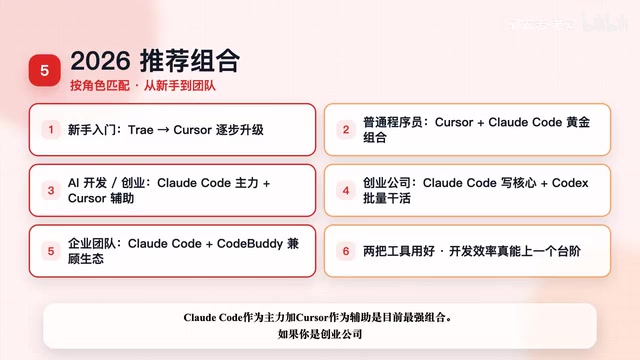
Getting Started
Trae for beginners → Cursor for advancement Start with Trae to familiarize yourself with AI-assisted coding workflows, then switch to the more powerful Cursor once you've built basic understanding.
Everyday Development for Regular Programmers
Cursor + Claude Code (The Golden Combination) Cursor handles daily coding, code completion, and rapid iteration; Claude Code handles complex refactoring, architecture analysis, and large tasks.
AI/LLM Developers and Solo Entrepreneurs
Claude Code (primary) + Cursor (secondary) This is the widely recognized strongest combination. Claude Code handles core Agent development and complex logic, while Cursor is used for quick daily coding.
Startup Teams
Claude Code + Codex One handles writing core code, the other handles batch task execution—maximizing efficiency.
Enterprise Teams
Claude Code + CodeBuddy Balances open-source capabilities with enterprise ecosystem needs, meeting compliance and private deployment requirements.
Conclusion: Overall Rankings and Selection Advice
AI Coding Tools Overall Rankings:
| Tier | Tools | Positioning |
|---|---|---|
| First Tier | Claude Code, Cursor | Strongest Agent + Most Mature IDE |
| Second Tier | Codex | Uniquely positioned in cloud automation |
| Third Tier | Trae, Qoder, CodeBuddy | Each with distinct features and limitations |
Core advice: If your goal is AI/LLM development, Agent development, or indie product entrepreneurship, go straight to learning Claude Code as your primary tool, paired with Cursor as a secondary tool. Master these two tools well, and your development efficiency can truly reach the next level. The key to choosing tools isn't chasing "the best one"—it's finding the combination that best matches your work scenario.
Related articles
OpenAI Codex Cloud Task Delegation: The Complete Workflow from VS Code to PR
A detailed guide to OpenAI Codex extension's cloud task delegation, covering the complete workflow from initiating cloud coding tasks in VS Code to reviewing changes and creating Pull Requests.
Coze Workflow in Practice: Complete Tutorial for AI One-Click Product Promo Video Generation
Step-by-step guide to building a Coze workflow for AI product promo videos, integrating HappyHours and Jimeng across 12 nodes with nine-grid storyboards and polling loops.
Getting Started with Claude Code: 5 Key Differences from Traditional AI Chatbots
Explore 5 key differences between Claude Code and traditional AI chatbots like ChatGPT, covering interaction, context, execution, memory, and tool integration.