Spring AI + Ollama: Run Large Language Models Locally at Zero Cost
Integrate Spring AI with Ollama to run open-source LLMs locally at zero cost with minimal code changes.
This article demonstrates how to integrate Spring AI with Ollama to run open-source LLMs like Gemma and Llama locally for free. By simply swapping a Maven dependency and updating configuration properties, developers can switch from OpenAI to local inference without changing any business code — showcasing Spring AI's powerful abstraction layer. The guide covers Ollama installation, model setup, Spring Boot integration, and practical hardware considerations.
Introduction: From Paid APIs to Free Local Inference
Spring AI has opened the door for Java developers to integrate with large language models, but when working with cloud services like OpenAI, API costs are an unavoidable topic. Is there a way to enjoy Spring AI's elegant abstractions without spending a dime? The answer is Ollama — a lightweight tool that runs LLMs on your local machine.
Based on a hands-on demonstration by an overseas developer, this article breaks down how to integrate Spring AI with Ollama, run open-source models like Llama, Mistral, and Gemma locally, and do so with virtually no changes to your business code.
What Is Ollama?
Ollama is a lightweight local LLM runtime tool — think of it as a local AI engine. Its key features include:
- Fully offline operation: Once models are downloaded locally, no internet connection is needed for inference
- Support for mainstream open-source models: Popular models like Llama, Mistral, and Gemma can be pulled with a single command
- Standard HTTP API: After launching a model, it exposes a REST interface on
localhost:11434, making it naturally compatible with frameworks like Spring AI - Zero cost: No token billing, no API Key — run as much as you want
Ollama represents the maturation of the local LLM inference toolchain. Before it, running LLMs locally typically required manually configuring Python environments, installing inference engines like llama.cpp or vLLM, and handling model quantization formats (such as GGUF, GPTQ) — all tedious steps. Ollama encapsulates this underlying complexity and provides a Docker-like experience: use ollama pull to fetch models and ollama run to start inference, dramatically lowering the barrier to entry. Under the hood, it's built on llama.cpp, supports CPU and GPU (CUDA/Metal) hybrid inference, and uses model quantization techniques (typically 4-bit quantization) to compress models from tens of GBs down to a few GBs, making them runnable on consumer-grade hardware.
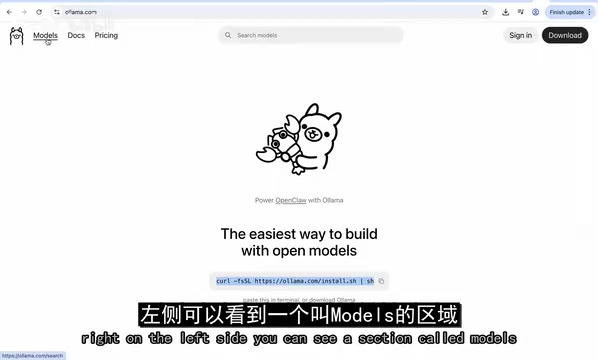
On the Ollama website (ollama.com), the Models section on the left lets you browse all models available for local execution. For this demonstration, we chose gemma:2b — a smaller, faster variant that's perfect for getting started.
Gemma is an open-source LLM series released by Google DeepMind, and 2B means the model has approximately 2 billion parameters. In the LLM world, parameter count is a key indicator of model capability: GPT-3 has 175 billion parameters, Llama 3's flagship version has 70 billion, and 2B is ultra-lightweight. Fewer parameters mean faster inference and lower hardware requirements, but performance on complex reasoning, long-text comprehension, and multi-step logic tasks decreases accordingly. 2B models are typically suitable for simple Q&A, text summarization, code completion, and other lightweight tasks — ideal for local development and debugging. Slightly larger models like Mistral 7B and Llama 3.2 offer a better balance between capability and resource consumption.
Setting Up the Local Environment
Installation and Verification
After installing Ollama, verify it with the following commands:
# Check version
ollama --version

# List downloaded models
ollama list
ollama list displays all models downloaded locally, such as gemma, llama3.2, etc.
Launching a Model
Running a model requires just one command:
ollama run gemma:2b
If the model hasn't been downloaded yet, Ollama will automatically pull it; if it's already downloaded, it launches directly. Once started, you can interact with the model right in the terminal.
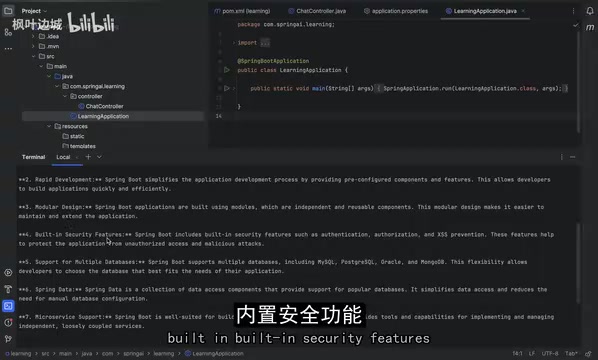
As shown above, when asked about Spring Boot, the Gemma model provided detailed answers covering open-source availability, rapid development, modular design, built-in security features, and more. Even as a small 2B-parameter model, the quality of answers for common technical questions is quite impressive.
Spring AI + Ollama Integration in Practice
Step 1: Update Maven Dependencies
This is the most critical step in the entire integration process. In pom.xml, replace the original OpenAI dependency with the Ollama dependency:
<!-- Remove OpenAI dependency, add Ollama dependency -->
<dependency>
    <groupId>org.springframework.ai</groupId>
    <artifactId>spring-ai-ollama-spring-boot-starter</artifactId>
</dependency>
Why is this dependency needed? Because your Spring Boot application doesn't know how to communicate directly with the locally running Ollama instance. This starter acts as a bridge: it handles all the underlying API calls, converts your requests into a format Ollama understands, and parses the responses back.
Looking deeper, Spring Boot's Starter mechanism is key to understanding the entire integration process. When you include spring-ai-ollama-spring-boot-starter in your pom.xml, Spring Boot's Auto-Configuration mechanism scans the classpath at startup, discovers Ollama-related classes, and automatically creates and registers the required Beans — including OllamaChatModel, HTTP client connection pools, and more. This mechanism is implemented through conditional annotations like @ConditionalOnClass and @ConditionalOnProperty, so developers don't need to write any configuration classes manually. This is exactly why switching from OpenAI to Ollama only requires changing the dependency and configuration: Spring Boot automatically decides which ChatModel implementation to create based on the Starter present in the classpath.
Step 2: Update Application Configuration
In application.properties or application.yml, replace the original OpenAI configuration:
# No API Key needed
# Specify the model to use
spring.ai.ollama.chat.model=gemma:2b
# Specify the Ollama service address (optional, Spring Boot auto-detects it)
spring.ai.ollama.base-url=http://localhost:11434
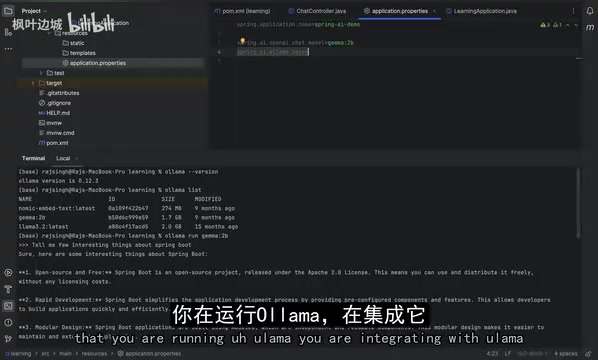
After Ollama launches a model, it exposes an HTTP API on port 11434 by default. Spring Boot's auto-configuration mechanism detects the Ollama dependency and automatically connects to this endpoint.
Step 3: Watch for ChatModel Type Changes
The demo encountered a typical gotcha: the ChatModel type referenced in the configuration needs to change from OpenAiChatModel to OllamaChatModel. This is because different AI providers have their own implementation classes. If you forget to update this, you'll see errors like "model mistral not found."
After making the correction and restarting the application, everything works as expected.
Step 4: Verify the Integration
With the application running on port 8080, send a request via curl:
curl "http://localhost:8080/ai?message=what is multi-threading"
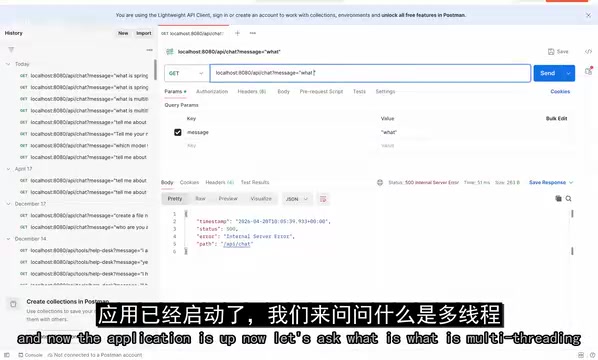
The model successfully returned a detailed explanation of multi-threading, including its concepts, advantages, and use cases. Note that local inference speed depends on your hardware — a 2B model on an average machine may take anywhere from a few seconds to over ten seconds to respond.
The Core Highlight: The Beauty of Zero Code Changes
The most noteworthy aspect of the entire integration process is that the business code in the Controller layer was completely unchanged.
// The same code works with both OpenAI and Ollama
@GetMapping("/ai")
public String chat(@RequestParam String message) {
    // Call the LLM and get a response
    return chatModel.call(message);
}
To switch from OpenAI to Ollama, developers only needed to do two things:
- Swap the dependency: Replace the starter in
pom.xml - Swap the configuration: Update the model name and address in
application.properties
This is the essence of Spring AI's design philosophy — shielding underlying differences through an abstraction layer. Spring AI's interface abstraction follows the classic Strategy Pattern and Spring's longstanding principle of interface-oriented programming. Its core interface ChatModel (called ChatClient in earlier versions) defines standard method signatures for interacting with LLMs, while OpenAiChatModel, OllamaChatModel, AnthropicChatModel, etc. are concrete implementations. This design is entirely consistent with how JpaRepository in Spring Data abstracts away database differences, and how DiscoveryClient in Spring Cloud abstracts away service registry differences. Developers program against interfaces, and the specific implementation is determined at runtime by Spring's dependency injection container, enabling pluggable switching of AI backends.
Practical Development Recommendations
Suitable Scenarios
- Development and debugging: Running models locally saves significant API costs and enables rapid iteration
- Privacy-sensitive scenarios: Data never leaves your machine, making it suitable for handling sensitive information
- Offline environments: Works normally even without network access
Hardware and Performance Considerations
- Hardware requirements: Even a small 2B model requires adequate memory and compute power; for 7B+ models, at least 16GB of RAM is recommended
- Model capability gap: Local small models still lag significantly behind commercial models like GPT-4 in reasoning ability — choose based on your actual needs
- Use caution in production: Ollama is better suited for development and testing; production environments require consideration of concurrency, stability, and other factors
The performance bottleneck of local inference comes primarily from two areas: memory bandwidth and compute power. LLM inference is a memory-intensive task — model parameters need to be loaded from memory to the processor, and generating each token requires traversing the entire model. Taking a 4-bit quantized version of a 7B model as an example, the model file is about 4GB, but actual runtime memory usage can reach 6-8GB (including intermediate states like KV Cache). For GPU inference, VRAM size is the key limiting factor; for CPU inference, memory bandwidth (not CPU frequency) is often the performance bottleneck. This also explains why Apple Silicon Macs excel in local inference scenarios — their Unified Memory Architecture provides extremely high memory bandwidth, with GPU and CPU sharing the same memory pool, avoiding the data transfer overhead between CPU memory and GPU VRAM in traditional architectures.
Conclusion
The Spring AI + Ollama combination provides Java developers with a zero-cost, zero-barrier path to AI application development. Ollama handles efficient local execution of open-source LLMs, while Spring AI provides elegant abstractions and integration — together, they let developers focus on business logic without worrying about low-level communication details.
More importantly, Spring AI's abstraction design means you can use Ollama for free debugging during development and seamlessly switch to OpenAI or other commercial services when going live — just by changing a configuration file. This kind of flexibility represents the highest level of framework design.
Key Takeaways
Related articles

Indie Developer Shows the Bill: Spent $325 Building a Mini Program, Earned Zero Revenue
An indie developer spent 6 months and $325 building an English reading mini program, earning zero revenue. A detailed breakdown of API costs, cloud services, and lessons learned.
Complete Guide to Custom Models and Agent Configuration in Trae
A detailed guide to configuring custom models in Trae via provider APIs and proxy APIs, plus how to create personalized agents for your own AI assistant.

Self-Media Assistant Download & Installation Guide: Multi-Platform One-Click Distribution Tool
Step-by-step guide to downloading and installing Self-Media Assistant on Windows and macOS, with tips on choosing the right Mac chip version for multi-platform content distribution.