The Codex Power User Guide: 10 Tips to Make AI Actually Do the Work for You

10 practical tips to turn Codex from a chatbot into a real AI engineering partner.
This guide shares 10 actionable tips for getting the most out of OpenAI Codex. Learn to assign clear tasks instead of vague questions, have Codex read your project first, draft plans before coding, provide complete error context for bug fixes, use Auto modes wisely, leverage it for testing and code reviews, break large tasks into phases, set project rules with AGENTS.md, and use a proven prompt template — all to make AI truly work within your development workflow.
A lot of people try Codex for the first time and open with something like "take a look at this code for me," then walk away thinking the results are underwhelming. The problem isn't Codex — it's how you're using it. Codex isn't an ordinary Q&A chatbot. It can read your project, modify code, run commands, fix bugs, and even take a feature from analysis all the way through to verification. You need to treat it like an AI engineer who's been dropped into your project, not a tool that just chats.
Here are 10 tips that will fundamentally change how you collaborate with Codex.
Don't Ask Questions — Assign Tasks
The most common mistake is saying: "Take a look at this project for me." That's way too vague. Codex has no idea whether you want it to review the architecture, find bugs, analyze business logic, or evaluate refactoring opportunities.
A better approach:
Analyze this project's architecture and output: the directory structure, core module responsibilities, data flow, main tech stack, and potential risks.
This kind of instruction reads more like a work assignment, and the results will be far more consistent. The thing AI Agents struggle with most isn't task difficulty — it's task ambiguity. The clearer the context you provide, the higher the quality of what it delivers.
First Time in a Project? Let It Understand the Big Picture First
After entering a project directory, don't rush to have it modify code. The first step should be:
Read through the entire project and generate an architecture overview, including the tech stack, directory structure, core business flows, API relationships, and database relationships.
This step is well worth the time investment. You'll get something like an onboarding document for new team members. From that point on, whenever you ask it to fix bugs or add features, it will have much better context and be far less likely to give you irrelevant answers.
Before Writing Code, Have It Draft a Plan
Don't jump straight to "add a user login feature." Instructions like that are prone to going off the rails — it might start modifying files immediately, only to realize halfway through that the approach is wrong.
The recommended workflow is: Analyze → Design → Confirm → Code → Verify.
Adding a "confirm" step saves you a lot of rework. Here's how you can phrase it:
Don't write code yet. First, analyze the implementation approach, list the steps, and wait for my confirmation before making any changes.
This habit may seem like an extra step, but it dramatically improves the accuracy of the final deliverable.
When Fixing Bugs, Provide the Full Error and the Goal
Codex is excellent at handling compilation errors, type errors, dependency conflicts, and API errors. The key is providing complete information:
Running
npm run buildproduces the following error (paste the full error message). Please locate the issue, analyze the root cause, propose a fix, modify the code, and run the command to verify the fix.
Never just say "the project has an error" — that's useless to a human, and it's useless to an Agent too. The complete error log is the core evidence Codex needs to pinpoint the problem.
Use Auto Edit and Full Auto with Caution
Codex has several working modes:
- Suggest: Only provides suggestions, doesn't touch code
- Auto Edit: Can automatically modify code
- Full Auto: Automatically executes complete tasks
Full Auto works well for scenarios with clear goals and clear feedback, such as: adding unit tests until they pass, fixing ESLint errors, or batch-fixing type errors.
But don't throw it at a massive task with no clear boundaries, like "refactor the entire system." For cases like that, have it break the work into a plan first, then execute step by step.
Don't Just Have It Write Features — Have It Write Tests
Many people use AI solely to write business code, but where it really shines is testing.

You can instruct it like this:
Analyze which modules in the project have insufficient test coverage. Prioritize adding unit tests and integration tests for core business logic, then run them to verify.
Testing tasks are a perfect fit for Codex because the goal is clear and the feedback is clear — either the tests pass or they don't, and if they don't, it keeps fixing. This is far more reliable than having it churn out a bunch of new features based on guesswork.
Have It Do Code Reviews
Don't only use Codex when something breaks. You can have it proactively check project quality:
Review the current project, focusing on: performance issues, security risks (SQL injection, XSS), memory leaks, and duplicate code. Output a report.
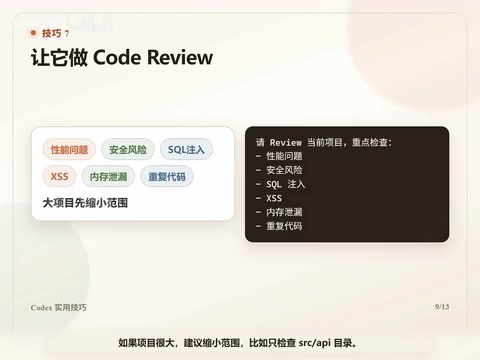
If the project is large, narrow the scope — for example, only review the src/api directory. The clearer the scope, the more useful the results. This kind of proactive code review helps you catch issues before they surface in production.
Always Break Large Tasks into Phases
Bad example: "Build me an e-commerce system." — That's way too big.
A better breakdown:
- Design the database schema
- Implement the user system
- Implement the product module
- Implement the order module
- Add tests and verify the end-to-end flow
Agents don't mind a heavy workload — what they struggle with is having too much crammed in at once. The more clearly you break things down, the easier it is for them to deliver high-quality results. Confirm after each phase before moving to the next — this is the golden rule of AI collaboration.
Put an AGENTS.md in Your Project
This is a tip many people don't know about. You can create an AGENTS.md file in your project root to tell Codex the project rules:
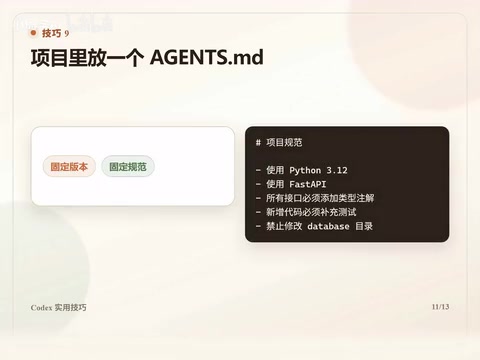
- 使用 Python 3.12
- 使用 FastAPI
- 所有接口必须添加类型注解
- 新增代码必须补充测试
- 禁止修改 database 目录
From then on, whenever Codex enters the project, it will reference these rules first. It's like writing a team development guideline for the AI, ensuring every action it takes stays within the boundaries you've set.
Use This Prompt Template Directly
Finally, here's the most commonly used prompt template from real-world practice:
You are a senior software architect.
Task Objective: (fill in your goal)
Constraints: (fill in your limitations)
Execution Steps:
- Analyze the current state
- Output a plan
- Wait for confirmation
- Implement changes
- Run verification
- Output a change report
Do not skip the verification step.
This template works for Python, Java, Go, C++, frontend projects, and even AI Agent projects. The important part isn't the "you are a senior architect" role-setting — what actually matters is: clear objectives, clear constraints, clear steps, and mandatory verification.
Summary
If you only use Codex as a chatbot, it'll do little more than explain code for you. But if you break tasks down clearly and have it read the project first, draft a plan, then modify code, and finally verify — it can truly do the work for you.
The core principle boils down to one sentence: Don't ask it "what do you think" — tell it "what you need to get done."
Shifting from "question asker" to "task assigner" — that's the key mindset change for getting the most out of Codex.
Related articles

OpenAI CFO Sarah Fryer on How AI Is Reshaping Finance
OpenAI CFO Sarah Fryer shares real-world AI applications in finance teams, including investor relations GPTs, full-coverage auditing, tax automation, and career advice for the AI era.
GDScript Beginner's Guide: Learning Godot Game Development with AI Assistance
GDScript is Godot's native scripting language with clean syntax and broad platform support. Learn GDScript basics, Cursor AI setup, and effective AI-assisted game development workflows.

Three Forms of AI: From Chat Windows to Collaborative Work to Command Line
AI isn't just a chat window. This article explains AI's three forms: Chatbox, Cowork, and CLI, with selection advice for Claude, Codex, Kimi, and DeepSeek.