The Complete AI App Development Workflow: Six Steps from Idea to Launch

A six-step guide to building real apps with AI tools like Codex and Cursor — no coding needed.
This article breaks down the complete workflow for building a launch-ready app using AI coding tools, covering six key steps: writing product documents, prototype design, full-stack development (frontend, backend, and database), project management, and testing. It emphasizes that while AI eliminates the need to write code, success requires understanding the full development process, breaking tasks into small pieces, and mastering the emerging discipline of Harness Engineering.
Many people have seen viral short videos: generate a flashy webpage with a single sentence, or watch AI whip up an app in seconds. But if you actually want to use AI coding tools to build a commercially viable product ready for launch, things are far from that simple.
Bilibili creator "字符滚烫" (Zìfú Gǔntàng) recently published a tutorial aimed at users with zero programming experience, outlining the complete six-step process from idea to product launch. The greatest value of this content lies in shattering the illusion of "build an app with one sentence" while simultaneously proving that ordinary people really can turn a business idea into a real product using AI coding tools like Codex and Cursor — without writing a single line of code.
It's worth understanding the positioning of these two tools first: Codex is an AI code-generation agent from OpenAI that can autonomously write, debug, and test code in a cloud sandbox environment — developers simply describe their requirements in natural language. Cursor is a code editor with integrated AI capabilities, built on the VS Code architecture, featuring built-in code completion, multi-file editing, and context understanding. It's widely regarded as one of the most powerful AI-assisted programming IDEs available today. These two tools represent two paradigms of AI programming: Codex leans toward fully automated asynchronous execution, while Cursor emphasizes real-time human-AI collaboration.
Step 1: Writing the Product Document — Turning Vague Ideas into Clear Plans
Most people's startup ideas stay stuck at the "I want to build a XXX" stage. But open any app on your phone and you'll notice that every piece of software has a clear functional structure: different pages, sub-pages, and interaction logic, all tightly interconnected.
What a product document does is transform the vague idea in your head into an executable functional architecture plan. In traditional software development, the Product Requirements Document (PRD) is the starting point of the entire project, typically taking a product manager days or even weeks to complete. A comprehensive PRD includes user personas, feature lists, information architecture, user flow diagrams, non-functional requirements, and more — it serves as the shared blueprint for designers and developers alike.
The good news is that this step can be entirely accomplished with AI assistance. Using a universal prompt template that has AI play the role of a professional product manager, you simply describe your product idea, and the AI outputs a rigorous product document. With internet-connected LLMs like ChatGPT and Claude, AI can simultaneously search market data, analyze competitor feature matrices, and output a structured PRD during the conversation — a capability that dramatically lowers the professional barrier to product planning.
Here's a critical reminder: always use an internet-connected AI tool to write your product document. This allows the AI to conduct market research simultaneously, helping you understand the competitive landscape and avoid building in a vacuum. Many tutorials overlook this detail, but it directly determines whether your product direction is viable.
Step 2: Prototype Design — Making Your Idea Visible
With the product document in hand, many people are eager to jump straight into coding. But there's a crucial step in between: turning the document into visual interface designs.
Previously, this required a product manager to sketch wireframes, then hand them off to a UI designer for high-fidelity mockups. High-fidelity mockups are interface prototypes with visual quality close to the final product, including precise color schemes, typography, component styles, and interaction annotations. In contrast, low-fidelity prototypes (wireframes) only show basic layouts and functional frameworks, typically represented with gray outlines. Traditionally, this step relied on professional design tools like Figma and Sketch, with designers manually drawing every interface element.
Now with AI, a single prompt plus the product document can directly output high-fidelity interface designs. This is what the creator calls "the first wow moment of AI programming" — the first time you see your idea take shape as a software interface.
Although this interface is view-only and has no actual functionality, its value goes beyond just "looking good." If you're resourceful enough, you can even use these designs to pitch freelance projects — because clients can already see a tangible prototype of the product. Recently emerging AI design tools like OpenDesign, v0.dev, and Galileo AI have made this step even more efficient, generating design mockups with complete color schemes and component layouts directly from text descriptions.
Step 3: Development — Breaking the "Frontend Is Everything" Misconception
This is the most critical — and most commonly misunderstood — part of the entire AI app development workflow.
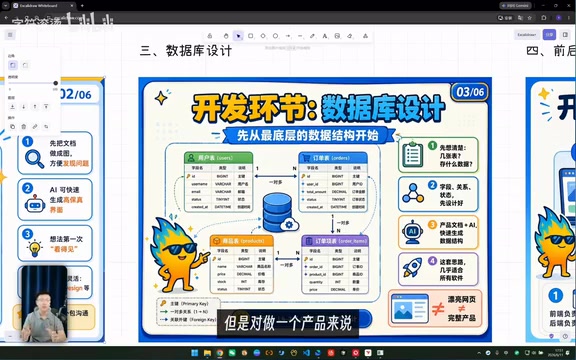
The video shows a very intuitive comparison: most people think AI programming is just about generating a pretty webpage, but real software development goes far beyond the frontend. A product ready for launch requires at least:
- Frontend: The interface users see and interact with
- Backend: Server-side programs that handle business logic
- Database: The underlying structure that stores all data
- Authentication & permissions system: User registration, login, and access management
- Deployment & operations: Server launch and stability assurance
- Scaling strategy: Plans for handling sudden surges in user traffic
Modern web applications widely adopt a frontend-backend separation architecture. The frontend runs in the user's browser or on their phone, handling interface rendering and user interaction, with common tech stacks including React, Vue, Next.js, and others. The backend runs on servers, handling business logic, data validation, and security controls, with popular frameworks like Node.js's Express and Python's FastAPI. The two communicate via APIs (Application Programming Interfaces) — the frontend sends HTTP requests, and the backend returns data in JSON format. The advantage of this architecture is that frontend and backend can be developed and deployed independently, which also makes it easier for AI tools to generate code module by module.
Start with Database Design
The recommended approach is to start development from the lowest level: data structure design. Using specialized database design prompts combined with the product document, let AI automatically complete the table structure design. This step lays the foundation for all subsequent frontend and backend development.
The database is the data storage core of a software system. Relational databases (such as PostgreSQL and MySQL) organize data through tables, where each table consists of rows (records) and columns (fields), with tables linked to each other through foreign keys. For example, an e-commerce system needs at minimum a users table, products table, orders table, and order details table. The quality of schema design directly impacts system query performance and scalability. In recent years, cloud database services like Supabase and PlanetScale have greatly simplified database creation and management, allowing non-technical users to perform basic operations through visual interfaces.
The Backend Is the Bridge Between Frontend and Database
The workflow of software is essentially this: when the frontend displays data, the backend reads it from the database and returns it; when the frontend creates new data (such as an order), the backend receives the request and writes it to the database. Once you understand this logic, backend development is no longer mysterious.
Keep Each Task as Small as Possible
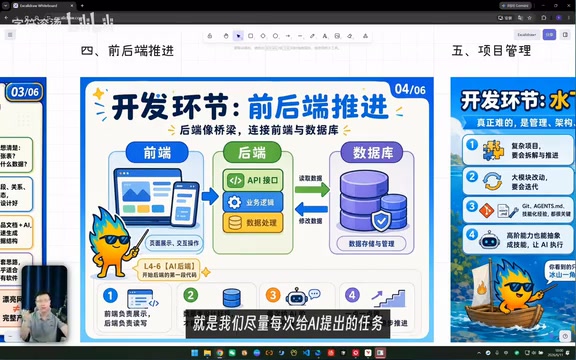
This is an extremely practical piece of advice: keep each development task you give to AI as small as possible. AI programming inherently suffers from hallucination issues, and only by breaking tasks down small enough can you ensure each modification stays within a controllable scope without affecting existing functionality. Think of it like building with LEGO — assembling the product one block at a time.
AI hallucination refers to large language models generating content that appears reasonable but is actually incorrect. In programming contexts, this manifests as AI calling non-existent APIs, fabricating fake function names, generating logically flawed code, or accidentally breaking other working modules while modifying one feature. This is precisely why task decomposition is so important — when each modification is small enough in scope, even if the AI makes an error, the blast radius is controllable, and developers can quickly locate and roll back the issue. The industry calls this strategy "small steps, fast iterations." Combined with a Git version control system, you commit a code snapshot after completing each small feature, ensuring you can always revert to the last stable state.
Step 4: Project Management — The Real Challenge Beneath the Surface
Getting AI to write simple frontend pages or backend logic? It already does that quite well. But the complexity of a real project far exceeds any single functional module.
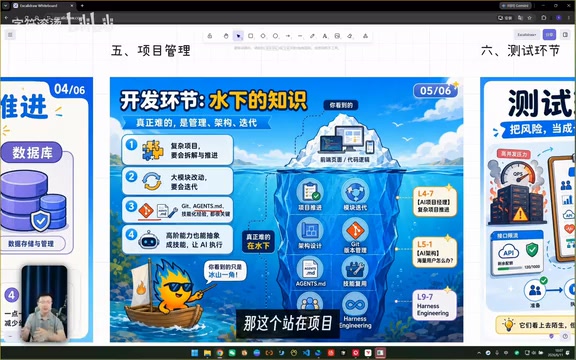
This involves three core challenges:
- How to drive complex projects forward: When a project is large, you need a clear progression strategy — knowing what to build first and what comes later
- How to iterate on large modules: When you want to modify a larger functional module during development, how do you safely iterate step by step without breaking existing features?
- How to handle scaling: What architectural considerations need to be addressed in advance when the product eventually has a large user base?
The creator calls these "underwater knowledge," and they represent the core of a concept gaining significant attention — Harness Engineering. It requires you to take a macro-level management perspective over the entire AI programming process, rather than fixating on the implementation of individual features.
Harness Engineering is a new concept that has emerged alongside the proliferation of AI coding tools. Its core idea is: in an era where AI can execute specific coding tasks, human value shifts to architectural decisions, task orchestration, and quality control. This is similar to the relationship between a chief architect and a construction crew in the building industry — you don't need to lay bricks yourself, but you must understand structural mechanics and know which load-bearing walls can't be removed. In AI programming practice specifically, Harness Engineering requires developers to possess four key capabilities: a holistic view of system architecture, the ability to judge task priorities, awareness of code quality review, and the ability to course-correct when AI output doesn't meet expectations. Those who master these capabilities are the ones who can truly harness AI tools to complete complex commercial-grade projects.
Step 5: Testing — The Last Line of Defense Before Launch
After development is complete, don't rush to launch. The testing phase needs to verify several critical issues:
-
Load testing: Will the product crash when a large number of users access it simultaneously? Load testing uses professional tools like JMeter and k6 to simulate hundreds or thousands of concurrent users accessing the system simultaneously, detecting response times, error rates, and resource consumption under high load. This helps you discover performance bottlenecks before launch, preventing the product from going down when users flood in.
-
Event tracking: We can't see what users are doing on their phones, so we must use tracking to measure which pages get the most visits, which buttons get clicked most frequently, and provide data support for future iterations. Event tracking involves embedding data collection points in frontend code to record every page view, button click, dwell time, and other behavioral data. Common tools include Google Analytics, Mixpanel, and Sensors Data (神策数据) in China. This data is the core basis for product iteration decisions.
-
Third-party service rate limiting: If your product integrates third-party services like LLM APIs, you need to design reasonable buffering mechanisms to handle rate limits. Rate limiting refers to external services restricting call frequency — for example, OpenAI's API has a cap on requests per minute, returning a 429 error code when exceeded. Mitigation strategies include designing request queues (queuing requests for sequential processing), local caching (caching common results to avoid redundant calls), and exponential backoff retry (waiting progressively longer intervals before retrying after failures).
The testing phase is essentially the development of individual functional modules. If you're familiar enough with the preceding development workflow, this step is simply a process of continuous repetition and optimization.
Core Takeaway: AI Programming Redefines What Ordinary People Can Achieve
Looking back at the entire workflow — product documentation, prototype design, database design, frontend and backend development, project management, testing and launch — there are indeed quite a few steps. But one fact is worth emphasizing repeatedly: you don't need to write a single line of code throughout the entire process.
What you truly need to learn is this complete workflow mindset and project management capability. The actual code implementation, database design, and API development can all be delegated to AI coding tools like Codex and Cursor. Moreover, this workflow is universal — whether you're building an app, a mini-program, or a website, regardless of industry, the underlying logic is the same.
This is the real value AI programming gives to ordinary people: it doesn't turn you into a programmer — it gives you the complete ability to turn ideas into products. The prerequisite is that you take the time to genuinely understand this process, rather than fantasizing that a single sentence can do it all.
Related articles
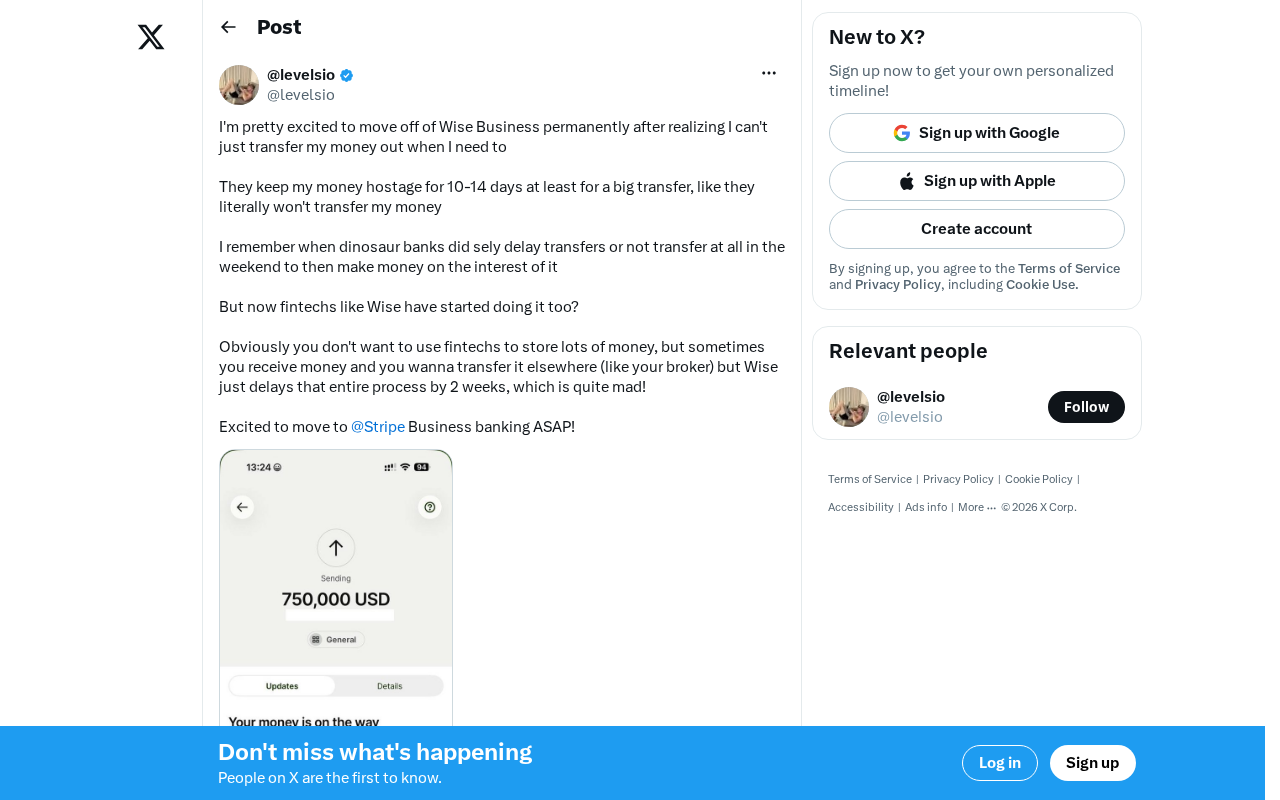
Wise Large Transfer Delayed Two Weeks: How Should Cross-Border Entrepreneurs Respond?
Wise Business users face 10-14 day delays on large transfers, sparking debate on whether fintech is repeating traditional banking mistakes. Analysis and practical tips for cross-border entrepreneurs.

Perplexity Partners with Intel: Local AI Models and Hybrid Inference Come to Laptops
Perplexity partners with Intel to bring local AI models and hybrid inference to Core Ultra Series 3 laptops. We break down the architecture, NPU capabilities, and the cloud-to-edge AI trend.

AI Large Model Learning Roadmap Breakdown: Three Stages from Application Development to Model Fine-Tuning
Deep breakdown of a popular AI large model learning roadmap covering LangChain, RAG, Agent, and LoRA fine-tuning across three stages, with analysis of its strengths and limitations for career changers.