The Complete Guide to Claude Desktop: 15 Core Features & 9 Money-Saving Tips

A complete guide to Claude Desktop's three modes, Skill system, automation workflows, and Token-saving tips.
This guide covers Claude Desktop's three work modes (Chat, Cowork, Code), model selection strategies across Haiku/Sonnet/Opus, the Skill system for consistent AI output, 8 real-world automation workflows from file organization to website deployment, and 9 practical tips to dramatically reduce Token consumption and costs.
Most people use Claude for nothing more than simple Q&A, tapping into less than 10% of its actual capabilities. From Chat to Cowork to Code, Claude has evolved into a super assistant that lives on your computer — one that can automatically organize files, scrape data, generate content, deploy websites, and even receive tasks remotely. This article provides a systematic overview of Claude Desktop's core features, how to build automated workflows, and practical tips for dramatically reducing Token consumption.
Three Work Modes: Chat, Cowork & Code
When you open Claude Desktop, you'll find three main modes in the upper-left sidebar, representing three levels of AI usage.
Chat is the most basic Q&A mode. The AI handles tasks like writing emails or scripts, but you still need to copy-paste, open applications, and publish things yourself. This is where most people stay.
Cowork lets the AI step out of the chat box and into your work environment. It can process files, organize materials, open applications, operate browsers, and complete entire workflows across different tools. Think of it as an AI assistant with a safety harness — when it encounters sensitive operations like deleting files or accessing new applications, the system asks for your confirmation. This design reflects Anthropic's longstanding emphasis on "AI safety": granting AI execution capabilities while using a Human-in-the-Loop confirmation mechanism to prevent mistakes, striking a balance between efficiency and safety.
Code is the most commonly misunderstood mode. Many people see "Code" and get intimidated, but it's actually the feature most worth adopting for everyday users. It doesn't require you to know programming — instead, it helps you build reusable work systems. You can place a claude.md file in your project folder as the AI's "onboarding manual," so it reads those instructions every time it enters the project. You can also connect APIs, run scripts, and integrate external tools like Notion and Gmail through MCP.
MCP (Model Context Protocol) is an open protocol standard released by Anthropic in late 2024, designed to solve the connection problem between AI models and external tools or data sources. Before MCP, every AI application needed a custom integration for each external service, leading to severe ecosystem fragmentation. MCP's design philosophy is similar to the USB-C port — providing a universal "plug" that allows any protocol-compliant tool to communicate with AI models in a plug-and-play fashion. In Claude Desktop, MCP appears as Connectors, allowing users to link AI to dozens of external services without writing any code.
Here's a simple decision framework: "I don't know how — please tell me" → use Chat. "I have a pile of stuff — please organize it" → use Cowork. "I have a workflow — please automate it" → use Code.
Model Selection Strategy: More Expensive Isn't Always Better
In the bottom-right corner of the Chat interface, you can choose from three models: Haiku, Sonnet, and Opus. The right choice directly impacts your efficiency and Token consumption.
Haiku is like a fast, low-cost intern — ideal for batch processing tasks such as organizing comment sections, rewriting bulk headlines, email summaries, and data formatting.
Sonnet is your daily workhorse: powerful, fast, and reasonably priced. Whether you're writing copy, scripts, notes, emails, summaries, or even code, Sonnet generally gets the job done. When in doubt, go with Sonnet.
Opus is the senior consultant, reserved for tasks involving complex judgment, reasoning, and planning — designing business models, planning course curricula, analyzing project feasibility, or designing automated workflows. Don't waste it on rewriting headlines or summarizing text; that's overkill.
Anthropic's three model tiers represent a typical "model family" design approach in the AI industry. Larger models have stronger reasoning capabilities and broader knowledge but are slower and more expensive to run; smaller models offer advantages in speed and cost, making them suitable for latency-sensitive batch tasks. This tiered strategy is also widely adopted by OpenAI (GPT-4o/GPT-4o mini), Google (Gemini Pro/Flash), and others, and has become an industry standard.
There's also the Adaptive Thinking feature. It's not a fourth model but rather a thinking mode. When enabled, Claude automatically adjusts its reasoning depth based on task difficulty, avoiding overthinking on simple questions or giving shallow answers to complex ones. This feature draws on a dynamic version of Chain-of-Thought technology — the model performs internal reasoning before answering, with the depth automatically calibrated to the question's complexity, similar to how humans quickly answer simple questions but deliberate carefully on complex ones.
The Skill System: Turning AI from a "New Hire" into a "Veteran Employee"
Skills are what separate beginner users from power users. Without Skills, the AI is like an assistant on their first day — always guessing what you want. With Skills, it's like an employee who's been with you for three months, familiar with your formatting preferences, quality standards, and decision-making logic.
A complete Skill file contains four modules: use case and objectives, workflow (execution sequence), output format requirements, and evaluation criteria (what counts as acceptable). It's essentially just a .md text file that you can open with any text editor.
Skills are fundamentally an advanced form of structured System Prompts. In the field of Prompt Engineering, researchers have long established that providing AI with clear role definitions, task steps, output formats, and evaluation criteria significantly improves output quality and consistency. Claude's Skill system productizes this best practice — users don't need to understand prompt engineering theory; they simply fill in four modules following a template to achieve professional-grade prompt results.
Three Ways to Get Skills
Official Skill Library: Go to Anthropic's official GitHub, download the Zip file, and drag it into the Cowork window for automatic installation.
Community Resources: The Skill Marketplace has over 1.3 million Skills searchable by topic; Skill.sh is another excellent free community.
Make Your Own (most recommended): There are two approaches —

The first is the "forward approach": compile your work standards, hand them to Claude with the instruction "Generate a Skill document based on this," then run a few actual tasks and have the AI adjust wherever the output falls short.
The second is the "reverse review": have Claude run a task for you first, making corrections along the way whenever you're unsatisfied. Once you're happy with the result, say "Please write up the process we just followed as a Skill." Claude will review the conversation and automatically generate a summary — extremely efficient. This method is particularly clever because it leverages the metacognitive capabilities of large language models — having the AI observe its own work process and extract patterns, which is often more comprehensive and structured than manual human summarization.
Practical Examples: 8 Automated Workflows
Example 1: One-Click Messy Folder Organization
Open Cowork and simply say "Please organize my Downloads folder." After confirming the plan, it executes directly. No coding, no extra tools — your files end up neatly organized, and nothing gets deleted.
Example 2: Generate Publish-Ready Xiaohongshu (Little Red Book) Image Posts
In Cowork, select your working folder, invoke your copywriting and image-creation Skills, and enter your topic. Claude automatically runs through the entire pipeline — writing the article, paginating, and creating images — saving both copy and images to your computer, ready to publish.
Example 3: Scrape Trending Topics into a Weekly Content Report
Combine Tavily (web search tool) + a topic evaluation Skill + a Notion connector, and let Cowork automatically search for trending AI and content creator topics from the past week, filter and evaluate them using the Skill, then write the results to Notion. Set up a Scheduled Task for every Monday at 9 AM, and the whole thing runs hands-free.
Tavily is a search API designed specifically for AI Agents. Unlike traditional search engines, it returns structured content summaries rather than lists of web links, making it easy for AI models to digest and reference directly. In this workflow, Tavily acts as the AI's "eyes," giving Claude — which would otherwise be limited to its training data — the ability to access real-time information. This combination of "search tool + evaluation Skill + output connector" is a textbook example of the AI Agent architecture — breaking a complex task into perception, reasoning, and execution phases, with different tool modules handling each phase while the AI model serves as the central coordinator.
Example 4: Plan a Complete Course Launch
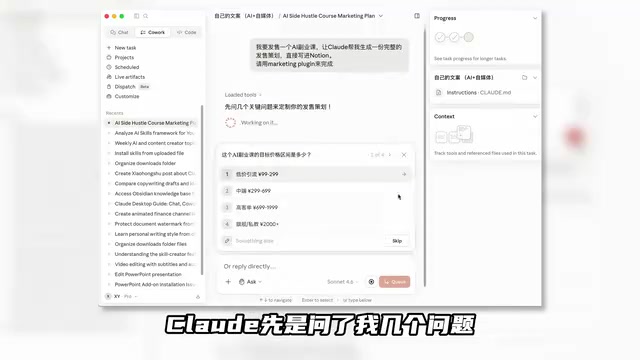
Install the Marketing Plugin (which includes 8 Skills and 13 Connectors), then type "I want to launch an AI side-hustle course — generate a complete launch plan and write it to Notion." Claude will ask about pricing, selling points, timeline, and other key details, then generate a comprehensive plan covering seven major sections — from warm-up period social media templates to launch-day urgency tactics, private community operations, and KPI targets.
Example 5: Deploy a Personal Website
Have Claude Code read your profile and video thumbnails, generate polished personal website code, then deploy it for free using Netlify with one click. The entire process requires zero coding, yet the result is award-worthy design quality.
Netlify is an automated deployment platform for frontend projects that supports publishing static websites directly from a Git repository or local folder, with a free tier that's more than sufficient for personal websites. The website code generated by Claude Code is typically based on frontend technologies like HTML/CSS/JavaScript, and Netlify automatically handles domain binding, HTTPS certificates, CDN acceleration, and other DevOps tasks. This "AI generates code + platform deploys with one click" model is redefining what "no-code" means — traditional no-code tools (like Wix or Squarespace) lower the barrier through drag-and-drop templates, but now AI generates professional-grade source code directly, giving users a fully customizable website rather than a template-constrained half-product.
Example 6: Build a Content Inspiration Collection App from Scratch
Use Claude Code to create an inspiration collection app where you can save great headlines, topic ideas, and case studies on the fly, organized by tags. Next time you're writing copy, just pull up your reference library.
Example 7: Automated YouTube Long-Form Video Production

Invoke a video production Skill, and Claude Code executes step by step: write script → generate title → polish copy → generate voiceover → create storyboard → generate images → auto-edit. The entire pipeline runs automatically; you only need to make choices at key decision points.
Example 8: Live Artifacts for Real-Time Task Tracking
After connecting Gmail, Google Drive, Calendar, Shopify, and other tools, Live Artifacts creates a persistent, real-time task tracker where you can check to-do items, content schedules, and store data at any time.
9 Money-Saving Tips: Say Goodbye to Token Anxiety
Claude doesn't charge per message — it charges per Token. Tokens are the basic units that large language models use to process text, and they don't simply equal one character or one word. For English, one Token is roughly 4 characters or 0.75 words; for Chinese, one character is typically encoded as 1.5 to 2 Tokens.
The key insight: every time you send a message, Claude re-reads the entire conversation history. This stems from the attention mechanism in the Transformer architecture — the model needs the full context window as input to generate a response and can't "remember" previous exchanges the way humans do. This means the longer the conversation, the more input Tokens each request requires (growing linearly), and costs rise accordingly. The first message might consume 500 Tokens, the tenth 5,000, and by the 30th you could be spending 230,000 Tokens. Over 98% of Tokens go toward re-reading conversation history. Claude's current context window is 200K Tokens, theoretically handling about 150,000 Chinese characters, but the closer you get to the limit, the more cost and latency increase.
Tip 1: Don't ask follow-up corrections. When Claude gives a wrong answer, don't correct it in the same conversation. Instead, revise your original prompt and regenerate in a new conversation.
Tip 2: Start a new conversation every 15–20 messages. Have Claude summarize the current conversation, then copy that summary into a new conversation to continue.
Tip 3: Consolidate your questions. Don't ask "summarize," "list key points," and "write a title" in three separate messages — ask for everything at once.
Tip 4: Use Projects for recurring files. Create a Project and upload files once; all subsequent conversations can reference them directly. Files in a Project exist as system-level context and aren't re-counted as Tokens in each conversation turn — this is the fundamental difference from uploading files directly in chat.
Tip 5: Set up Memory. Save background information once through settings to avoid repeating yourself in every new conversation.
Tip 6: Turn off unused features. Features like web search and deep thinking consume extra Tokens even when you're not actively using them.
Tip 7: Take advantage of the 5-hour window. Your quota resets every 5 hours, so splitting your usage into 2–3 sessions per day is most efficient.
Tip 8: Avoid peak hours. Quotas deplete faster during peak times. For users in Asia, peak hours are roughly 8 PM to 2 AM. This is because Anthropic uses a dynamic rate-limiting strategy — when server load is high, each user's available quota is slightly compressed to maintain overall service quality.
Tip 9: Set an overage spending cap. Pro or Max users can enable overage billing to keep using Claude beyond their quota, but make sure to set a monthly cap to prevent overspending.
Conclusion
From Chat's simple Q&A, to Cowork's environment operations, to Code's system building, Claude Desktop now offers a complete productivity toolchain. The core philosophy is: use Skills to codify your expertise, use Connectors to link your tools, and use automation to replace repetitive work. Tools will keep evolving, but people who master the right methods will always move faster than those who stick to the basics.
Related articles

AI Large Model Learning Roadmap Breakdown: Three Stages from Application Development to Model Fine-Tuning
Deep breakdown of a popular AI large model learning roadmap covering LangChain, RAG, Agent, and LoRA fine-tuning across three stages, with analysis of its strengths and limitations for career changers.
AI Agent Development: A Complete 6-Week Systematic Learning Roadmap
A 6-week systematic learning roadmap for AI Agent development, covering core architecture, ReAct principles, multi-agent collaboration, RAG integration, and deployment.
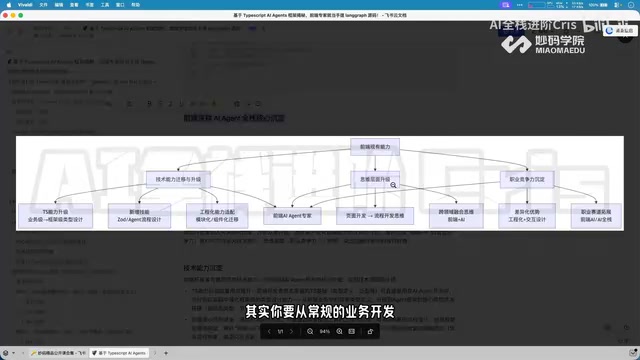
Four Core Advantages Frontend Developers Have When Transitioning to AI Agent Development
Frontend developers have key advantages for AI Agent development: TypeScript ecosystem fit, low-barrier full-stack bridging, and state management isomorphism. Learn the transition path here.