The Complete Guide to DeepSeek TUI: Installation, Configuration, and Hands-On Use of a Terminal AI Coding Agent
A complete guide to DeepSeek TUI, the terminal AI coding agent optimized for DeepSeek models.
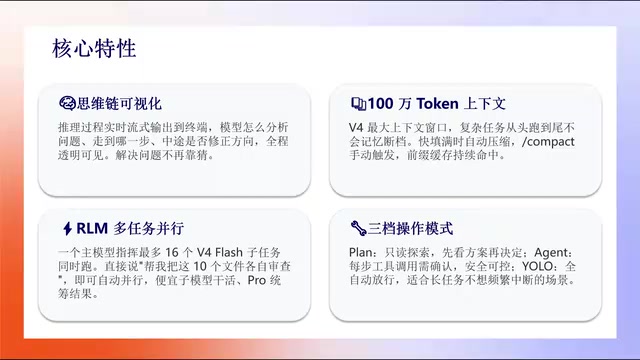
DeepSeek TUI is a terminal-based AI coding agent optimized for DeepSeek models, offering chain-of-thought visualization, a million-token context window with smart compression, and up to 16 parallel subtasks. This guide covers installation, API key configuration, and three hands-on use cases: ML model training, batch file processing, and generating complete projects from scratch using natural language.
What Is DeepSeek TUI?
DeepSeek TUI is a terminal-based coding agent specifically optimized for DeepSeek models — think of it as the DeepSeek equivalent of Claude Code. Although the repository was created back in January, it really took off in early May after the release of DeepSeek V4, quickly amassing nearly 29.6K stars on GitHub and landing on the trending charts.
TUI stands for Text-based User Interface, as opposed to the GUI (Graphical User Interface) we use daily. In software development, the terminal has always been a core tool for power users — from vim/neovim editors to tmux window management, the terminal ecosystem is already highly mature. In recent years, the rise of AI coding assistants has brought tools like Claude Code, Aider, and Cursor to the forefront. Among them, Claude Code, launched by Anthropic, was the first to define the "terminal coding agent" category. DeepSeek TUI was born out of this trend, specifically adapted and optimized for the DeepSeek model family, aiming to carve out its own space in this rapidly growing field.
Its core philosophy is deep optimization around DeepSeek models — from design logic to feature details, everything is tailored to DeepSeek's strengths. For developers who prefer working in the terminal, DeepSeek TUI offers a brand-new AI-assisted programming experience: no more switching between a web interface and a code editor. You can complete the entire workflow — from describing requirements to generating code and running it — directly in the terminal.
Three Core Features of DeepSeek TUI
Chain-of-Thought Visualization: Transparent AI Reasoning
This is DeepSeek TUI's most distinctive differentiator compared to other terminal coding tools. With tools like Claude Code, you assign a task and it just completes it — if you want to understand the model's reasoning process, you have to dig through logs. TUI is different. During task execution, you can watch in real time how the model analyzes the problem, how it progresses step by step, and how it adjusts its approach along the way. The entire thought process is transparent and visible.
Chain-of-Thought (CoT) is a key reasoning technique in the large language model space, first systematically proposed by Google in a 2022 paper. The core idea is to have the model generate intermediate reasoning steps before arriving at a final answer, similar to how humans use "scratch paper" when solving problems. DeepSeek models excel at chain-of-thought reasoning — in particular, the DeepSeek-R1 model introduced a reinforcement learning-driven long-chain reasoning mechanism that can demonstrate clear step-by-step reasoning in complex tasks. TUI's chain-of-thought visualization leverages the thinking tokens output by DeepSeek models, presenting these normally hidden intermediate reasoning steps to users in a real-time streaming format.
This visualization capability is incredibly valuable for both learning and debugging. Developers don't just get results — they understand the AI's decision-making logic, which helps them refine their prompts more effectively.
Million-Token Context Window with Smart Compression
Thanks to DeepSeek V4's million-token context window, TUI has a natural advantage when handling large projects. The context window refers to the maximum amount of text a large language model can "remember" and process in a single conversation. Early GPT-3.5 only supported 4K tokens (roughly 3,000 English words), while DeepSeek V4 has pushed this to 1 million tokens — meaning the model can read and understand the complete codebase of a medium-to-large software project in one go.
More importantly, TUI has additional optimizations at the agent level: when the context window is about to fill up, the system automatically performs compression, trimming less important information to sustain longer conversations and task execution. This smart compression mechanism uses a strategy similar to summary extraction — retaining key code structures, variable definitions, and task objectives while trimming redundant intermediate outputs and repetitive information, thereby maximizing effective information density within the limited window. You can also manually trigger compression with the /compact command.
This means that when handling complex multi-step tasks, DeepSeek TUI won't "lose its memory" due to context overflow — it maintains a coherent understanding of the entire project.
Multi-Task Parallelism and Three Safety Modes
TUI supports up to 16 subtasks running in parallel, dramatically improving processing efficiency for complex projects. Under the hood, this relies on a multi-agent collaboration architecture: a main agent (Orchestrator) handles task decomposition and scheduling, multiple sub-agents independently execute their assigned subtasks, and the main agent aggregates the results. This design borrows from concurrent programming concepts in software engineering, breaking down complex tasks that would otherwise need to be completed sequentially into parallelizable units. For example, when generating a complete web application, frontend components, backend APIs, and database configurations can be handled by different sub-agents simultaneously, significantly reducing overall completion time.
For safety, TUI offers three operation modes:
- Read-Only Exploration Mode: Review the plan before deciding — ideal for the evaluation phase
- Agent Mode: Every tool call requires human confirmation — safe and controlled
- YOLO Mode: Fully automatic — just describe the task objective and TUI handles everything on its own
The YOLO mode gets its name from "You Only Live Once," hinting at the risk of fully automated execution. It's best suited for sandbox or non-critical environments. For production environments, it's recommended to start with Agent mode and switch to YOLO mode as needed once you're comfortable.
DeepSeek TUI Installation and Configuration Tutorial
Environment Setup and Installation Steps
Installing DeepSeek TUI theoretically requires just one command, but your system needs to have Node.js installed first. If it doesn't, complete the following steps:
-
Install Node.js: Visit the Node.js official website, download the LTS (Long-Term Support) version, choose the installer for your operating system, and follow the installation steps.
-
Install TUI: Run the npm install command in your terminal. Since the repository is hosted overseas, users in China may experience slow download speeds or connection timeouts. The official repository provides a domestic mirror address, but configuring it can be a bit cumbersome. A practical tip: just ask DeepSeek — tell it you want to install TUI and have it provide the complete steps including domestic mirror configuration.
Configuring the DeepSeek API Key
After installation, you'll need to configure a DeepSeek API Key, which involves a paid service:
- Search for and navigate to the DeepSeek API open platform
- Create an API Key (name it whatever you like)
- Make sure to copy and save the key immediately — it's only displayed once
- Top up your account balance
- Follow the prompts to configure the API Key in your terminal
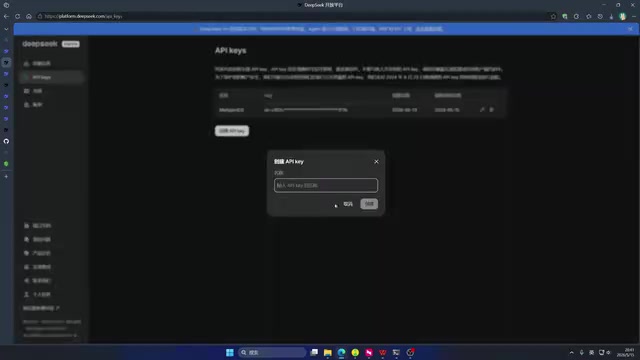
Once configured, type deepseek in your terminal to launch TUI (Windows users can open a terminal via Win+R and typing CMD).
Three Hands-On Use Cases Explained
Use Case 1: Auto-Configuring an Environment and Training a Machine Learning Model
In a live demo, TUI was used to automatically configure a Conda environment for a GitHub project and run a training task. Conda is one of the most popular environment management tools in the Python ecosystem, developed and maintained by Anaconda. It solves the core problem of "dependency hell" — different projects may require different versions of Python and third-party libraries, and Conda avoids version conflicts by creating isolated virtual environments. In machine learning, environment configuration is often the most time-consuming prerequisite, involving CUDA drivers, PyTorch/TensorFlow framework versions, and compatibility of various dependency libraries. Although environment configuration still poses some challenges for the agent (it ultimately opted for an existing environment), TUI successfully completed the dataset download and model training.
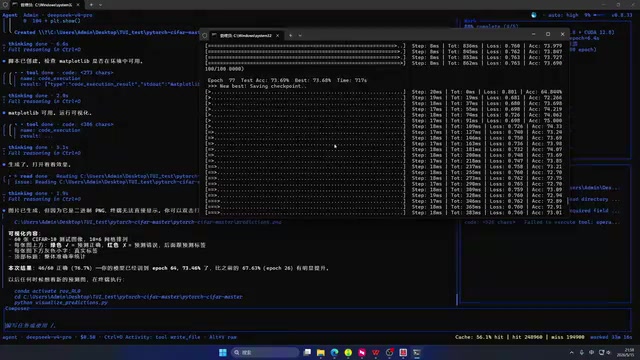
By epoch 77, the model had reached 73% accuracy. The CIFAR dataset used in the demo is a classic benchmark in computer vision, published by the Canadian Institute for Advanced Research (CIFAR). It contains 60,000 32×32 pixel color images across 10 categories (airplane, car, bird, cat, etc.) and is commonly used for training and evaluating image classification models. Reaching 73% accuracy after 77 epochs is a reasonable intermediate result for a basic model. TUI also automatically generated test code that displayed CIFAR dataset prediction results — green labels indicate correct predictions, red labels indicate errors. The entire process, from environment configuration to result visualization, was essentially automated.
Use Case 2: Batch File Processing and Data Operations
While file processing isn't TUI's strongest suit, it can still handle it competently. In the demo, TUI successfully read all subdirectories on the D: drive and extracted a file list. Data operations like Excel processing were also handled well. For everyday batch file management needs, DeepSeek TUI serves as a convenient helper tool.
Use Case 3: Generating a Complete Code Project from Scratch
This is DeepSeek TUI's most valuable use case. The traditional workflow goes: describe requirements to an AI on a web interface → copy code into your project → encounter errors → go back to the web interface to fix them — rinse and repeat. With TUI, you can describe your requirements directly in the terminal and let it iterate autonomously from zero to one, with no manual error management needed.
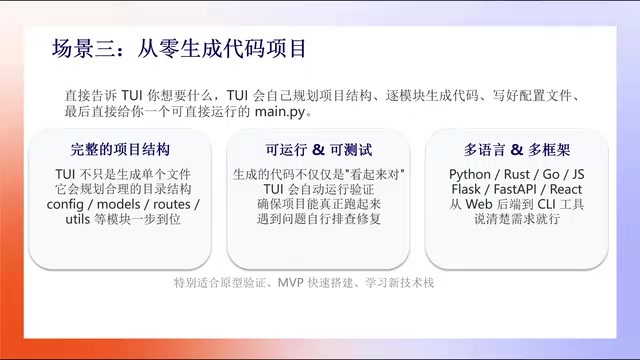
DeepSeek TUI autonomously handles the following:
- Creates a complete project architecture with a well-organized directory structure
- Identifies and fixes errors on its own during iteration
- Supports multiple programming languages including Python, JavaScript, and more
In the demo, a reinforcement learning log file for robot path tracking (containing 1,000 steps of x/y coordinate data) was provided, and TUI extracted the coordinates and generated a visualization chart. Reinforcement Learning (RL) is one of the three major paradigms of machine learning. Its core idea is to have an agent continuously optimize its behavior strategy through interaction with the environment based on reward signals. Path Tracking is a classic problem in robot control, where the goal is to have a robot follow a preset reference path while minimizing the deviation between the actual trajectory and the reference trajectory. TUI's ability to automatically transform raw data into visualizations demonstrates its practical value in data analysis and scientific computing scenarios — developers don't need to manually write matplotlib bindingcode; they just describe what they need in natural language. The final chart clearly showed the reference path (dashed line) and the actual path (blue line), with good tracking performance and minimal error.
Summary: DeepSeek TUI's Strengths and Future Outlook
As a terminal-based intelligent coding assistant, DeepSeek TUI represents an important direction in AI-assisted programming: enabling developers to read, write, and execute code using natural language in the terminal environment they know best. Its three core advantages — transparency through chain-of-thought visualization, coherence through a million-token context window, and cost-effectiveness through optimization specifically for DeepSeek V4 — give it a unique competitive edge among similar tools.
Of course, DeepSeek TUI still has limitations — for instance, the success rate for complex tasks like environment configuration has room for improvement. But it's easy to foresee that as model capabilities continue to evolve, the vision of reading code, writing code, and searching for resources all through natural language in a single terminal tool is rapidly becoming reality.
Related articles
AI Large Model Learning Roadmap Breakdown: Three Stages from Application Development to Model Fine-Tuning
Deep breakdown of a popular AI large model learning roadmap covering LangChain, RAG, Agent, and LoRA fine-tuning across three stages, with analysis of its strengths and limitations for career changers.
AI Agent Development: A Complete 6-Week Systematic Learning Roadmap
A 6-week systematic learning roadmap for AI Agent development, covering core architecture, ReAct principles, multi-agent collaboration, RAG integration, and deployment.
Four Core Advantages Frontend Developers Have When Transitioning to AI Agent Development
Frontend developers have key advantages for AI Agent development: TypeScript ecosystem fit, low-barrier full-stack bridging, and state management isomorphism. Learn the transition path here.