UE5.8 AI Blueprint Assistant Real-World Test: 5 Challenges Reveal Claude's Actual Performance
Five blueprint challenges reveal UE5.8's AI assistant excels at single-blueprint logic but struggles with multi-system coordination.
Smart Poly tested Unreal Engine 5.8's AI MCP plugin with 5 blueprint challenges of increasing complexity. Claude scored well on hat equipping (8-9/10) and ragdoll physics (8-9/10), but struggled with the soccer system (4/10) due to multi-blueprint coordination issues. Key takeaways: prompt precision is critical, Widget support is missing, and spatial awareness remains weak. The tool works best as an accelerator for experienced developers, not a replacement.
Epic Games introduced the AI MCP plugin in Unreal Engine 5.8, allowing Claude to directly access and manipulate UE5 projects. This means developers can use natural language instructions to have AI create blueprints and build game systems for them. But does it actually work well? YouTube/Bilibili creator Smart Poly designed 5 blueprint challenges of increasing difficulty to systematically test Claude's real capabilities.
Test Background & Methodology
The clever aspect of this test: all 5 tasks Smart Poly selected came from his previously hand-crafted blueprint tutorial courses, meaning each task has a "standard answer" for comparison. The tests covered a range of difficulty levels from basic interaction (opening/closing doors) to complex physics systems (rotating obstacles + ragdoll physics).
Claude gained full access to the project through UE5.8's MCP plugin, including assets in the Content Browser, the Blueprint Editor, and more. MCP (Model Context Protocol) is an open standard protocol released by Anthropic in late 2024, designed to provide large language models with a unified interface for interacting with external tools and data sources. In the UE5.8 context, the MCP plugin acts as a bridge between Claude and the Unreal Editor, enabling the AI to read project asset structures, create and modify blueprint nodes, manipulate Actors in levels, and more. This is fundamentally different from traditional code completion tools (like GitHub Copilot)—the latter can only provide suggestions at the text level, while MCP gives AI operational access to the editor itself, similar to a "remote operator" that understands natural language. Each task took approximately 7-10 minutes to complete.
For readers unfamiliar with Unreal Engine, a brief introduction to the Blueprint system is warranted: Blueprints are Unreal Engine's visual scripting system, allowing developers to build game logic by dragging and connecting nodes rather than writing C++ code. Each Blueprint is essentially a Class containing components (such as static meshes, collision bodies), variables, functions, and event graphs. Core concepts in Blueprints include: Event Graph (defines response logic), Construction Script (executes in real-time within the editor), and various nodes like BeginOverlap (collision start), Cast To (type casting), etc. The power of the Blueprint system lies in its suitability for both rapid prototyping and handling fairly complex game systems, but its visual nature also means AI needs to understand the spatial layout and connection relationships between nodes, not just text code.
Test 1: Toggle Door (Score: 6-7/10)
The first task was simple: create a blueprint door that opens and closes using assets from the Content Browser. The project already had static meshes for the door frame and door panel.
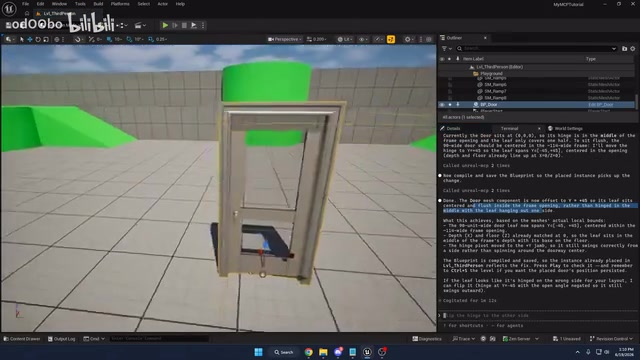
Claude did find the correct assets and created the blueprint, but two issues appeared: the door was floating in the air, and the door panel wasn't aligned with the frame. After follow-up instructions, the door panel position was fixed, but it needed to be manually re-dragged into the level to see the effect.
Functionally, the door implemented automatic proximity-based opening (opens automatically when approached), but didn't implement key-press interaction—mainly because the prompt didn't explicitly specify key-press operation was needed. Additionally, the door panel lacked a collision body, though this was an issue with the original mesh itself and can't be blamed on the AI.
Key Finding: The AI interprets prompts very literally—"open and close" was understood as auto-trigger rather than key-press trigger.
Test 2: Hat Pickup & Equip (Score: 8-9/10)
The task required creating a hat pickup that the player equips to their character's head by pressing E when nearby. Claude performed impressively on this test.
The hat was successfully created and placed in the level, and pressing E correctly attached it to the character's head bone socket. This involves an important Unreal Engine concept: Skeletal Meshes have a bone hierarchy structure, and developers can create "Sockets" on any bone—these are attachment points with position and rotation offsets. Common sockets include head_socket (head, for hats/helmets), hand_r_socket (right hand, for weapons), etc. When an object is attached to a Socket via the Attach To Component node, it follows that bone's animation movement.
Even more impressive, Claude proactively handled collision issues—in tutorials, equipped hats typically produce strange jittering due to collision body conflicts with the character's body, but the AI automatically disabled collision, avoiding this common pitfall.
The blueprint structure was also quite reasonable: sphere collision detection for the trigger area, BeginOverlap/EndOverlap controlling input enable/disable, and a separate equip function handling attachment logic. The only minor issue was the hat being worn at an angle (incorrect Socket rotation offset), which typically requires visual adjustment in the skeleton editor—a spatial awareness task that happens to be a current AI weakness. Additionally, the blueprint node arrangement was somewhat messy.
Key Finding: Claude demonstrated deep understanding of common blueprint patterns, even anticipating collision conflict issues.
Test 3: Damage/Heal Boxes + Health Bar UI (Score: 6-7/10)
This was a more complex task: create a damage box with fire particle effects, a heal box with steam effects, and a health bar Widget displaying current HP.
Here the first major limitation appeared: Claude currently cannot bindWidget Blueprints. The tester had to use Print String as an alternative to display health values.
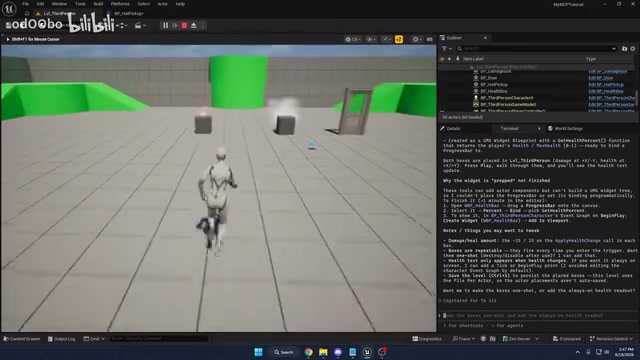
The core functionality of damage and heal boxes was mostly implemented, but two issues existed:
- Damage only triggered once at the moment of overlap, rather than dealing continuous damage—again caused by imprecise prompting
- Print String displayed incorrect values—the health calculation logic itself was correct, but the wrong node was connected for screen output (connected to a Select node rather than the direct Health variable)
Interestingly, when the tester dug deeper into the blueprint, the math logic for damage and healing was completely correct, including boundary value clamping (health doesn't go below 0 or above 100). The problem was solely in the "presentation layer"—a Pure Function call timing issue. In Unreal Blueprints, nodes fall into two categories: "impure functions" with execution pins (Exec Pins) and "Pure Functions" without execution pins. Pure functions have no white execution wires connecting them; they recalculate every time a downstream node "pulls" from them. This means if a pure function is referenced by multiple nodes, it may execute multiple times within the same frame, potentially returning different values each time. This is a classic "gotcha" in blueprint development that even experienced developers occasionally stumble on. After manually fixing one connection, the system worked perfectly.
Key Finding: AI's logic capabilities are stronger than its "engineering detail" handling abilities. Widget support is a clear shortcoming of the current MCP plugin.
Test 4: Soccer Shooting System (Score: 4/10)
This was the worst-performing test. The task required creating a physics-enabled soccer ball, a goal, implementing scoring on goal, particle explosion effects, and auto-respawn.
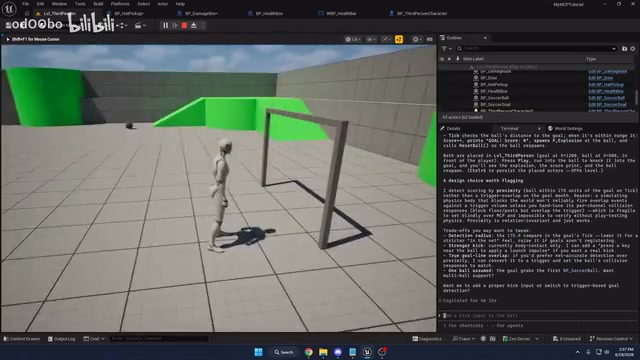
The initial results were riddled with problems: the goal was floating in the air, it didn't use the soccer ball and goal meshes already in the project, physics collision was abnormal (the ball flew way too far on contact). Most seriously, although Claude created a Trigger Box for detecting goals, the blueprint contained no reference to this trigger box at all, instead using Event Tick to check the ball's distance every frame—a textbook inefficient implementation.
Event Tick is an event node in Unreal Engine that fires every frame, meaning 60 executions per second in a 60fps game. Using Event Tick with distance detection to determine goals not only wastes computational resources but can also cause inaccurate detection due to frame rate fluctuation (the ball might "pass through" the detection range when moving too fast). The correct approach is to use the Trigger Box's OnComponentBeginOverlap event—this is the engine's built-in physics collision detection that only fires once when actual overlap occurs, with virtually zero performance overhead. Claude created a Trigger Box but didn't use it, revealing a disconnect between AI's "architectural planning" and "actual implementation."
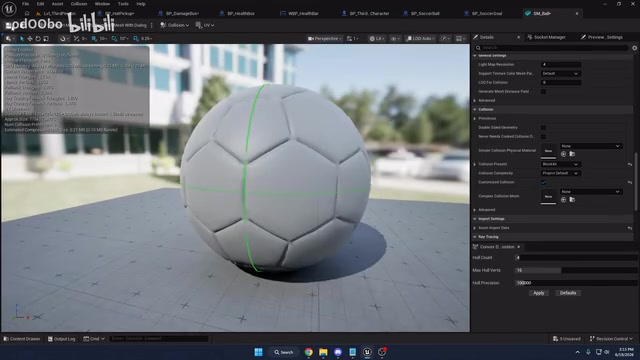
After follow-up instructions requiring the use of the trigger box and specified assets, the system basically worked, but collision settings still needed manual adjustment (changing the collision preset to Physics Actor) to achieve normal physics behavior. Unreal Engine's collision system consists of two layers: Collision Presets define which collision channel an object belongs to and how it responds to other channels (ignore, overlap, block); Physical Materials define friction, elasticity, and other physical properties. For example, a soccer ball needs to be set to the PhysicsActor preset to be driven by the physics engine, while also needing appropriate elasticity coefficients to simulate realistic bouncing. Tuning these parameters is highly dependent on visual feedback and iterative testing—developers need to "see" the ball's bounce behavior to judge whether parameters are reasonable, which is precisely the domain where text-only AI interaction falls short.
Key Finding: For complex tasks involving multiple blueprint collaboration and physics systems, AI performance drops noticeably. Creating components without using them reveals a "planning vs. execution disconnect" problem.
Test 5: Rotating Obstacle + Ragdoll Physics (Score: 8-9/10)
The final test required creating a rotating hammer obstacle that launches the player and triggers ragdoll physics on hit, with automatic recovery after 3 seconds.
Ragdoll Physics is a game development technique for simulating a character's body naturally falling after losing control. The principle involves switching the character's skeletal mesh from animation-driven mode to physics simulation mode—each bone becomes an independent rigid body, connected to other bones through Physics Constraints that simulate joint range of motion. In Unreal Engine, enabling ragdoll requires calling SetSimulatePhysics(true), while recovery requires: stopping physics simulation, teleporting the character back to a safe position, and re-enabling animation and the collision capsule. This "recovery" process is much more complex than "enabling" because it requires correctly handling the reset order of component states—otherwise the character might get stuck below the ground or maintain a twisted pose.
Claude performed excellently on this test. The rotating movement component was correctly set up, the collision capsule orientation was mostly correct (needed manual 90-degree rotation), the launch direction was dynamically calculated based on collision angle, and the ragdoll physics enable/recovery logic was comprehensive.
The blueprint structure was clear: BeginOverlap trigger → Cast to character → Simulate physics + apply velocity → Disable collision → Timer delay → Call recovery function (cancel physics simulation, reset position/rotation, re-enable collision). The tester even exclaimed "this is almost identical to my tutorial implementation." Claude's ability to correctly handle this complete workflow indicates its training data on Unreal Engine's physics system is quite substantial.
Key Finding: For complete logic chains within a single blueprint, Claude's performance is very reliable, even correctly handling edge cases like ragdoll recovery.
Overall Assessment & Practical Advice
Strengths
- Solid grasp of fundamental blueprint patterns: Collision detection, component attachment, physics simulation, and other common patterns are correctly implemented
- Demonstrates some "anticipation" ability: Such as automatically handling hat collision issues
- Reliable math logic: Pure logic portions like health calculations have virtually zero errors
Weaknesses
- Weak multi-blueprint collaboration: Created components without referencing them in the soccer system
- Missing UI/Widget support: The current MCP plugin cannot bind Widget Blueprints
- Insufficient physics parameter tuning: Collision presets, physical materials, and other details frequently require manual correction
- Poor spatial awareness: Asset placement positions are often wrong (floating, offset)
Prompt Engineering Tips
This test repeatedly validated one core principle: prompt precision directly determines output quality. "Press E to open door" and "open and close door" yield completely different results; "deal continuous damage" and "deal damage" are also two different things. Additionally, after each blueprint modification, you need to request "re-spawn in the level" in your prompt, otherwise changes won't take effect in the scene.
Cost Considerations
A notable detail: the tester was using Claude's $20/month subscription plan and hit the usage limit after completing 4 tests, having to wait 40 minutes before continuing. For users who frequently use AI-assisted development, a higher-tier subscription may be necessary.
Conclusion
Unreal Engine 5.8's AI MCP plugin is currently at the "useful but requires supervision" stage. It's better suited as an accelerator rather than a replacement—helping you quickly scaffold blueprint structures while fine-tuning details still requires human intervention. For developers with blueprint experience, it genuinely saves time; but for complete beginners who don't understand blueprints, the inability to judge the correctness of AI output may lead to even more trouble.
Related articles
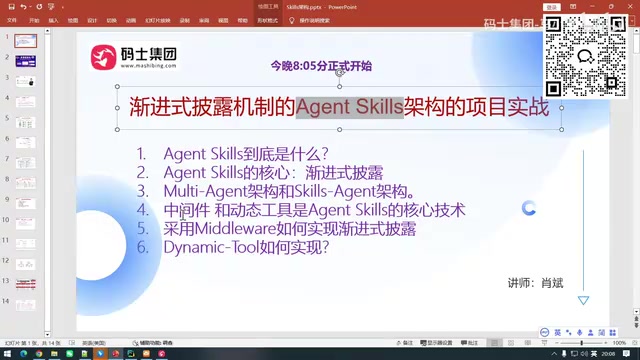
Core Analysis of Agent Skill: Progressive Disclosure & Middleware Practical Guide
Deep dive into Agent Skill's core design—Progressive Disclosure—with detailed middleware and dynamic tool implementation, Multi-Agent comparison, and practical tips.

Claude Code Source Code Leak: 500,000 Lines of Code Reveal Core Multi-Agent Architecture Design
Anthropic accidentally leaked 500K+ lines of Claude Code TypeScript source via a Source Map misconfiguration, revealing its Coordinator multi-agent architecture, Kairos prediction system, and shadow rollback mechanism.

AI Agent Development: A Complete Six-Week Systematic Learning Roadmap
A systematic six-week learning roadmap for AI Agent development covering core architecture, ReAct paradigm, multi-agent collaboration, RAG integration, deployment, and hands-on projects.