Unreal Engine 5.8 MCP Server Setup Tutorial: AI Agent-Driven Game Development in Practice
Step-by-step guide to setting up Unreal 5.8's MCP server for AI-powered game development.
This tutorial walks through configuring Unreal Engine 5.8's built-in MCP server to connect AI agents for automated game development. It covers DeepSeek API key setup, enabling MCP plugins, launching the server, and demonstrates natural language-driven scene building including mesh placement, emissive material creation, and lighting. The article also discusses current limitations and future potential.
Introduction: Unreal Engine Enters the AI Collaboration Era
Unreal Engine 5.8 introduces an exciting new feature — built-in MCP (Model Context Protocol) server support. MCP is an open protocol released by Anthropic in late 2024, designed to provide large language models with a standardized way to connect to external tools and data sources. It uses a client-server architecture where the LLM acts as a client, sending requests to the server via the MCP protocol, while the server exposes a set of "Tools" for the model to invoke. This design allows AI to go beyond pure text conversations and actually operate software, read/write files, query databases, and more. Unreal Engine's built-in MCP server essentially wraps the editor's functionality (such as creating Actors, modifying materials, editing Blueprints, etc.) into MCP tool interfaces, enabling external LLMs to call these functions directly through the standard protocol.
This means developers can connect large language models directly to the engine, allowing AI to act as an "agent" that helps build scenes, create materials, and even write Blueprint logic. A Bilibili content creator leveraged this new feature along with open-source projects to build an AI agent tool, delivering an initial experience of "letting AI build your game with one click."
Although Unreal 5.8 is still in preview and has some stability issues, this direction undoubtedly signals a major shift in game development workflows. This article provides a detailed walkthrough of the setup process, real-world results, and current limitations of this tool.
Unreal 5.8 MCP Server Environment Setup: Three Steps to Connect an AI Agent
Step 1: Software Initialization and DeepSeek API Key Configuration
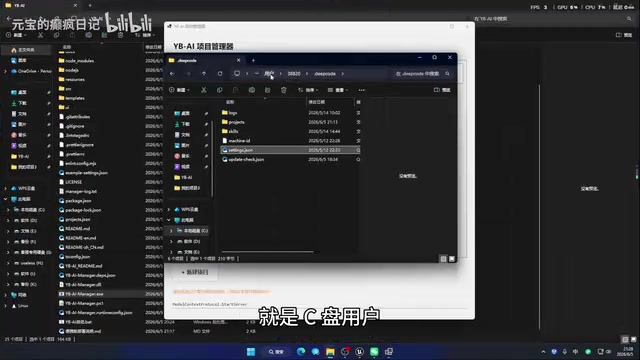
First, create a new project in the companion software, select the corresponding Unreal Engine project file, then click Run to perform local initialization. After initialization, locate the configuration file in your system user directory (the path is a hidden folder under C:\\Users\\YourUsername\\) and enter your API key.
One important detail: this tool is specifically optimized for DeepSeek, so developers are advised to apply for an API key from the DeepSeek website. DeepSeek is a series of large language models developed by DeepSeek (the company). Among them, DeepSeek-Coder and DeepSeek-V3 perform particularly well on code generation and comprehension tasks. DeepSeek employs a Mixture of Experts (MoE) architecture, which dramatically reduces inference costs while maintaining high performance — API pricing is only a fraction of comparable overseas models. In multiple code benchmarks (such as HumanEval and MBPP), DeepSeek's performance approaches or even surpasses GPT-4-level models. For Unreal Engine's MCP scenarios, the model needs to understand the engine's API structure and generate correct call sequences, which demands extremely strong code comprehension and generation capabilities. DeepSeek's cost-performance advantage makes it an ideal choice. This selection not only reduces usage costs but also demonstrates that Chinese-developed LLMs have become highly competitive in the code generation domain.
Step 2: Enable the Unreal Engine MCP Plugin
In the Unreal Engine editor, go to the Plugin Manager and search for "MCP." Two related plugins will appear — enable both and restart the engine. This is a native feature new to Unreal 5.8, indicating that Epic Games has already built the foundational infrastructure for AI collaboration at the engine level.
Step 3: Start the MCP Server and Establish the Connection
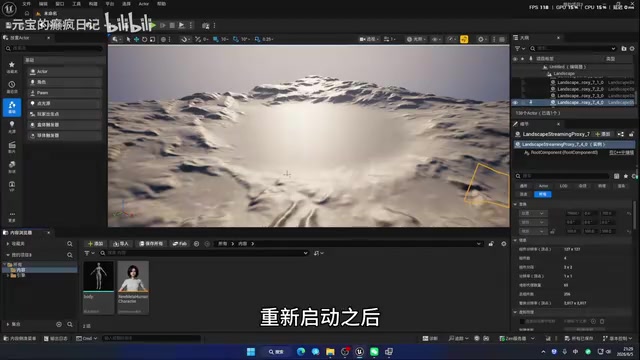
After restarting the engine, open the Console, copy the startup command provided by the companion software, paste it into the console, and press Enter. Once the server starts successfully, the AI agent is connected to Unreal 5.8, and developers can issue instructions directly using natural language.
The entire setup process isn't overly complex, but pay attention to hidden folder visibility settings and ensure the API key is entered correctly.
Hands-On Demo: Natural Language-Driven Scene Building
Basic Scene Creation Test
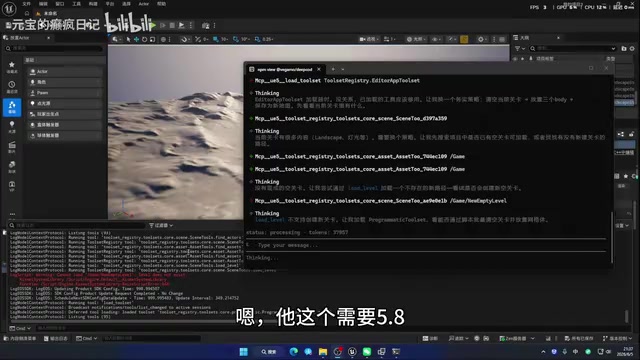
In the demo, the creator first attempted a basic task: "Create an empty map and place three mesh objects named 'body' from the project inside it." The AI agent received the instruction and began executing automatically, with related call commands displayed in real time on the interface.
However, an issue emerged during actual testing — the AI occasionally couldn't find instructions, causing execution to halt. This is a known instability factor in the Unreal 5.8 preview build. The creator adopted a workaround: manually create an empty level first, then let the AI make improvements on the existing level.
Compound Tasks and Material Operations
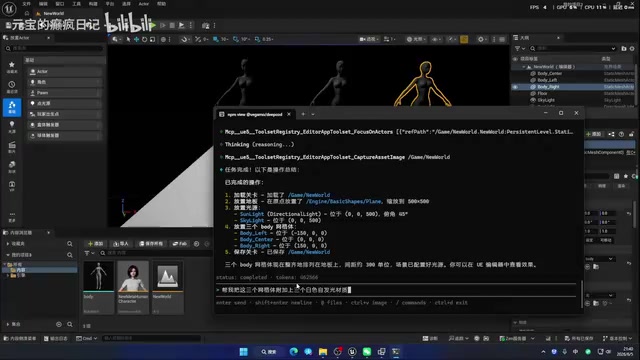
Next, the creator posed a more complex request: "Place a light source and a floor in the level, then put three body meshes on top of the floor." The AI agent successfully completed this compound task. While the lighting wasn't ideal, the floor, light source, and three static meshes were all created as requested.
Going further, the creator tested operations involving materials and Blueprints: "Attach three white emissive materials to these three meshes, then add some sky light effects to the scene." This task tested whether the AI could handle the logic of material creation and application.
In Unreal Engine's physically-based rendering (PBR) pipeline, emissive materials are implemented through the Emissive Color channel in the Material Editor. Unlike standard diffuse or specular reflections, emissive lighting doesn't depend on light sources in the scene — instead, the object's surface itself becomes a light emitter. Technically, emissive color values can exceed 1.0 (HDR range), and when combined with Unreal Engine's post-process Bloom effect, they produce a noticeable glow. If the Lumen global illumination system is enabled, emissive objects can also serve as indirect light sources that illuminate the surrounding environment. When the AI agent creates an emissive material, it needs to correctly set the Material Domain, Shading Model, and connect the color value to the Emissive Color input — this reflects the AI's depth of understanding of the engine's material system.
The results showed that the AI successfully created emissive materials and applied them to the corresponding meshes, while also adding sky light effects. After enabling real-time preview, the scene displayed three brightly glowing emissive objects with reasonable sky lighting, essentially achieving the expected result.
Current Limitations and Future Outlook
Issues at the Current Stage
Based on the demo, the MCP functionality in Unreal 5.8 currently has several notable limitations:
- Insufficient stability: The AI agent occasionally encounters call errors or lost instructions during execution, requiring manual intervention
- Complex Blueprint capabilities unverified: Testing so far has focused mainly on scene building and simple material operations; the ability to write advanced Blueprints has not been thoroughly validated. Blueprints are Unreal Engine's visual scripting system, allowing developers to implement game logic by dragging and connecting nodes without writing C++ code. Blueprints are essentially a node-graph-based programming paradigm where each node represents a function call, variable operation, or flow control, connected through execution pins and data pins. The Blueprint system covers nearly all game functionality, from simple door-opening logic to complex AI behavior trees and UI interactions. The challenge of having AI automatically write Blueprints lies in the fact that Blueprints involve not only logical correctness but also spatial layout of nodes, pin type matching, and deep interaction with engine subsystems — making it far more complex than generating plain text code
- Execution efficiency needs optimization: The AI takes considerable time to complete tasks, and the intermediate process isn't smooth enough
Application Scenarios Worth Anticipating in the Official Release
Nevertheless, the potential of this feature is enormous. When Unreal 5.8 officially launches, with bug fixes and feature improvements, AI agents are expected to play a greater role in the following scenarios:
- Rapid prototyping: Describe a scene in natural language and let AI automatically generate an initial version
- Automating repetitive work: Mechanical operations like batch-placing assets and uniformly setting materials
- Blueprint writing assistance: Automatically generating Blueprint logic from functional descriptions, lowering the programming barrier
Conclusion
Unreal 5.8's MCP server feature marks the beginning of deep integration between game engines and AI. While the current version is still in a "functional but not stable enough" stage, it demonstrates an entirely new development paradigm — developers shift from "manual operations" to "natural language commands," with AI agents handling the actual execution.
For game developers, now is a great time to learn about and experiment with this technology. As Unreal 5.8's official release approaches and LLM capabilities continue to improve, AI-assisted game development will evolve from a "novelty" to a "practical tool."
Key Takeaways
Related articles
DeepSeek + Codex Tutorial: Achieve Low-Cost AI Coding with Codex++
Learn how to connect DeepSeek to Codex using the open-source tool Codex++. Covers provider setup, connection testing, and launch verification for low-cost AI coding.

AI Alleviating Sierra Leone's Teacher Shortage: Technology Empowering Rather Than Replacing Educators
Sierra Leone faces severe teacher shortages. AI as a teacher partner can provide personalized tutoring, content preparation, and basic Q&A. This article analyzes AI education prospects, infrastructure challenges, and localization strategies in developing countries.
Hands-On Tutorial: Integrating Google Maps Grounding with Firebase AI Logic
Learn how to integrate Google Maps Grounding with Firebase AI Logic in three steps. Combine Gemini with map data to build smart location-aware AI apps.