Vue 3 in Practice: A Complete Guide to Building a NetEase Cloud Music Clone from Scratch
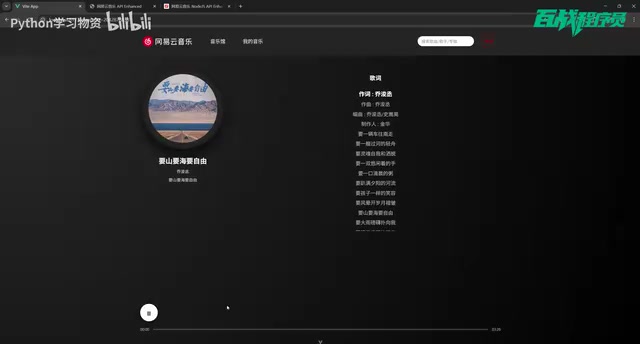
A complete guide to building a NetEase Cloud Music clone using Vue 3 and its ecosystem.
This guide walks through building a full NetEase Cloud Music web clone from scratch using Vue 3, Vue Router, Pinia, and Axios. It covers core modules including the music library homepage, QR code login authentication, personal playlists, search functionality, and an audio player built with the HTML5 Audio API. A locally deployed API service with 200+ endpoints makes it beginner-friendly and cost-free.
Project Overview
For frontend beginners, finding a hands-on project that's both practical and engaging isn't easy. As one of the most popular music platforms in China, NetEase Cloud Music's web client covers a wide range of common frontend development modules — from page routing and data fetching to audio playback and user authentication — touching on nearly all the core concepts of Vue 3 development.
This article is based on a comprehensive Vue 3 tutorial series from Bilibili (B站), walking through the complete development approach for building a NetEase Cloud Music clone from scratch. It will help you understand the project's feature architecture, technology choices, and key implementation details.
Core Feature Modules Breakdown
Music Library Homepage
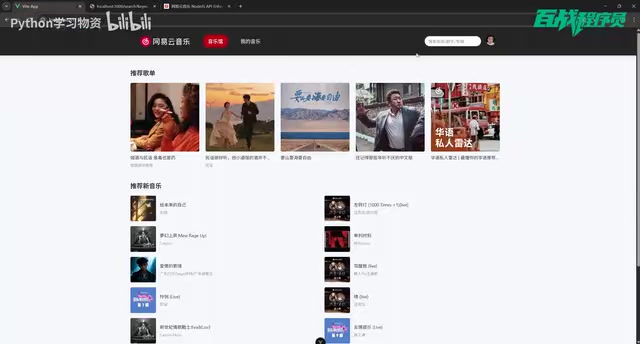
The homepage serves as the face of the entire project and is the most information-dense page. Based on the tutorial demo, the homepage consists of the following content sections:
- Recommended Playlists: Displays popular playlists as cards; clicking one navigates to the playlist detail page with the full song list
- Recommended New Music: Showcases the latest music releases
- Artist Rankings: Displays trending artist leaderboards
Implementing these modules involves the core philosophy of Vue 3's component-based development — each section can be abstracted into an independent component, with data passed via props to maintain code maintainability. Vue 3's Composition API plays a crucial role here: unlike the traditional Options API, which scatters logic across data, methods, computed, and other options, the Composition API uses the setup function to co-locate related logic. Combined with reactive APIs like ref and reactive, each component's data fetching, state management, and event handling can be organized into cohesive code blocks, significantly improving the maintainability of complex components.
The complete user journey — clicking a playlist card to enter the detail page, then clicking a specific song to navigate to the player page — maps directly to Vue Router's nested routing and dynamic routing design.
QR Code Login & User Authentication
The login module is one of the more technically demanding parts of this project. The tutorial implements QR code login, which is one of the officially supported authentication methods for NetEase Cloud Music.
Here's the specific flow:
- The user clicks "My Music," and the system checks the login status
- Users who aren't logged in are redirected to the login page, where a QR code is displayed
- The user scans the QR code using the NetEase Cloud Music mobile app
- The user confirms authorization on their phone
- After successful authorization, the page automatically redirects to the homepage with the user now logged in
QR code login is essentially a polling-based authentication method. The core principle works as follows: the frontend requests the server to generate a unique QR code token, which is then encoded into a QR code and displayed to the user. The frontend then begins polling at regular intervals (typically every 1–3 seconds) to check the token's status. When the user scans the QR code with the mobile app, the app binds the user's identity information to that token and sends it to the server. The server updates the token status to "scanned, pending confirmation" or "authorized." On the next polling cycle, the frontend detects the status change, completes the login flow, and obtains the user credentials. This approach avoids the security risks of entering account credentials on the web and is widely adopted by mainstream applications (WeChat, Alipay, etc.).
This flow involves several technical concepts — frontend polling (periodically checking scan status), state management (globally maintaining login state), and route guards (redirecting unauthenticated users) — making it extremely valuable for understanding frontend-backend interaction.
My Music
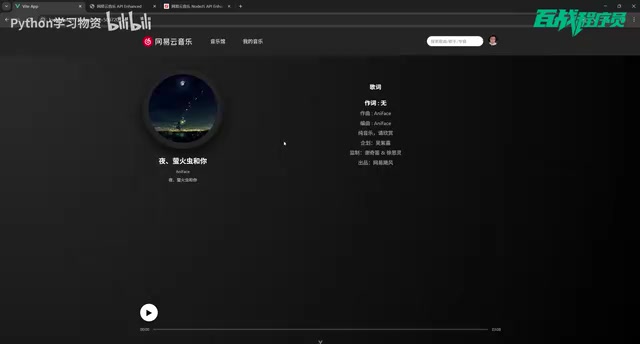
After a successful login, the "My Music" page displays the user's personal playlist collection. Clicking any playlist opens its detail page, and clicking a specific song navigates to the player. The core of this module lies in fetching and displaying user data — after login, the user's playlist API is called, and the data is managed globally through Pinia.
Pinia is the officially recommended next-generation state management library for Vue, effectively replacing Vuex. Compared to Vuex, Pinia removes the concept of mutations (state is modified directly in actions), fully supports TypeScript type inference, supports multiple Store instances without nested modules, and has a smaller bundle size. In a music application, playback state (current song, playback progress, playlist) and user state (login info, personal playlists) are classic examples of data that needs to be shared globally. Using Pinia allows any component to access and modify this state while keeping the data flow traceable.
Search Functionality
Search is a high-frequency feature in any music application. The tutorial implements keyword search — users enter a song name, the search API is called to fetch results, and clicking any song in the results navigates to the player page.
Music Player Implementation
The playback feature is the soul of the entire project. When a user selects a song from a playlist detail page or search results, they're navigated to a dedicated player page for audio playback. This requires the HTML5 Audio API, combined with Vue 3's reactivity system, to implement playback controls, progress bars, and other interactions.
The HTML5 Audio API provides comprehensive audio control capabilities and serves as the technical foundation for web-based music players. The core HTMLAudioElement object offers play() and pause() methods for playback control, currentTime and duration properties for progress tracking, and a volume property for volume control. By listening to the timeupdate event, you can update the progress bar in real time; the loadedmetadata event retrieves the total audio duration; and the ended event triggers auto-advancement logic. In Vue 3, the Audio instance is typically created within a composable function, with playback state wrapped in ref so the UI can reactively reflect progress changes. It's worth noting that modern browsers enforce strict autoplay restrictions (Autoplay Policy) — the first playback must be triggered by user interaction, which is an edge case that requires special handling during development.
Setting Up the Local API Service
One of the project's major highlights is that all API endpoints are deployed locally, with no dependency on external services. The tutorial provides the complete server source code — developers simply start it locally to access over 200 available endpoints.
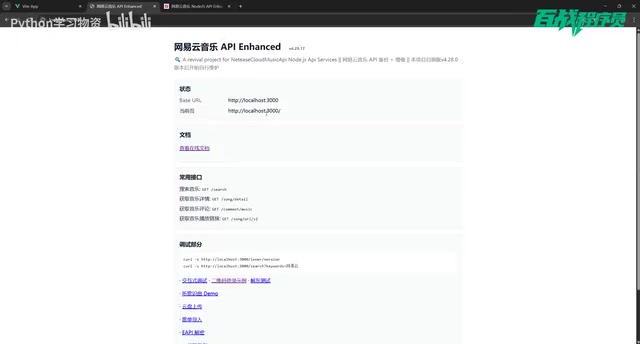
The service runs on localhost:3000. Taking the search endpoint as an example, you just need to construct the appropriate path and parameters to retrieve real music data. This approach offers several clear advantages:
- Zero cost: No need to purchase a server or domain
- Stable and controllable: Unaffected by third-party service fluctuations
- Learning-friendly: You can test endpoint responses directly in the browser to understand frontend-backend data exchange
Interestingly, the current version of the tutorial only uses about a dozen endpoints, while the complete API documentation provides over 200. This means developers have plenty of room to explore and extend functionality on their own after completing the basic features.
Tech Stack & Project Architecture
Although the tutorial targets beginners, its tech stack fully aligns with the current mainstream Vue 3 ecosystem:
| Technology | Purpose |
|---|---|
| Vue 3 | Core framework, using Composition API |
| Vue Router | Page routing management |
| Pinia | Global state management (login state, playback state, etc.) |
| Axios | HTTP request handling |
| Node.js | Runtime environment for the local API service |
The project also includes complete source code, database files, and project documentation, which is extremely beginner-friendly — when you encounter issues, you can directly reference the source code to troubleshoot rather than fumbling in the dark.
Learning Tips & Feature Extension Ideas
Tips for Vue 3 Beginners
- Get it running first, then understand it: Start by following the tutorial to get the entire project up and running. Make sure the local API service works properly, then gradually understand the implementation logic of each module.
- Focus on data flow: Pay close attention to the complete chain from API requests to page rendering — this is a core competency in frontend development.
- Extend features on your own: After mastering the basic features, try using the remaining API endpoints to implement new functionality.
The Practical Value of Route Guards
Vue Router's Navigation Guards are the core mechanism for implementing page access control, and they have a direct application in this project. The global beforeEach guard executes before every route transition, making it ideal for login status checks. When an unauthenticated user attempts to access the "My Music" page, the route guard intercepts the navigation request and redirects the user to the login page. The guard function receives to (target route) and from (source route) parameters, and determines whether to allow, redirect, or cancel the navigation based on its return value. Once you master this pattern, you can easily extend it to more complex permission control scenarios.
Possible Feature Extensions
- Scrolling lyrics display
- Playlist management
- Comments section
- MV playback
- Personalized recommendations
- Responsive design (mobile adaptation)
The tutorial author has also mentioned plans to release a NetEase Cloud Music 2.0 version with additional feature modules, so interested developers should stay tuned.
Conclusion
This Vue 3 NetEase Cloud Music tutorial uses a product everyone is familiar with as a vehicle to tie together core frontend skills including Vue Router routing management, Pinia state management, Axios API calls, QR code login authentication, and Audio playback. For developers currently learning Vue 3, this is a project that combines both fun and practicality. The complete source code and local API service also significantly lower the barrier to entry, allowing learners to focus on frontend logic itself rather than getting bogged down by environment configuration and API issues.
Related articles
Claude Fable 5 Global Ban: Deep Analysis of the AI Economic Chain Fracture Crisis
Claude Fable 5 banned globally just 3 days after launch. Deep analysis of the jailbreak controversy, AI supply chain fracture risk, Anthropic's fear marketing backfire, and local AI deployment strategies.
Claude Fable 5 Hands-On: Is Doubling the Tokens Worth It? A Rust Programming Comparison with Opus 4.8
Hands-on Rust project comparison of Claude Fable 5 vs Opus 4.8. Fable 5 uses 2x tokens for only marginal quality gains and has stability issues.

Compile First: Using AI to Revive the Dormant Files on Your Hard Drive
Explore how the open-source LLM Wiki project uses a compile-first paradigm to turn dormant local files into a searchable AI knowledge base, compared with traditional RAG approaches.