What Is Claude Code? Five Key Differences from Regular AI Chatbots
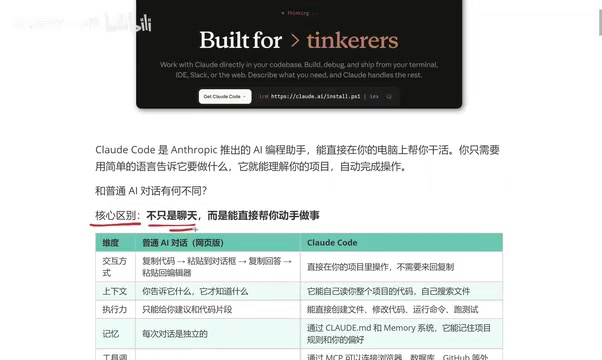
Five core differences between Claude Code and regular AI chatbots explained in depth.
This article breaks down five key dimensions that set Claude Code apart from regular AI chat tools like ChatGPT and DeepSeek: interaction method, context understanding, execution power, memory persistence, and external tool integration. As an AI Agent running in your terminal, Claude Code goes beyond giving advice — it reads your project, writes code, runs tests, and remembers your preferences, representing a paradigm shift in AI-assisted development.
Introduction: Why Claude Code Is Suddenly Everywhere
Recently, Claude Code has been rapidly gaining traction in the developer community. As an AI coding assistant from Anthropic, it's fundamentally different from the AI chat tools we're familiar with like ChatGPT and DeepSeek — it doesn't just chat, it can actually write code, modify files, and run commands for you.
Anthropic was founded in 2021 by siblings Dario Amodei and Daniela Amodei, former OpenAI research VP and colleagues, as an AI safety company. Their core mission is to build reliable, interpretable, and controllable AI systems. The Claude model series is Anthropic's flagship product, and Claude Code is a command-line development tool (CLI Agent) built on top of Claude Sonnet/Opus model capabilities. Unlike traditional code completion tools, Claude Code falls into the "AI Agent" category — it can not only generate text but also autonomously plan, invoke tools, and interact with environments. This marks a paradigm shift in AI programming tools from "assisted completion" to "autonomous execution."
In simple terms, Claude Code is an AI coding assistant that runs directly in your computer's terminal. You just tell it what to do in natural language, and it automatically understands your project structure to handle code writing, file modifications, test execution, and various other tasks. This "conversation as programming" workflow is redefining how developers work day to day.
Claude Code vs. Regular AI Chat: A Five-Dimension Comparison
To truly understand what makes Claude Code powerful, we need to compare it with regular AI web-based chat (like ChatGPT and DeepSeek) across five key dimensions. The differences across these dimensions fundamentally reflect the architectural gap between AI Agents and traditional AI assistants. Traditional AI assistants follow an "input-output" single-turn or multi-turn conversation model, where each interaction is an independent text generation task. AI Agents, on the other hand, have a complete action loop of "perceive-plan-execute-feedback": they can perceive environmental state (read files, check errors), formulate action plans (decide which files to modify and in what order), execute specific operations (write files, run commands), and adjust subsequent actions based on results (e.g., fix bugs if tests fail). This capacity for autonomous decision-making and action is the core reason Claude Code can handle complex development tasks.
Dimension 1: Interaction Method — Say Goodbye to Copy-Paste
Previously, when using web-based AI, the workflow looked like this: copy code → paste into the chat box → get a response → copy it back to your editor. This back-and-forth copy-paste process isn't exactly complicated, but it's definitely tedious — especially when multiple files are involved.
Claude Code is completely different. You simply open a terminal in your project directory and interact directly. It handles everything within your project environment, eliminating all the copy-paste steps.
Claude Code runs in the system terminal, which means it inherently has OS-level file read/write permissions and command execution capabilities. Unlike web-based AI running in a browser sandbox, a terminal tool can directly access the local file system, invoke system commands (like git, npm, python, etc.), and read environment variables and configuration files. This architectural design allows the AI to operate on a project like a real developer, rather than giving "remote guidance" through a browser window.
Dimension 2: Context Understanding — Automatically Comprehending Your Entire Project
The limitation of regular AI chat is that it only knows what you tell it. You need to manually provide all relevant code snippets and background information.
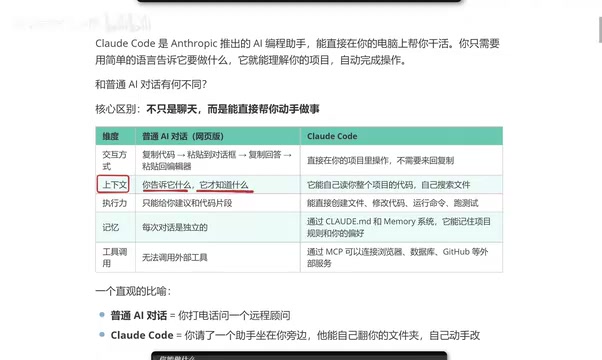
Claude Code can directly and automatically read your entire project's code, search for relevant files on its own, and proactively understand the full project context. This means its understanding of your project goes far deeper than regular AI chat, resulting in more precise suggestions and code.
The key to this capability lies in the underlying model's ultra-long context window (Claude 3.5 Sonnet supports a 200K token context). 200K tokens is roughly equivalent to 150,000 English words or 500,000 Chinese characters — enough to accommodate the core code files of a medium-sized project. Additionally, Claude Code employs an intelligent file retrieval strategy: rather than reading all files at once, it dynamically searches and loads relevant code based on your question, similar to how RAG (Retrieval-Augmented Generation) works, maximizing information density within the limited context window.
Dimension 3: Execution Power — From "Giving Advice" to "Getting It Done"
Regular AI can only give you suggestions or code snippets — it can't provide complete project-level code. After all, a real project consists of numerous files and complex logic that are difficult to handle through a chat box alone.
Claude Code excels here: it can directly create files, modify code, run commands, and execute tests — it truly has "hands-on" capability. Say "refactor this component for me," and it will modify the code and save it directly. More importantly, its execution process is a complete action loop — after modifying code, it automatically runs tests to verify results, and if errors are found, it autonomously fixes them until the task is truly complete.
Dimension 4: Memory — Remembering Your Coding Preferences
A major pain point with regular AI chat is that once you close the window and open a new conversation, all previous memory is gone. Every conversation starts from scratch, forcing you to repeatedly explain the same background information.
Claude Code can remember your project rules and coding preferences through configuration files. Your code style, tech stack choices, naming conventions, and more can all be persistently stored, forming a programming style profile unique to you. Specifically, you can create a .claude configuration file in your project root directory, writing in your team's coding standards, architectural conventions, and technology preferences. Claude Code automatically loads these configurations every time it starts, ensuring generated code always meets your project standards.
Dimension 5: Tool Integration — Connecting to External Services
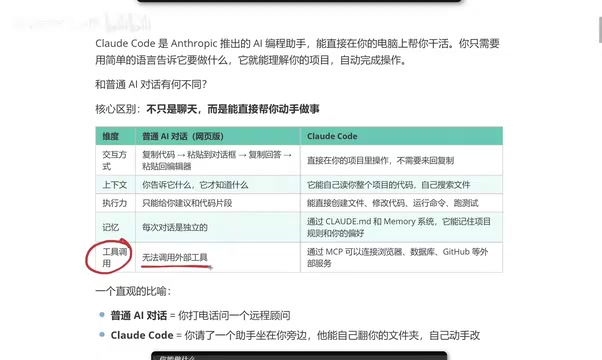
Regular web-based AI essentially cannot invoke external tools (although ChatGPT has some plugins, they have a high barrier to entry and some require payment).
Claude Code can directly connect to browsers, databases, GitHub, and other external services through MCP (Model Context Protocol), offering extremely strong extensibility and truly bridging the gap between AI and the development toolchain.
MCP is a standardized protocol open-sourced by Anthropic in late 2024, designed to solve the connection problem between AI models and external tools and data sources. Before MCP, every AI tool needed to develop separate integration interfaces for each external service, leading to severe ecosystem fragmentation. MCP adopts a standardization approach similar to USB: it defines a unified communication protocol so that any service only needs to implement the MCP Server interface to be callable by any MCP-compatible AI client. Currently, hundreds of MCP Servers are available, covering common development scenarios like GitHub, Slack, PostgreSQL, and browser automation (Puppeteer/Playwright). This means Claude Code's capability boundaries aren't fixed — they can be continuously expanded by the community.
An Intuitive Analogy
If we use an analogy to summarize the difference between Claude Code and regular AI chat:
- Regular AI chat = Calling a remote consultant on the phone — they know everything but can only give advice; you still have to do the actual work yourself
- Claude Code = Having an assistant sitting right next to you who can browse through your folders, modify code hands-on, and run tests to verify results
The technical essence of this analogy is: regular AI chat is a stateless text generation service, while Claude Code is a Stateful Autonomous Agent. The former starts from zero with each interaction; the latter continuously perceives the environment, maintains task state, and iterates actions based on feedback.
What Can Claude Code Do?
Based on actual usage experience, Claude Code's capabilities cover the following areas:
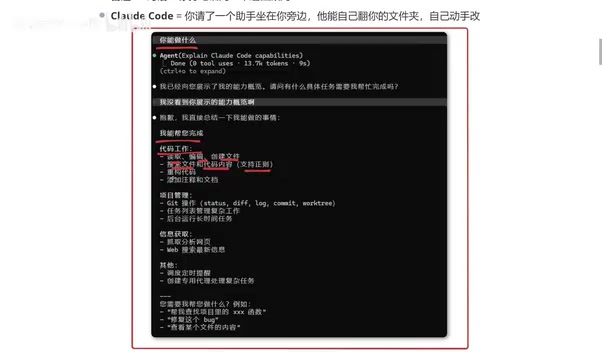
Code Work:
- Read, edit, and create files
- Search files and code content
- Refactor code, add comments and documentation
Project Management:
- Git operations (commits, branch management, etc.)
- Task list management
- Run long-running tasks in the background
Information Retrieval:
- Fetch and analyze web content
- Web search
- News and information retrieval
Other Capabilities:
- Schedule timed reminders
- Create specialized agents for complex tasks
It's worth noting that these capabilities don't exist in isolation — they can be combined. For example, you can ask Claude Code to "search for the latest API changes in a library on GitHub, then automatically update all related calls in the project, and finally run tests to ensure there are no breaking changes." This kind of multi-step, cross-tool complex task chain is precisely the core advantage of AI Agents over traditional AI assistants.
Claude Code vs. Cursor: How to Choose?
Many developers ask: I'm already using Cursor — do I need to switch to Claude Code?
From a practical standpoint, both have their strengths, and you can't go wrong with either. However, Claude Code has one fairly notable advantage — lower token consumption. Tokens are the basic billing unit for large language models; every time the AI reads input and generates output, it consumes tokens. In AI coding scenarios, token consumption mainly comes from three areas: reading project code (input tokens), AI-generated code and explanations (output tokens), and context accumulation across multiple conversation turns. Claude Code's token efficiency advantage over Cursor primarily stems from its more precise file retrieval strategy (reducing irrelevant code reads) and higher first-pass generation accuracy (reducing back-and-forth revision rounds). For heavy users, this efficiency difference could mean savings of tens of dollars per month.
For frontend developers in particular, Claude Code's output tends to better match expectations, reducing the time and cost of repeated adjustments.
What Cursor can do, Claude Code can generally do as well. Which tool you choose depends more on your usage habits and specific development scenarios. If you're comfortable working in the terminal, Claude Code will feel more natural; if you rely more on a graphical IDE interface, Cursor might suit you better. The two aren't mutually exclusive either — many developers choose to use Cursor for daily coding while reserving Claude Code for more complex refactoring, debugging, and project-level tasks.
Conclusion
Claude Code represents an important evolutionary direction for AI programming tools: from "giving advice" to "getting it done." Through deep project understanding, powerful execution capabilities, and persistent memory, it has truly become a coding partner at the developer's side.
From a broader perspective, the AI Agent paradigm that Claude Code represents may be the next major transformation in software development. When AI is no longer just passively answering questions but can proactively understand requirements, plan solutions, execute operations, and verify results, the developer's role will gradually shift from "code writer" to "requirements definer and quality gatekeeper." This doesn't mean programmers will be replaced — it means every programmer's productivity will be dramatically amplified.
For programmers looking to boost their development efficiency, Claude Code is well worth exploring seriously. Whether you're a frontend, backend, or full-stack developer, this tool has the potential to change how you write code every day.
Related articles
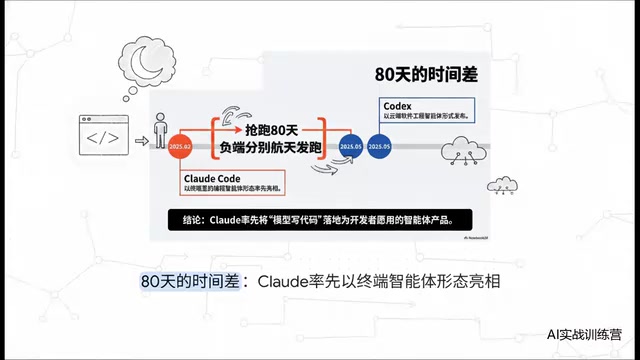
Claude Code vs Codex: A Deep Comparison — Who Wins When the Tech Converges
Deep comparison of Claude Code vs OpenAI Codex across first-mover advantage, architecture, market share, and reliability. Discover what truly matters when AI coding tools converge.
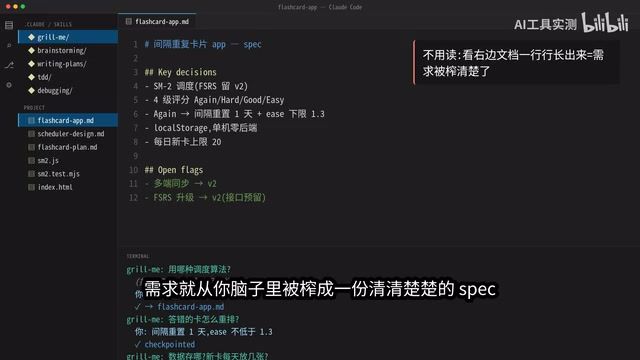
5 Daily Claude Code Tips: Let AI Interrogate You Instead
5 daily Claude Code tips: Grill Me for requirements, Brainstorming for architecture, Writing Plan for execution, TDD for testing, and Debugging for precise fixes — a complete AI coding workflow.

AITS Hands-On Review: API + Web + App Automated Testing All in One Platform
In-depth review of AITS: an AI testing platform covering API automation, Web automation, App real-device cloud testing, and performance testing end-to-end.