5 Daily Claude Code Tips: Let AI Interrogate You Instead
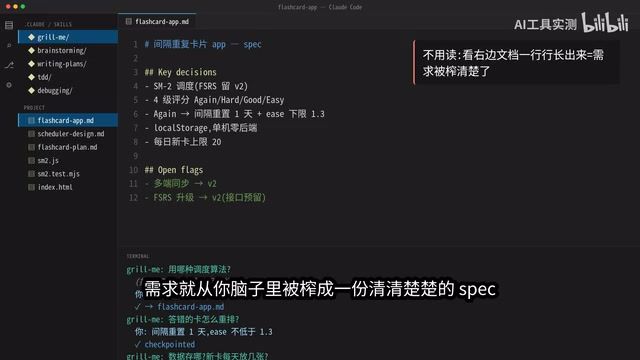
Five Claude Code techniques that form a complete AI coding workflow — starting with letting AI interrogate you.
This article shares five practical Claude Code techniques chained into a complete workflow: Grill Me (AI-driven requirements elicitation), Brainstorming (architecture selection), Writing Plan (dependency-mapped execution steps), TDD (test-driven development for edge cases), and Debugging (test-guided precise fixes). The core insight: let AI interrogate you during requirements, then constrain it with plans and tests during execution.
When using Claude Code, most people's habit is to toss out a vague requirement and let the AI guess its way through. The result? Wrong direction, broken logic, endless rework. The problem isn't that the AI isn't smart enough — it's that you didn't feed it clear requirements.
A content creator shared five Claude Code techniques he uses every day. The core idea: don't let AI blindly write code — let it interrogate you instead. These five techniques chain together into a complete workflow, taking you from a fuzzy idea to a running application, with structure at every step.
Grill Me: Let AI Turn the Tables and Interrogate You
This is the starting point of the entire workflow — and the most counterintuitive step.
Most people use AI coding like this: I state the requirements, you implement them. But the problem is that the requirements in your head are often vague, fragmented, and full of hidden assumptions. The AI takes one sentence and starts guessing — and when it guesses wrong, things go sideways.
The Grill Me approach is the exact opposite — you tell Claude Code your rough idea, then let it grill you question by question: What algorithm? How should incorrectly answered cards be rescheduled? Where is the data stored? How many new cards per day?
You answer casually, and it asks while documenting every decision, saving after each answer. Even if the conversation goes on for an hour, nothing from earlier gets forgotten.
Grill Me is essentially a "Requirements Elicitation" technique. In traditional software engineering, this corresponds to a requirements analyst conducting in-depth interviews with clients. The primary reason software projects fail is often not technical issues but unclear requirements. A classic IBM study showed that defects introduced during the requirements phase cost 6-10x more to fix if discovered during the coding phase. Grill Me transforms this process from "human asks human" to "AI asks human," leveraging the large language model's contextual understanding to systematically uncover the hidden assumptions and unexpressed constraints in the user's mind.
In the end, all those scattered ideas in your head get "blasted" into a crystal-clear spec document. No more guessing at requirements — every subsequent step has a solid foundation.
Brainstorming: Hash Out the Approach Before Writing Code
With requirements clear, don't rush into coding. The second step is to have AI help you brainstorm solutions.
For example, where should a scheduling logic live? Claude Code will lay out multiple approaches: pure functions, a stateful layer, or embedding it directly in the UI. Each option is annotated with pros and cons — green for selected, red for rejected, with solid reasoning.
Using the creator's actual case as an example, the final choice was the pure function approach, for these reasons:
- Deterministic input/output makes unit testing easiest
- If you later want to switch from the SM-2 algorithm to the more accurate FSRS, you only need to modify one file
- Zero changes to UI code
SM-2 (SuperMemo 2) is a spaced repetition algorithm proposed in 1987 by Polish researcher Piotr Wozniak and serves as the algorithmic foundation for virtually all modern flashcard applications (such as Anki). It dynamically adjusts review intervals and the "Easiness Factor" based on the user's rating of each card (0-5). FSRS (Free Spaced Repetition Scheduler) is a next-generation algorithm proposed by the open-source community in recent years, based on a DSR (Difficulty-Stability-Retrievability) three-parameter model. It uses machine learning to fit the user's actual memory curve and is approximately 30%-40% more accurate than SM-2 in predicting forgetting probability. A key consideration in choosing the pure function architecture was precisely to enable a smooth future migration from SM-2 to FSRS.
Pure Functions are a core concept in functional programming — functions that always return the same output for the same input and produce no side effects. Using pure function design in software architecture offers three significant advantages: first, exceptional testability — no need to mock databases or network requests, just pass in parameters and verify; second, excellent composability — multiple pure functions can be assembled like LEGO bricks; third, concurrency safety — with no shared state, there are no race conditions. Designing the scheduling logic as a pure function leverages exactly these properties — the algorithm core is completely decoupled from the UI layer, so swapping algorithms requires changes to only one file with zero UI modifications.
If these architectural decisions aren't thought through before you start coding, the cost of changing them later is extremely high.
Writing Plan: Turn the Approach into Numbered Steps
Once the approach is selected, the next step is to have AI turn it into an execution plan with numbered steps and clearly marked dependencies.
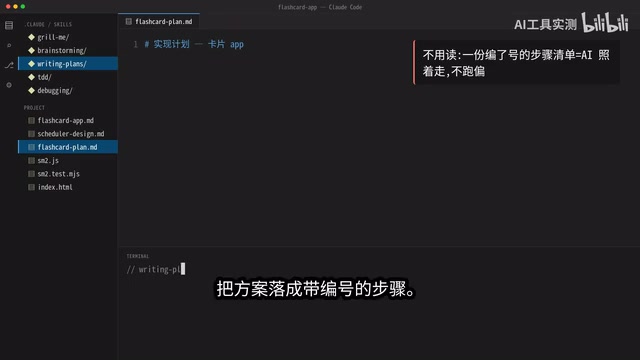
The key is "marking dependencies clearly" — write the scheduling logic first, then the tests, and finally connect the UI. This order is critical because AI can easily get the sequence backwards, leading to rework.
The emphasis on "marking dependencies clearly" corresponds to the concept of a Task Dependency Graph in software engineering. In project management, this is similar to the Critical Path Method (CPM) — identifying which tasks must be executed sequentially and which can run in parallel. For AI coding assistants, this step is especially critical because large language models are prone to "sequence hallucinations" when handling multi-step tasks — they might start writing upper-layer code that depends on a module before that module has been implemented, causing compilation errors or interface mismatches. Explicit numbering and dependency annotations essentially give the AI a construction blueprint, forcing it to proceed in the correct topological order.
More importantly, this plan lets you review before a single line of code is written. If the direction is wrong, you catch it on the spot — far cheaper than writing everything and then scrapping it.
The essence of this step: use documentation to constrain AI's behavioral boundaries, making it execute along a roadmap you've reviewed rather than improvising freely.
TDD: Write Tests Before Writing Code
The fourth technique is TDD (Test-Driven Development), which has become especially important in the AI coding era.
TDD (Test-Driven Development) was formally introduced by Kent Beck in 2003. Its core cycle is "Red-Green-Refactor": first write a failing test (red), then write the minimum code to make it pass (green), and finally refactor to optimize. In traditional development, TDD is controversial due to its high upfront investment and slower pace. But in AI-assisted coding scenarios, TDD's value is amplified — because AI-generated code inherently lacks an "intent verification" mechanism. It may produce code that's syntactically correct but has subtle logical deviations. Test cases serve as an automated "acceptance gate," forcing AI output to pass explicit correctness criteria rather than merely "looking right."
Tests are executable requirements — they nail down "what counts as correct" in code. Have Claude Code write the test cases first, then the implementation. When you run the code, most tests go green, but there are always one or two that stay red — and these red cases often expose edge cases that are nearly impossible to catch by eyeballing code.
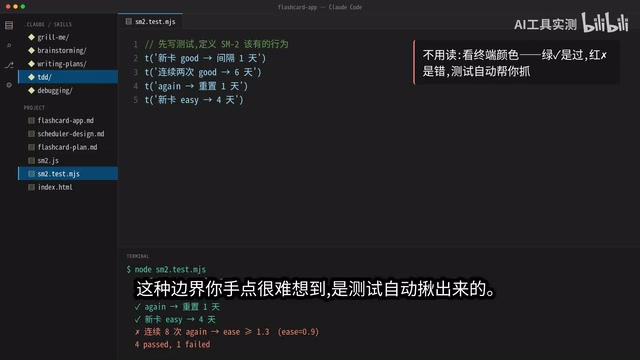
The creator shared a real example: one test discovered that after eight consecutive wrong answers, the memory parameter dropped to 0.9, falling below the minimum threshold. Any lower and the entire interval algorithm would collapse. This kind of edge case is nearly impossible to spot by staring at code — it was caught automatically by the tests.
Debugging: Follow the Tests to the Root Cause — No Blind Guessing
The final technique is debugging, but not the traditional kind where you stare at code and guess.
Because you already have comprehensive test cases from the previous step, the tests pinpoint exactly where the problem is — the branch for wrong answers forgot to enforce a lower bound on the parameter. The fix is equally clear: add one line of code to clamp the parameter at 1.3 or above.
Run the tests again — all green. From error to fix, the tests guide you the entire way, instead of you scanning hundreds of lines of code one by one.
This "test-driven debugging" approach stands in stark contrast to traditional debugging. Traditional debugging relies on developer experience and intuition — setting breakpoints, adding logs, tracing line by line — with efficiency highly dependent on individual skill. In AI coding scenarios, AI-generated code logic is a "semi-black box" to the developer — you roughly know what it's doing, but may not understand every line's details. With test cases serving as "probes," problem localization shifts from "finding a needle in a haystack" to "precision-guided targeting," dramatically reducing the cognitive burden of debugging.
Five Steps Chained into a Complete Workflow
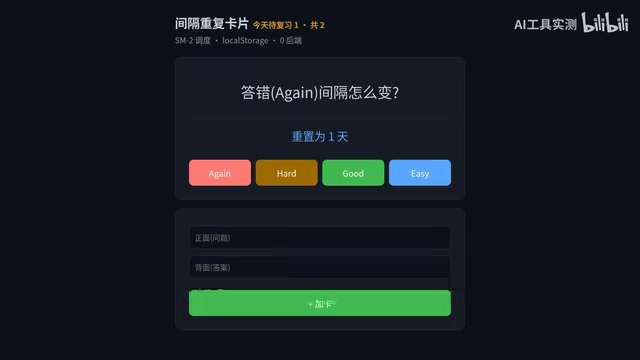
Looking back at these five techniques, they're not isolated tips — they form a complete Claude Code workflow:
- Grill Me → Clarify requirements, generate a spec
- Brainstorming → Define the approach, choose the architecture
- Writing Plan → List steps, mark dependencies
- TDD → Write tests, nail down edge cases
- Debugging → Fix cleanly, all green
A fuzzy idea, step by step, becomes a genuinely usable application.
The underlying logic of this five-step workflow actually aligns with the essence of the classic "Waterfall Model" in software engineering — requirements analysis, system design, detailed design, coding, and testing/verification — except each phase is accelerated by AI, and the human role shifts from "executor" to "decision-maker" and "reviewer." This is also the best-practice direction for current AI-assisted development: not having AI do everything end-to-end, but retaining human judgment and oversight at every critical checkpoint.
Core Insight: Who Should Be Directing Whom?
The most thought-provoking aspect of this workflow is: when using AI to write code, should you be directing it, or should it be interrogating you?
The answer is both. During the requirements phase, let AI interrogate you to force out the hidden assumptions in your head. During the execution phase, use plans and tests to constrain the AI, keeping it on the roadmap you've reviewed.
This "human-AI collaboration" model is far more efficient than simply giving AI instructions. AI isn't a tool that replaces your thinking — it's a partner that helps you structure and make your thinking process explicit. Mastering this methodology is what it truly means to use Claude Code well.
From a broader perspective, this workflow reveals a deeper trend in AI coding tools: prompt engineering is evolving into workflow engineering. Early on, people focused on how to write a single good prompt. Now, best practice is designing an entire structured human-AI interaction process. The optimization ceiling for a single prompt is limited, but when you chain together multiple carefully designed interaction steps into a reusable workflow, AI output quality undergoes a qualitative leap. This is why more and more teams are codifying AI coding best practices into standardized process templates, rather than just a collection of prompt tricks.
Related articles
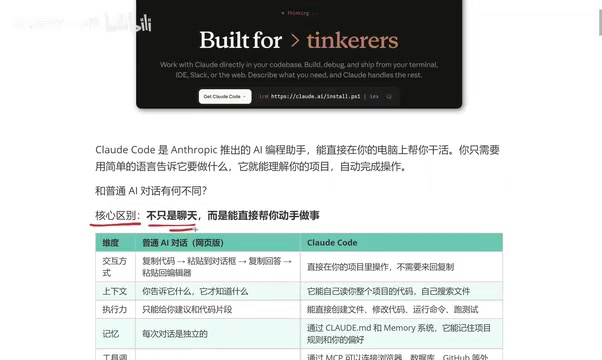
What Is Claude Code? Five Key Differences from Regular AI Chatbots
Explore the five key differences between Claude Code and regular AI chatbots like ChatGPT and DeepSeek — from interaction, context, execution, memory, to tool integration.
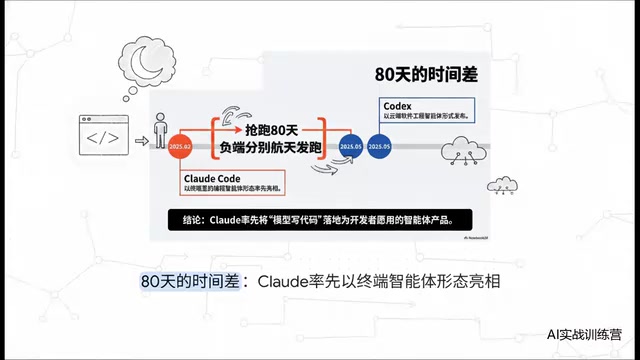
Claude Code vs Codex: A Deep Comparison — Who Wins When the Tech Converges
Deep comparison of Claude Code vs OpenAI Codex across first-mover advantage, architecture, market share, and reliability. Discover what truly matters when AI coding tools converge.

AITS Hands-On Review: API + Web + App Automated Testing All in One Platform
In-depth review of AITS: an AI testing platform covering API automation, Web automation, App real-device cloud testing, and performance testing end-to-end.