Zero-Code Development of a Desktop AI Art Review Tool: A Vibe Coding Case Study
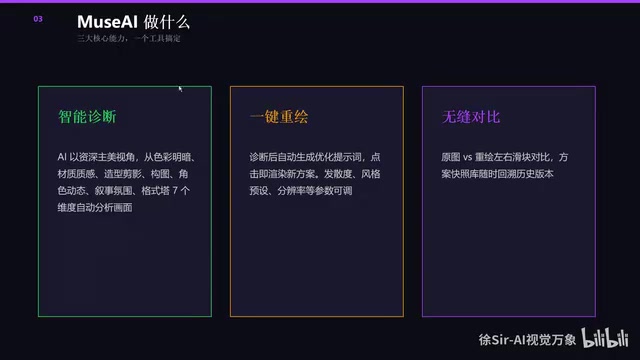
Game art director builds desktop AI art review tool using zero-code Vibe Coding approach.
A game art director used Vibe Coding (zero-code, conversation-driven development) to create Muse AI, a desktop tool that streamlines art review workflows. It features AI-powered scoring, automatic conversion of revision suggestions into generated images, atmosphere presets, and video optimization capabilities — demonstrating how domain experts can leverage AI programming to build professional tools without writing code.
When AI Programming Meets the CG Industry: A Game Art Director's Practice
With the explosion of AI programming tools like Cursor and Claude Code, "Vibe Coding" is becoming one of the hottest tech trends. But most examples remain at the level of building web pages or writing simple utilities — cases where AI programming is truly applied to professional workflows are rare.
Bilibili creator Teacher Xu, a game company art department lead, used the Vibe Coding approach — entirely zero-code, purely conversation-driven — to develop a desktop art review tool called Muse AI. It directly addresses the efficiency pain points of daily art review and revision planning in art teams. The value of this case lies not just in the tool itself, but in how it demonstrates that non-programmers can use AI programming to genuinely improve professional workflow efficiency.
Muse AI: Solving Core Pain Points in Art Review
In game art teams, lead artists or art directors spend a significant portion of their daily work on art review — evaluating designers' work, providing revision suggestions, finding reference images, and communicating revision directions. These tasks are highly repetitive yet require professional judgment, making them a classic "high-frequency, low-efficiency" bottleneck.
Muse AI was developed specifically for this scenario. It's packaged as a desktop application that runs with a double-click, featuring a complete welcome interface and functional sections, divided into basic and advanced versions to accommodate different user levels.
Core Feature 1: AI-Powered Art Review and Scoring
Muse AI supports importing both image and video assets. For videos, the tool automatically breaks them down into individual shots, enabling independent review of each frame. The review workflow is designed with professional rigor:
- Style Positioning: Considering the aesthetic preferences across different countries and regions, the tool includes built-in style positioning functionality
- Core Intent Annotation: Designers can annotate each image with core design intent (e.g., "cave scene" or "dusk atmosphere"), making AI evaluation more precise
- Multi-Model Integration: Supports connecting to multiple LLM APIs, allowing users to freely choose based on their needs
The AI provides professional art scoring and revision suggestions based on this information — not generic feedback, but targeted assessments across specific artistic dimensions.
Core Feature 2: One-Click Image Generation from Suggestions
This is Muse AI's most ingenious design — the AI doesn't just provide text-based suggestions, it automatically converts revision recommendations into image generation prompts, then directly calls image generation models to produce revised effect previews.
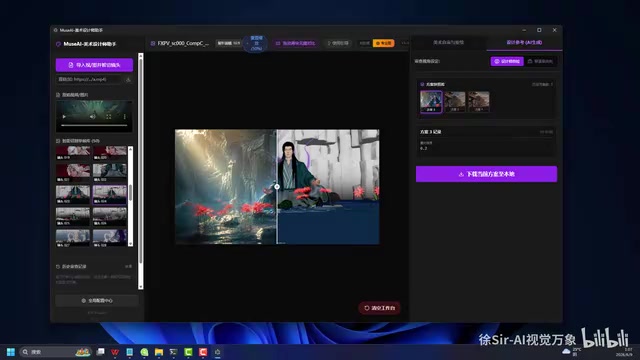
After generation, the tool provides a slider comparison feature, allowing users to drag left and right to intuitively compare the original image with the AI-modified version, along with zoom and magnification tools. This means art directors no longer need to verbally describe "the feeling I want" — instead, they can directly provide designers with a visual reference image, dramatically improving communication efficiency.
As Teacher Xu puts it: "The most important thing in design is clarifying exactly what we want to achieve. Once you know which direction to go, the process of making changes is actually quite enjoyable."
Core Feature 3: Atmosphere Presets and Quick Color Grading
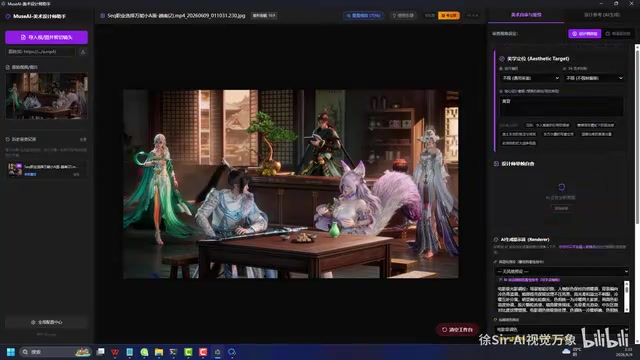
The tool also includes rich atmosphere preset functionality, including different weather effects (rain, snow, fog), various lighting moods (dark, bright, dusk), and more. The prompts for these presets have been pre-tested and optimized — users simply click to apply.
For example, when "dusk" is entered as the design intent, the AI automatically adjusts its evaluation criteria to incorporate dusk lighting characteristics. When "snowy weather" is selected, the generated image naturally incorporates snowflakes and winter atmosphere elements.
Additionally, the tool provides a history feature for reviewing past evaluations and generated results, supports one-click clearing to start a new review round, and allows downloading satisfactory generated images locally for designer reference.
AI-Assisted Video Atmosphere Optimization: A More Cutting-Edge Application
Teacher Xu also demonstrated a more cutting-edge application — using AI to modify videos rendered from UE (Unreal Engine).

The workflow is: first use Muse AI to perform AI review and image generation on individual video frames, obtain optimized visual effects, then use AI tools to apply style replacement and atmosphere adjustment to the entire video. From the demonstrated comparison, the lighting quality and material rendering show very noticeable improvements, with the overall "premium feel" of the footage significantly enhanced.
This "AI review → AI image generation → AI video modification" pipeline is essentially exploring an entirely new CG post-production workflow — using AI to enhance the final quality of rendered video, rather than repeatedly returning to the engine to adjust parameters.
Vibe Coding Insights: A Domain Expert's Development Journey
Teacher Xu revealed that Muse AI was developed entirely using the Vibe Coding approach, initially with Cursor and later experimenting with Claude Code and other tools. Beyond Muse AI, he also developed using the same method:
- Multiple UE-related tool plugins
- An analysis tool for deconstructing viral content
- An automated workflow from UE white-model rendering to AI video generation
The key insight is: the true value of Vibe Coding isn't "zero-code" itself, but enabling domain experts to directly translate their professional needs into usable tools. An art director understands the pain points in the review process far better than any programmer. AI programming lets them skip the "describing requirements to a programmer" step — the stage where the most information is lost.
Implications for the Industry
This case gives us several important directions to consider:
- The best users of AI programming may not be programmers, but domain experts with clear professional needs who lack coding ability
- The barrier to desktop-level applications is disappearing — from web-based utilities to packaged, distributable desktop programs, the capability boundaries of Vibe Coding are expanding rapidly
- Chaining AI tools together is where real productivity lies — standalone AI review or AI image generation has limited impact, but stringing review, suggestions, image generation, and video modification into a complete workflow delivers exponential efficiency gains
As Teacher Xu says, this is the trend of the future, and we must keep pace with it. For practitioners in the CG industry and all creative industries, learning to use AI programming to customize professional tools may be one of the most worthwhile skills to invest time in right now.
Related articles
AI Programming Learning Roadmap: A Complete Six-Stage Guide from Beginner to Expert
A systematic breakdown of the six-stage AI programming learning roadmap, from zero-code start to mastering Cursor and professional tools, methodology frameworks, advanced patterns, and project practice.
Deep Dive into Devin's Background Agent Architecture: Behind the 80% AI-Committed Code
Deep analysis of Devin's background agent architecture: brain-sandbox separation, environment setup, MCP integration, memory systems, and multi-agent collaboration challenges.

Claude Code in Practice: An In-Depth Efficiency Comparison Between Claude and DeepSeek for Programming
A hands-on comparison of Claude vs DeepSeek V4 for AI programming: code quality, development efficiency, and cost differences. DeepSeek costs 1/6 to 1/10 of Claude but requires 1-2x more time.