Code Architecture Visualization Tool: Auto-Generate Interactive Architecture Diagrams

A tool that auto-generates interactive architecture diagrams from code repos has topped GitHub trending for five days straight.
This GitHub-trending code visualization tool automatically parses repositories and generates interactive architecture diagrams, making module relationships and call flows immediately visible. Unlike static documentation, diagram nodes link directly to source code for seamless navigation. It targets three key use cases: onboarding to open source projects, helping new team members ramp up, and improving code review efficiency. Its popularity also reflects a broader trend of AI Agents moving deeper into software engineering — shifting from coding assistance to understanding and managing entire codebases.
The Code Visualization Tool Taking GitHub by Storm
When taking over a large codebase, the biggest headache for developers is untangling the call relationships between modules. A tool that has topped GitHub's global trending list for five consecutive days does exactly one thing brilliantly: automatically parsing code repositories and generating interactive architecture visualizations.
Think of it as an X-ray scanner for your project — it clearly maps out core modules, request flows, and call relationships on an architecture diagram, turning what would normally require line-by-line reading into an instantly comprehensible overview.

Solving the Core Pain Points of Code Comprehension
From Line-by-Line Reading to Rapid Big-Picture Understanding
Traditional code comprehension is slow and exhausting. You jump between files, manually trace function calls, and try to construct a mental model of how the system runs. For large projects with hundreds of thousands of lines, just figuring out the basic logic can take days.
This tool automates that implicit understanding process by directly visualizing project structure and relationships, helping developers build a cognitive framework for the entire system within minutes — dramatically cutting onboarding time.

Node-to-Source Linking for Precise Code Navigation
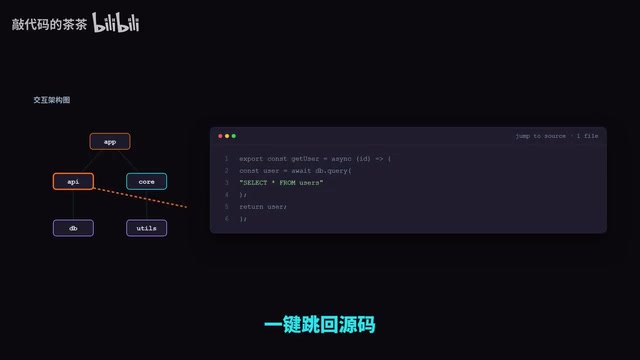
What sets this apart from static diagrams is the deep linkage between nodes and source code. When you spot a module worth inspecting on the architecture diagram, a single click takes you directly to the corresponding location in the source code.
The visualization isn't just an isolated reference document — it's an actionable navigation tool. Instead of digging through project directories, you use the architecture diagram as a map to pinpoint exactly the code you need.
Three Key Use Cases
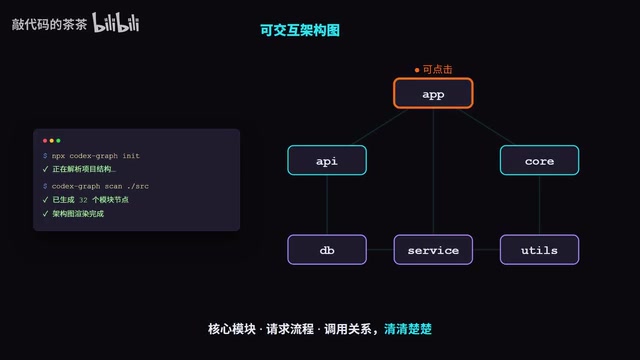
The tool is primarily designed for three high-frequency needs:
Getting Up to Speed with Open Source Projects
When learning or contributing to an open source project, the biggest barrier is understanding the overall architecture. With auto-generated architecture diagrams, you can first grasp the core modules and data flow at a high level, then gradually drill into the details — significantly lowering the learning curve.
Onboarding New Team Members
When joining a new team or inheriting a legacy project, the architecture diagram serves as automatically generated, always up-to-date technical documentation. It helps new members quickly understand how the project works and reduces dependence on senior colleagues.
Improving Code Review Efficiency
During code reviews, reviewers need to understand which modules are affected by a change and its downstream impact. Architecture diagrams help reviewers quickly assess which callers might be affected by a modification, enabling more thorough reviews rather than just focusing on changes in a single file.
AI Agents Are Reshaping Developer Tooling
The rise of tools like this reflects a broader trend: AI Agents moving deeper into the software development workflow. AI is taking on more development responsibilities — evolving from coding assistance to understanding and managing entire codebases.
The tool's author has reportedly compiled 18 real-world Agent deployment case studies across different domains, covering scenarios like code comprehension, review, and documentation generation. This signals that Agent technology has moved from proof-of-concept to delivering tangible value in specific development workflows.
For developers, tools like this offload the mechanical, repetitive cost of understanding code to machines — freeing people to focus on work that requires creativity and judgment. As these tools mature, getting up to speed on a new project will no longer be a days-long ordeal.
Summary
This trending GitHub tool is focused in scope but precise in solving developers' core pain points. Its viral success validates a familiar principle: great developer tools don't need to do everything — they just need to solve one high-frequency problem thoroughly enough to earn widespread recognition.
For developers looking to improve their code comprehension efficiency or explore Agent applications in practice, tools like this are well worth trying. Check the official documentation to learn more about the tool's specific features and supported use cases.
Related articles

XR Accessibility Design in Practice: Alchemy Labs' Rules for Inclusive Spatial Experiences
Alchemy Labs UX lead Jasmine Cano shares practical XR accessibility design lessons: strategies for four disability types, small-body mode, snap turning, environmental read-aloud, beam stabilization, and more.

Building an Audio-First Experience for Smart Glasses with Gemini Nano 4
A detailed guide on building an audio-first experience for smart glasses with Gemini Nano 4 and ML Kit: Jetpack projected connection management, on-device speech synthesis and recognition, a two-pass low-latency architecture, XML-tag streaming TTS routing, and hands-on lessons from structured output.

LLM Voice Interaction: Martin Fowler on the Current State and Boundaries of the Technology
Martin Fowler discusses LLM Voice, sparking debate on Hacker News. This article examines voice interaction's real value and engineering challenges in the LLM era, including latency, turn-taking, and barge-in, and analyzes how voice and text interfaces should divide the work.