OpenAI Codex Desktop Experience: A Zero-to-Hero Guide for AI Programming
OpenAI Codex Desktop brings AI programming to everyone with a visual interface and natural language coding.
OpenAI's new Codex Desktop app for macOS transforms command-line AI coding into a visual experience accessible to non-developers. Available to free and Plus users, it features parallel task execution, plan mode for complex projects, and skill management. A practical demo shows building a fully automated AI blog website from scratch using natural language instructions, completing deployment in under 2 minutes.
AI Programming Barriers Just Got Lower: Codex Desktop Is Here
Since 2025, Vibe Coding has been on fire — with AI assistance, even ordinary people can rapidly develop projects and practical tools. The concept of Vibe Coding was coined by former Tesla AI Director Andrej Karpathy in early 2025, referring to a programming approach where users describe their needs in natural language and let AI automatically generate code. Unlike traditional programming, it emphasizes "describing intent" rather than "writing logic" — users only need to express what effect they want, and AI handles converting it into runnable code. The rise of this paradigm is driven by breakthrough advances in large language models' code generation capabilities, especially as models like GPT-4 and Claude 3.5 have reached practical levels in understanding complex programming requirements and generating multi-file projects.
However, for users with zero technical background, whether it's OpenAI's Codex or Anthropic's Claude Code, these are command-line tools — no graphical interface, all operations done in the terminal, with project configuration, code debugging, and history review all relying on typed commands. The experience is far from beginner-friendly. The command-line interface (CLI) is the most primitive way to interact with a computer, requiring users to type specific formatted text commands to operate the system. For developers, CLI offers extremely high flexibility and efficiency, but for ordinary users it presents significant cognitive burden: memorizing command syntax, understanding file path concepts, handling environment variable configuration, interpreting error logs, and more. Previously, using these tools required first installing the Node.js runtime environment, installing tool packages via npm or pip, then entering commands in the terminal to interact — the entire process constituted a substantial barrier for non-technical users.
The good news is that OpenAI recently launched a macOS version of the Codex desktop application, wrapping the original command-line functionality into a visual desktop application with an experience similar to ChatGPT, truly lowering the barrier of AI programming to a level accessible to everyone. This article will detail the features and usage of Codex Desktop, and demonstrate its programming capabilities through practical examples.

Codex Desktop Pricing and Availability
Supported Platforms and User Coverage
Currently, Codex Desktop is only available for macOS. According to official staff on Twitter, the Windows version is expected to launch this month. A particularly welcome piece of news: both free users and Plus ($20/month) users can now try Codex Desktop. Plus or Pro users can also enjoy double the rate limit for two months before April.
Usage Quota Details
Taking the $20/month Plus plan as an example, there are 45 to 225 usage credits every 5 hours, depending on the selected model. Codex Desktop has integrated the latest o3, o4-mini, and other models, with different models further divided into low, medium, high, and ultra-high reasoning levels — the more advanced the model, the fewer available uses.
It's worth explaining the characteristics of the o-series models here: o3 and o4-mini are reasoning model series launched by OpenAI in 2025. Unlike the GPT series' instant responses, o-series models employ a "Chain of Thought" mechanism, performing multi-step internal reasoning before generating the final answer, thus performing better on complex logic, mathematical proofs, and code generation tasks. Reasoning Effort is a resource allocation mechanism introduced for these models: low-level reasoning consumes fewer computational resources with faster responses but limited reasoning depth; ultra-high reasoning invokes more computational steps for deep thinking, suitable for handling architecture design, complex bug investigation, and other high-difficulty tasks, but correspondingly consumes more usage credits. Users can flexibly choose based on task complexity — simple code modifications only need low-level reasoning, while complex tasks involving multi-file refactoring are better suited for high-level reasoning.
Compared to competitors like Claude Code, Codex currently has a cost-performance advantage. Based on actual testing, daily use basically won't hit the quota limit.
Complete Breakdown of Codex Desktop Interface Features
Three Core Modules
The left navigation bar of Codex Desktop contains three core modules:
1. Process Management (Folder-Based)
Each project corresponds to a local folder, and multiple processes (conversations) can be created under each folder, with each process corresponding to a development task. Codex supports parallel tasks, allowing simultaneous development operations across multiple projects — a very practical feature. Parallel tasks mean users can simultaneously initiate AI development requests for multiple projects or multiple functional modules of the same project, without waiting for one task to complete before starting the next. Under the hood, each task runs in an independent sandbox environment with its own file system snapshot and execution context, without interfering with each other. This is extremely valuable for real development scenarios — for example, you can simultaneously have AI fix frontend styling issues, write backend API endpoints, and generate unit tests, dramatically shortening the overall development cycle.
2. Automated Tasks
You can create scheduled auto-executing tasks, setting task names, associated project folders, task descriptions (Plans), and even binding Skills, which run automatically after setting the execution time.
3. Skill Management
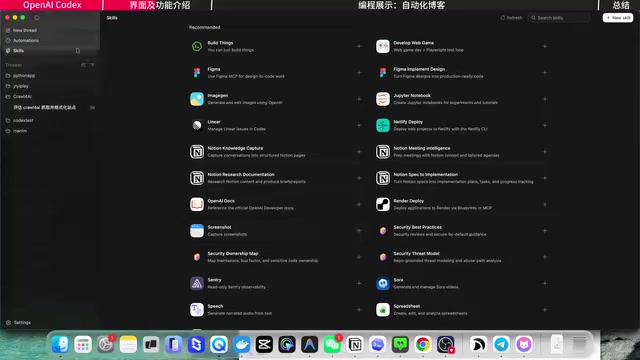
Previously in the command-line version of Codex, installing and managing Skills required manual operations in the project folder. The desktop version provides a dedicated visual interface and Skill marketplace, making installation and management clear at a glance. Skills can be quickly activated in the conversation window via slash commands.
Two Key Settings
In the conversation window, there are two noteworthy features:
- Plan Mode: When developing complex or long-term tasks, you can have Codex first plan a task list and then complete them step by step, rather than directly generating code. This is very important in actual project development. The value of Plan Mode lies in simulating a professional developer's workflow — first conducting requirements analysis and technical solution design, confirming the overall architecture and implementation path before starting to code. This prevents AI from generating scattered, inconsistent code snippets without a global perspective, and is especially suitable for complex tasks involving multiple file modifications that require consideration of inter-module dependencies.
- Permission Mode: Divided into "Safe Mode" (sandbox environment, confirmation required for each step) and "Full Access Mode" (automatically generates code, executes code, installs dependencies, no manual intervention needed). A sandbox environment is an isolated execution space where AI operations don't directly affect the user's real file system — changes are only applied to the actual project after user confirmation, providing a layer of safety for beginners.
Additionally, the upper right corner supports connecting to an IDE editor to view code, as well as directly opening a terminal to run the project.
Practical Case: Building an AI Blog Website from Scratch with Codex
Project Background
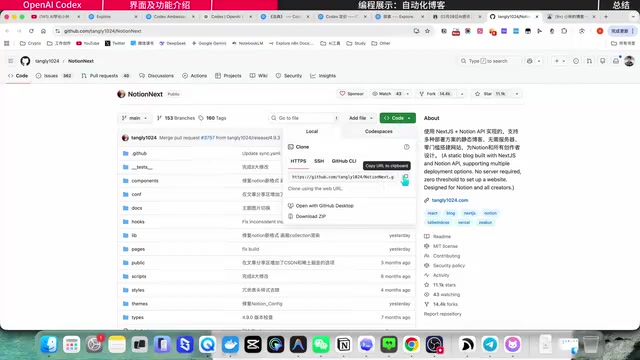
Using an AI blog website as an example, the site is built on the open-source project NotionNext, with two core features:
- AI Daily Digest Section: Automatically collects and summarizes AI news daily, generating a digest
- Video Section: Automatically syncs YouTube channel video information to the blog
The entire website operates fully automatically, requiring no manual intervention. NotionNext is an open-source blog system built on the Next.js framework, with a core design philosophy of using Notion as the content management backend (CMS). It reads page content from Notion databases in real-time via Notion's official API, then presents them as beautiful blog pages through Static Site Generation (SSG) or Server-Side Rendering (SSR). Next.js is the most popular full-stack framework in the React ecosystem, supporting file routing, API routes, image optimization, and other features. The advantage of this architecture is that users only need to edit content in Notion like writing a document, and the website updates automatically — no need to touch any code or traditional CMS backend.
Step 1: One-Click Project Pull and Deployment
After creating a new project folder in Codex, simply paste NotionNext's GitHub link into the conversation window and ask Codex to pull the project locally and analyze its functionality. Codex automatically completed all operations and clearly displayed every command executed.
Compared to the command-line version, the desktop version's interaction experience has undergone a qualitative leap — all operation records are displayed in a collapsible visual format, intuitive and easy to understand.
Next, configure the Notion Page ID and ask Codex to run the project — the entire process took only 1 minute and 53 seconds. If done manually, it would take at least several hours to familiarize yourself with the documentation and gradually install the environment and dependencies. After running npm run dev in the terminal, the website becomes accessible locally. Here, npm run dev is the standard development startup command for Node.js projects — npm (Node Package Manager) is JavaScript's package management tool, and run dev executes the development server script defined in the project configuration file, typically starting a hot-reloading web server locally for developers to preview changes in real-time.
Step 2: Driving Feature Modifications with Natural Language
After project deployment, send modification instructions for two unsatisfactory areas:
- Remove the scrolling section from the homepage
- Set a custom default cover image for the AI Daily Digest category, and put the image URL parameter into environment variables
Codex completed all modifications in 2 minutes and 14 seconds. Although the homepage section removal didn't fully meet expectations (it was changed to a recommended articles section), the cover image feature was perfectly implemented — after configuring the image link in the .env file, all articles under the AI Daily Digest category automatically use the specified cover, while the video category automatically pulls YouTube video thumbnails. The environment variable file (.env) is a standard practice in modern web development for managing configuration information. It separates sensitive or variable configuration items like API keys, database addresses, and feature toggles from code logic, ensuring both security (.env files are not committed to code repositories) and convenience in switching configurations between different deployment environments.
For unsatisfactory parts, simply continue describing the expected result in natural language, and Codex can iterate on modifications. This interaction style embodies the core advantage of Vibe Coding: the development process becomes a continuous dialogue and feedback loop — users don't need to understand code details, they only need to judge whether the result meets expectations, then guide AI adjustments using natural language.
Step 3: N8N Workflows for Fully Automated Content
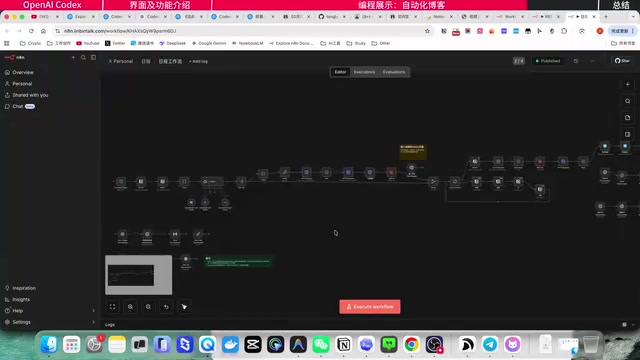
The automated content generation for the website relies on two N8N workflows. N8N is an open-source workflow automation platform, similar to Zapier or Make (formerly Integromat), but supports self-hosted deployment with data fully under user control. It uses a visual node editor that lets users connect different services and APIs through drag-and-drop to build complex automation flows. Each node represents an operation step, such as HTTP requests, data transformation, conditional logic, AI model calls, etc. N8N supports Cron scheduled triggers, Webhook triggers, and various other startup methods. Combined with RSS parsing nodes, Notion API nodes, and Telegram Bot nodes, it can achieve a complete automation chain from content collection, AI processing, to multi-platform distribution.
Specifically for this project, the two workflows handle:
- RSS Sync Workflow: Automatically syncs articles from different WeChat public accounts and subscription sources, saving them to a Notion database. RSS (Really Simple Syndication) is a standardized content subscription format — almost all news websites, blogs, and content platforms provide RSS feeds. By parsing these feeds, you can get the latest published content in real-time without manually checking each website for updates.
- Daily Digest Generation Workflow: Parses RSS content, filters AI industry news, performs summary generation, and automatically writes to the Notion database. This step typically calls a large language model API to intelligently filter and generate summaries from original articles, ensuring the quality and relevance of the daily digest content.
Once data enters Notion, the NotionNext project automatically parses and displays it on the website. Meanwhile, the workflow also automatically pushes the daily digest to a Telegram fan group. From content collection to generation and publishing, a complete fully-automated closed loop is achieved. The elegance of this architecture lies in using the most suitable tool for each step: N8N handles process orchestration and scheduled triggers, large language models handle content understanding and generation, Notion handles structured data storage, and NotionNext handles frontend display — each performing its role, seamlessly connected through APIs.
Core Takeaway: AI Programming Is Truly Accessible to Everyone
After using Codex Desktop for a while, the biggest takeaway is that AI programming has truly become accessible to everyone. Previously, building a website or small tool required either writing code yourself or paying someone to do it. Now, as long as you can clearly articulate your ideas, AI can handle most of the work — not just project development, but also deployment, launch, and debugging.
This is equivalent to giving everyone a technical assistant, enabling ideas to be rapidly realized. Competitiveness no longer depends on how many programming languages or professional skills you've mastered, but on whether you can clearly define and decompose problems, making AI an amplifier of execution capability. This ability is called "Problem Structuring" in management science — transforming vague requirements into clear, actionable task descriptions. In the AI programming era, the value of this ability is greatly amplified — the precision of your requirement descriptions directly determines the quality of AI output.
The human role is shifting from executor to planner — this is a trend everyone needs to recognize. Mastering the ability to collaborate with AI will become one of the most important competitive advantages of the future. From a broader perspective, this is consistent with the pattern of every tool revolution in history: from handicraft workshops to industrial assembly lines, from manual calculation to spreadsheets, every evolution of tools has liberated humans from repetitive execution, allowing them to focus on higher-level creative thinking and decision-making. The popularization of AI programming tools is the latest manifestation of this historical process in the field of software development.
Key Takeaways
Related articles

Claude Code for Test Development in Practice: An AI Programming Workflow That Doubles Your Efficiency
A practical guide to Claude Code for test development: auto-generating test scripts, Plan Mode workflows, MCP + Playwright integration, and Subagent parallel tasks to build systematic AI-assisted workflows.

Hermes Agent Hands-On Review: An AI Efficiency Revolution for Indie Game Developers
Indie game developer reviews Hermes Agent vs OpenClaude: intelligent context compression, real-time Memory, remote control via Telegram, and practical use cases in game dev, social media, and email.

Vibe Coding Beginner's Guide: Tool Selection Across Three Categories with Practical Examples
A comprehensive guide to Vibe Coding's three tool categories: Agent frameworks, CLI Coding, and IDE tools, with practical examples including Snake game and data analysis workbench.