4 Steps to Simulate the Claude Fable 5 Workflow Using System Prompts

Simulate Claude Fable 5's workflow in Claude Code using system prompts in 4 simple steps.
This guide walks through a 4-step process to simulate the Claude Fable 5 workflow using system prompts in Claude Code: downloading the community-made prompt file, placing it in the project root, launching with a skip-confirmation command, and switching to Opus 4.8 Max. It clarifies that this is prompt engineering — not a true model revival — and includes important safety warnings about running in autonomous mode.
Introduction: Fable 5 Hasn't Truly Returned
Recently, a claim has been circulating in the community — that Claude Fable 5 can be "revived." But let's clarify a key fact first: this is not the model itself making a comeback. Rather, it's about simulating Fable 5's working style and approach within the Claude Code environment through carefully crafted system prompts.
A system prompt is a special layer within the interaction architecture of large language models. In a typical LLM API call, messages are divided into three roles: system, user, and assistant. The system prompt holds the highest priority — it's injected before the conversation begins and defines the model's behavioral boundaries, personality traits, and output specifications. Unlike user prompts, system prompts are typically invisible to end users, yet they profoundly influence every response the model generates. In Claude Code's architecture, system prompts can be loaded via external Markdown files, which provides tremendous flexibility for custom workflows.
The core idea behind this approach is simple: since we can't directly call a model version that's been retired or modified, we use prompt engineering to make a current high-capability model (like Opus) operate according to Fable 5's behavioral patterns. Here's the concrete four-step process.
Background: What Is Fable 5?
Fable 5 (also referred to as CloudFable 5 by the community) is a working style exhibited by the Claude model during a specific version iteration. It was known for more proactive task execution, fewer confirmation interruptions, and more coherent code generation. In AI model version iterations, even within the same model series, behavioral differences between versions can be remarkably significant — this depends not only on changes in model weights but is also closely tied to RLHF (Reinforcement Learning from Human Feedback) tuning strategies, safety alignment parameters, and adjustments to default system prompts. Once a version is updated and replaced, its unique behavioral patterns disappear along with it — which is exactly why the community is trying to "reproduce" it through prompt engineering.
Step 1: Download the System Prompt File
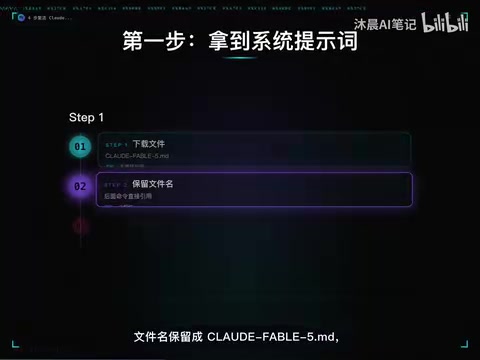
First, you need to obtain the community-created system prompt file. At its core, this is a carefully written Markdown document that defines Fable 5-style behavioral guidelines, output formats, and working logic.
Key detail: The filename must remain cloudfable-5.md, because the startup command in later steps will read this file by name. If you rename it, the command won't be able to find the corresponding prompt file.
Step 2: Place the File in Your Project Root Directory
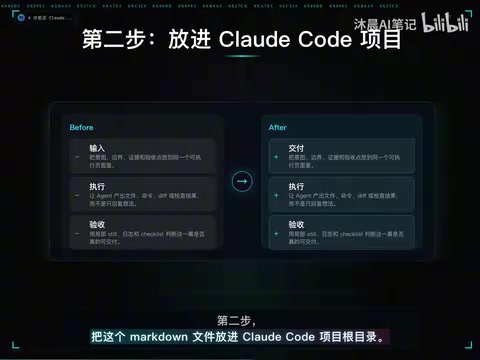
Place the downloaded cloudfable-5.md file into your Claude Code project root directory.
This step seems simple, but there's an important caveat: Claude Code scans the project root directory for configuration and prompt files at startup. The system prompt will only be loaded correctly if it's placed in the right location. If your project structure is complex, make sure the file is in the top-level directory, not buried in a subfolder.
To understand why, you need to know how Claude Code works. Claude Code is a terminal-native AI programming tool released by Anthropic that allows Claude to directly read, write, and execute code in the user's local development environment. Unlike traditional chat-based AI assistants, Claude Code has file system access, terminal command execution, Git operations, and other capabilities — essentially making it an agentic programming partner. It scans the project directory structure to understand context, which is why the prompt file must be in the project root — Claude Code's context loading mechanism prioritizes configuration files in the root directory.
Step 3: Launch Claude Code with the Specified Command
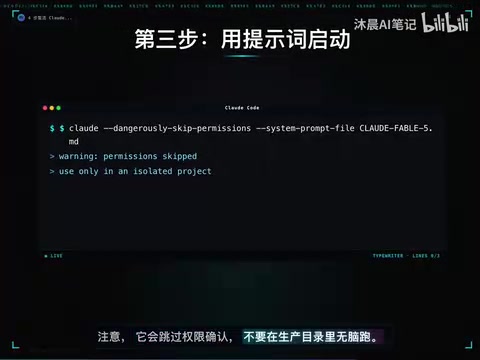
This step requires the most caution in the entire process. Use the specific startup command to load the system prompt and run Claude Code.
⚠️ Important Safety Warning
This startup command will skip confirmation, meaning Claude Code won't ask you step-by-step whether to proceed when executing operations. While this boosts efficiency, it also introduces risk.
In Claude Code's default working mode, whenever the AI needs to perform an operation that could have side effects (such as writing files, executing shell commands, deleting code, etc.), it pauses and requests user confirmation. This is a "Human-in-the-Loop" safety design that ensures the AI doesn't modify critical files without authorization. Skipping confirmation essentially switches Claude Code to fully autonomous mode, where the AI can execute multiple steps in sequence without waiting. This is extremely efficient for large-scale refactoring or continuous tasks, but it also means a single misjudgment could trigger a chain reaction — such as accidentally deleting files, overwriting important configurations, or executing dangerous shell commands.
Therefore, keep the following points in mind:
- Never run this blindly in a production directory
- Try it first in a test project or sandbox environment
- Make sure your code is under version control (Git) so you can roll back if something goes wrong
The skip confirmation design was intended to make the Fable-style workflow smoother — one of Fable 5's hallmarks was more proactive, more coherent task execution rather than frequent interruptions waiting for user confirmation. But this also means you need to place more trust in its behavior while maintaining closer oversight. In this scenario, version control isn't just a best practice — it's an essential safety net.
Step 4: Switch the Model to Opus 4.8 Max
The final step is to switch the model to Opus 4.8 Max. This is one of the most capable models in the Claude series, and only at this level can the complex behavioral patterns defined in the system prompt be fully understood and executed.
Opus is the flagship tier in the Claude model family, representing the strongest reasoning capabilities, the longest context window, and the most precise instruction-following ability. In Anthropic's model hierarchy, from lowest to highest: Haiku (lightweight and fast), Sonnet (balanced), and Opus (maximum capability). Choosing Opus 4.8 Max to run Fable-style prompts is not arbitrary: complex system prompts contain extensive behavioral rules, conditional logic, and style constraints. Only a model with sufficiently strong instruction-following and context comprehension abilities can accurately translate these rules into consistent behavioral patterns. Weaker models might ignore some rules or gradually "forget" the system prompt's requirements over long conversations.
Once the switch is complete, you'll have a Fable-style Claude Code workflow — it will exhibit more proactive code generation, more coherent task execution, and Fable 5's signature working rhythm.
Analysis: The Boundaries and Value of Prompt Engineering
What Is This, Really?
Put simply, this is an advanced prompt engineering exercise. Through a structured Markdown file, it defines how the model should think, act, and organize its output. It doesn't change the model's underlying capabilities, but it can significantly alter the model's behavioral patterns and output style.
Prompt engineering has evolved from simply "asking the right questions" into a systematic technical discipline. Advanced prompt engineering involves multiple layers: structured instruction design (using Markdown headings, lists, and other formatting elements to organize complex rules), role definition (shaping the model's "personality" through detailed behavioral descriptions), few-shot examples (providing input-output samples to calibrate model behavior), and metacognitive instructions (telling the model how to think, not just what to do). The Fable 5 system prompt file is essentially a comprehensive application of these techniques — it doesn't change the model's parameter weights (which would require fine-tuning or retraining), but through precise context injection, it reshapes the model's behavioral distribution at inference time. The ceiling of this approach depends on the base model's capability limits, but within those limits, the behavioral differences can be remarkably significant.
What Can It Do?
- Simulate Fable 5's working style and rhythm
- Make Claude Code behave more proactively and coherently during coding tasks
- Reduce interaction interruptions and improve workflow efficiency
What Can't It Do?
- It's not the real Fable 5 model — the underlying weights and training data haven't changed
- It cannot reproduce certain unique capabilities that Fable 5 may have possessed
- The effectiveness of the system prompt is limited by the base model's comprehension and instruction-following ability
Conclusion
This four-step process demonstrates the potential of prompt engineering in real-world development workflows. While it can't truly "revive" a model version, a well-designed system prompt can indeed reproduce a specific working style and behavioral pattern to a significant degree. For developers who miss Fable 5's way of working, this is a worthwhile approach to try — just remember to operate in a safe environment.
Key Takeaways
Related articles
Developing a 2D RPG with Godot 4: A Hands-On Tutorial for Complete Beginners
A complete tutorial on building a 2D RPG from scratch with Godot 4 and GDScript, covering tilemaps, character controls, enemy AI combat, and scene transitions for beginners.

The Ultimate Guide to Squeezing Every Drop from Mythos/Fable: Burning Through $8,000 in Inference Credits in 10 Days
Deep dive into maximizing Anthropic's Fable/Mythos model: 5-hour limit workarounds, dual account rotation, multi-Agent orchestration, and Mac Mini remote deployment to get $8,000 of inference from a $200 subscription.

Building a Travel Route Planning Mini-Program with AI in One Day: A Full Workflow from Design to Launch
Learn how to build a complete travel route planning WeChat Mini-Program in one day using AI tools like Modao AI and Cursor, covering UI design, code generation, debugging, and deployment.