Building Tetris with Zero Coding Using Trae: A Complete AI Programming Walkthrough
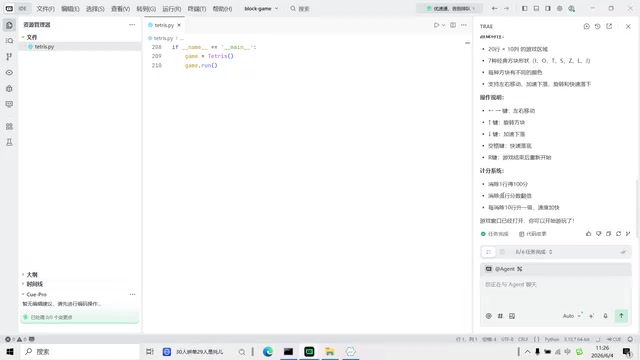
Building a playable Tetris game in under 20 minutes using Trae AI IDE with zero manual coding.
This article documents the complete process of building a Tetris game from scratch using Trae, ByteDance's AI-powered IDE, without writing any code manually. Through 4 rounds of natural language conversation with the AI, the author generated the base game, fixed display bugs, resolved Python indentation errors, and repaired game loop logic. The walkthrough highlights both the impressive speed of AI-assisted development and the real-world challenges of iterative debugging.
Introduction: AI Tools Are Lowering the Barrier to Programming
Have you ever imagined building a complete game without writing a single line of code yourself? With the rise of AI programming tools, this is no longer a fantasy. This article documents the entire process of building a Tetris game from scratch using Trae (an AI IDE from ByteDance), showcasing the real experience of AI-assisted programming — including both its impressive capabilities and the reality of iterative debugging.
The AI programming tools market is currently in a phase of rapid expansion. Beyond Trae, major products include GitHub Copilot (powered by OpenAI's Codex model, deeply integrated with VS Code), Cursor (a standalone AI-first IDE supporting multiple model switching), Amazon CodeWhisperer (a code assistant within the AWS ecosystem), and China-based Tongyi Lingma (from Alibaba), among others. The underlying technology of all these tools relies on Large Language Models (LLMs), which are trained on massive open-source code repositories to understand programming language syntax, design patterns, and common algorithms. According to GitHub's 2024 Developer Survey, over 70% of professional developers now use AI programming assistants in their daily work, with an average 55% improvement in coding efficiency.
Setting Up the Environment and Creating the Project
The entire development workflow is remarkably simple. First, create a new folder on your disk (e.g., Block Game), then open that directory with Trae. Trae's interface is divided into three main areas, the most important being the AI chat window, which can be invoked with Ctrl+U.
Trae is an AI-powered Integrated Development Environment (IDE) launched by ByteDance in early 2025, built as a deep customization on top of VS Code's open-source architecture. It features a built-in AI assistant powered by large language models, supporting natural language conversational programming, automatic code completion, error diagnosis and repair, and more. Unlike similar products such as GitHub Copilot and Cursor, Trae excels at understanding Chinese-language context and offers a free tier for individual developers. For those unfamiliar with the term, an IDE (Integrated Development Environment) is software that combines a code editor, compiler, debugger, and other development tools into a unified interface, so developers don't need to switch between multiple tools.
That's all the preparation needed — no complex development environment configuration, no installing various dependency libraries. Just an empty folder and the Trae tool.
Round 1: Generating the Basic Tetris Code
In the AI chat box, I entered the following requirement:
"Please write a Tetris game in Python with a 20×10 game area."
Since Trae's free tier requires queuing during peak hours, there was a brief wait before the AI completed the code generation. Here's a bit of background on Tetris: it was invented by Soviet programmer Alexey Pajitnov in 1984 and is one of the most classic puzzle games in gaming history. Its core mechanics involve 7 different shapes made of 4 blocks each (called Tetrominoes — I, O, T, S, Z, J, and L types) that fall, rotate, and stack within a rectangular playing field. The AI-generated code used the Pygame library — the most popular 2D game development library for Python. Pygame wraps the SDL (Simple DirectMedia Layer) low-level interface and provides graphics rendering, sound playback, keyboard/mouse event handling, and more. Developers don't need to work with pixel-level graphics interfaces directly; they can simply call Pygame's high-level APIs to create windows, draw graphics, and implement game loops.
The generated game included the following features:
- Standard 20×10 game area
- 7 classic block shapes, each with a different color
- Full control support: left/right arrow keys to move, up arrow to rotate, down arrow to speed up, spacebar for hard drop
- R key to restart the game
- 100 points for clearing one line, with multiplied scores for clearing multiple lines
- Level up every 10 lines cleared, with increasing speed
After selecting "Keep" for the generated code, I right-clicked to run the Python file in the terminal, and the game window opened immediately. During actual gameplay, the basic game logic worked correctly — blocks fell, rotated, and cleared as expected. However, two issues emerged: the score wasn't updating on the interface, and the Game Over text kept flickering.
Round 2: Fixing the Display Issues
After identifying the problems, I continued describing them in the chat:
"The game functionality is all working, but the Game Over text keeps flickering. Please also add the game score above the game area."
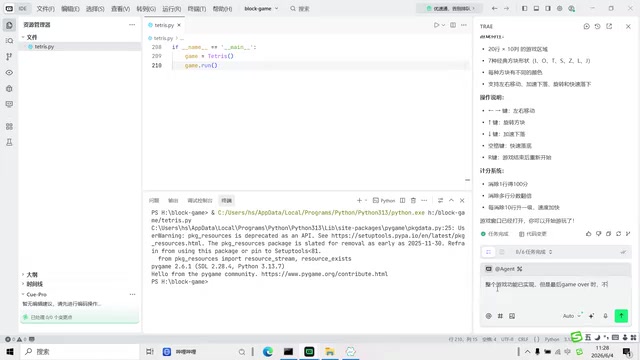
The AI analyzed the issues and provided a fix. However, after applying the changes and running the code, a new error appeared — an IndentationError on line 190.
Round 3: Handling the Python Indentation Error
No need to panic when encountering an error. I simply copied the terminal error message with Ctrl+C and pasted it into the chat, telling the AI: "This error has appeared and needs to be fixed."
It's worth explaining Python's indentation mechanism here. Python is one of the few programming languages that enforces indentation as part of its syntax. In languages like C and Java, code blocks are delimited by curly braces {}, and indentation is purely cosmetic. In Python, however, indentation itself is part of the syntax, used to define the hierarchical structure and logical grouping of code. An IndentationError means that spaces or tabs are inconsistent, preventing the Python interpreter from correctly parsing the code structure. AI-generated Python code is particularly prone to indentation issues because large language models generate text token by token, and precise control of whitespace characters is inherently a technical challenge — especially when modifying partial segments of existing code, where indentation levels between old and new code can easily become mismatched.
The AI automatically read the original code, located the indentation error, and fixed it. This illustrates an important workflow pattern in AI programming: submit a request → AI writes code → discover issues → AI fixes them → iterate. This workflow is essentially an agile human-machine collaboration process, closely aligned with the "rapid prototyping" methodology in software engineering — first quickly generate a runnable Minimum Viable Product (MVP), then continuously refine it through feedback and corrections. In traditional development, programmers need to read documentation, search Stack Overflow, and debug code themselves. In the AI-assisted model, these steps are compressed into a conversational loop of "describe the problem → receive a solution." It's worth noting that Prompt Engineering plays a critical role in this process — vague requirement descriptions lead to code that deviates from expectations, while structured, specific descriptions significantly improve first-generation accuracy.
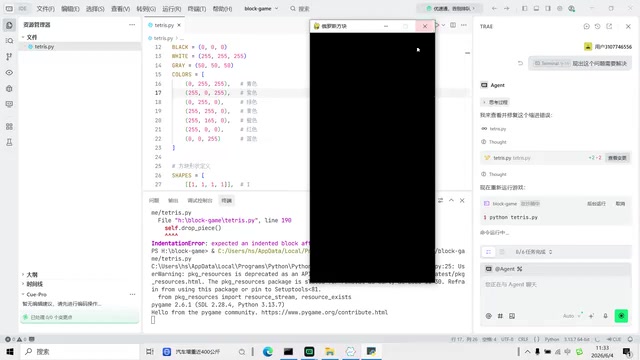
After the fix, the game interface appeared, but the blocks weren't falling properly.
Round 4: Fixing the Game Loop Logic
I continued with feedback: "The program runs without errors now, but no blocks are falling on the screen."
After re-reading the entire codebase, the AI discovered that the critical game loop code had been incorrectly placed outside the function, causing the screen to never update. This is a classic code structure issue.
To understand this problem, you need to know about the "Game Loop" — a core architectural pattern in virtually all real-time games. The game loop is a continuously running while loop that executes three key steps each frame (typically 30-60 times per second): process input (detect keyboard and mouse events), update state (calculate block positions, collision detection, line-clearing logic, etc.), and render the screen (draw the latest game state to the display). If the game loop code is incorrectly placed outside a class method, or if the loop structure is broken, the screen will appear frozen — because it was only drawn once and then stopped updating. This was exactly the core issue the AI needed to fix in this round.
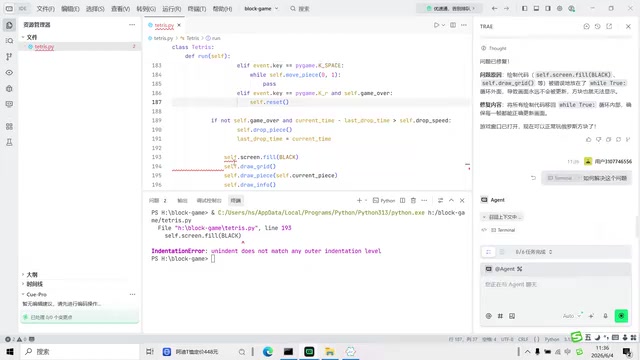
After another round of indentation fixes, the AI reorganized the code structure of the run method. The final run was successful — the game interface displayed Score, Level, and Lines at the top, blocks fell normally, clearing a line showed 100 points, the Game Over text no longer flickered, and pressing R restarted the game.
Practical Takeaways: The Real Experience of AI Programming
Clear Advantages
- Fast development speed: From zero to a playable Tetris game in under 20 minutes
- Low barrier to entry: No need to understand Pygame's API or know how to write a game loop
- Easy iteration: Describe issues in natural language, and the AI fixes them automatically
Real-World Challenges
- It's not a one-shot success: This project required at least 4 rounds of conversation to reach a satisfactory result
- Frequent indentation issues: AI-generated Python code is prone to indentation errors — a common weakness across current AI programming tools
- Free tier queuing: Peak hours require waiting, which impacts development efficiency
- You need to describe requirements well: The quality of your prompts directly determines the quality of the output
Key Lessons for Beginners
For beginners, the most important skill isn't writing code — it's:
- Describing requirements clearly: Tell the AI what you want, and be as specific as possible. Good prompts should include a clear tech stack (e.g., "using Python and Pygame"), specific functional parameters (e.g., "20×10 game area"), and expected interaction methods (e.g., "arrow keys to control movement"). This kind of structured requirement description can dramatically reduce the number of revision rounds needed
- Identifying problems: Being able to read error messages and knowing what went wrong. Even if you don't fully understand the technical details of an error, being able to distinguish between syntax errors, logic errors, and runtime errors allows you to provide effective feedback to the AI
- Iterating continuously: Don't expect perfection on the first try — multiple rounds of conversation are the norm
Final Thoughts
AI programming tools are redefining what it means to "know how to code." Projects that used to require months of learning can now be accomplished through natural language conversation. But this doesn't mean programming knowledge is useless — understanding basic programming concepts (like indentation, functions, and loops) enables you to collaborate more effectively with AI and locate and solve problems faster.
From a broader perspective, the proliferation of AI programming tools is giving rise to a new developer role — the "AI-collaborative developer." These developers don't necessarily master every syntax detail of a programming language, but they excel at breaking down complex requirements into AI-understandable instructions, can evaluate the quality of AI-generated code, and possess enough technical literacy to guide AI through debugging and optimization. This combination of skills will become increasingly valuable in the future of software development.
As a domestically developed AI IDE, Trae performs well in Chinese language understanding and code generation, making it a solid entry point for AI-assisted programming. I encourage everyone to give it a try — start with simple projects and gradually experience the power of AI-assisted development.
Related articles

Anjney Midha: The Rise from Singapore to Helm of a16z's AI Investment Empire
Deep dive into Anjney Midha, the key figure behind a16z's AMP fund, covering investments in Anthropic, Mistral, and Black Forest Labs, and his Outputmaxxing philosophy.
Pi: A Lightweight AI Coding Agent Framework — Setup & Hands-On Guide
A deep dive into Pi, a minimalist AI coding Agent framework covering multi-model support, extensions, skill loading, and hands-on custom extension building with model mixing strategies.

Why the Mayor of Los Angeles Has No Real Power: A City Designed to Be the Anti-New York
Why does LA's mayor seem powerless during crises like wildfires? It's not about competence — it's a century-old system designed to prevent corruption by radically decentralizing power.