Claude Code Architecture Deep Dive: ReAct Loop, Context Window & CLAUDE.md Mechanism Explained
Three-layer architecture breakdown of Claude Code: ReAct Loop, sliding context window, and CLAUDE.md.
This article dissects Claude Code's underlying architecture through three key layers: the ReAct Loop (Think → Act → Observe) that drives its agent execution cycle, the 200K-token sliding context window that serves as its only memory, and the CLAUDE.md file that acts as a persistent anchor never evicted from context. Understanding these mechanisms explains common behaviors like forgetting earlier instructions and high Token consumption in long tasks.
Many people use Claude Code to write code every day, but have you ever wondered what's actually happening under the hood after you hit Enter? Today, instead of discussing how to use it, let's talk about how Claude Code's underlying architecture actually works. Bilibili creator Data老B used three architecture diagrams to explain Claude Code's operating mechanism with remarkable clarity. This article builds on that foundation with further analysis and elaboration.
The Complete Loop: Full Pipeline from Input to Execution
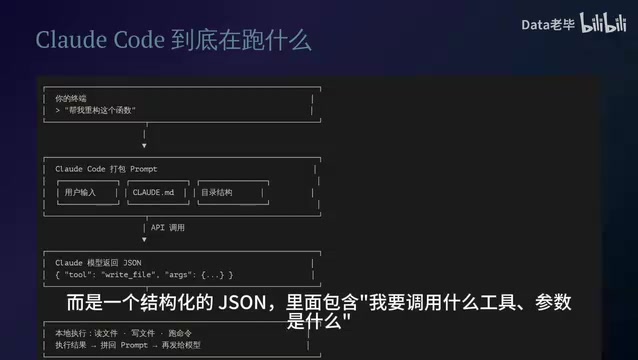
What happens behind the scenes when you type a command in the terminal?
First, Claude Code takes your input, the contents of your .claude/CLAUDE.md file, the current directory structure, and other information, and packages it all into one massive Prompt that gets sent to the Claude model via API.
What the model returns isn't plain text — it's a structured JSON containing "which tool I want to call" and "what the parameters are." This structured output is based on Anthropic's Tool Use (also known as Function Calling) protocol — an interaction paradigm between large models and external systems that has become an industry standard. The core idea is to completely decouple "decision-making" from "execution": the model is only responsible for reasoning and planning, outputting JSON objects that conform to a predefined Schema to declare the tool name and parameters it needs to invoke; the actual file reading/writing, command execution, and other operations are handled by the local runtime. Compared to having the model directly generate bash scripts for execution, the Tool Use protocol provides stronger type safety and permission control. Claude Code can validate tool calls and intercept permissions before execution, preventing dangerous operations.
Once Claude Code receives this JSON, it executes the corresponding operation in your local environment — reading files, writing files, running commands — then appends the execution results back into the Prompt and sends it to the model again.
This constitutes one complete loop. The entire process can be summarized as:
- User Input → Package context → Send API request
- Model Response → Return structured tool call instructions (JSON)
- Local Execution → Execute tool operations → Return results
- Repeat → Until the task is complete
This architecture isn't complicated, but understanding it is crucial for using Claude Code effectively. It's worth noting that this Agent Loop architecture is fundamentally different from AI code completion plugins in traditional IDEs (like GitHub Copilot's Inline Suggestion mode). Traditional code completion is a single-turn interaction: send the current code context to the model, the model returns completion suggestions, and the interaction ends. Claude Code's Agent Loop is a multi-turn autonomous interaction: the model can independently decide which files to read, which commands to execute, and which content to search, dynamically adjusting subsequent behavior based on the results of each step. This enables Claude Code to handle complex tasks like "refactor a certain interface across the entire project" that require cross-file understanding and multi-step operations — not just completing the current line of code. This architecture essentially upgrades the large model from a "tool" to an "agent," with the tradeoff being higher Token consumption and longer execution times.
ReAct Loop: Think → Act → Observe
The loop mechanism described above has a formal name: the ReAct Loop (Reasoning + Acting). Its core consists of three steps repeated continuously: Think, Act, Observe.
The ReAct framework was first proposed by Yao et al. in their 2022 paper ReAct: Synergizing Reasoning and Acting in Language Models. Before this, reasoning (Chain-of-Thought) and action generation in large models were typically studied as two separate research directions. ReAct's core contribution was demonstrating that alternating between reasoning traces and tool calls significantly improves model performance on complex tasks. This pattern has become the underlying paradigm for virtually all current AI Agent frameworks (such as LangChain, AutoGPT, and OpenAI Assistants API), and Claude Code is one of the most mature engineering implementations of this paradigm in programming scenarios.
Specifically within Claude Code, the three phases work as follows:
- Think (Reasoning): The model first outputs its thought process — you can actually see this content in the terminal
- Act (Action): The model outputs a Tool Use instruction specifying which tool to call, such as
Read File,Bash,Search, etc. - Observe (Observation): Claude Code executes the tool call in a local sandbox, takes the result, and appends it as a Tool Result into the next round's Prompt
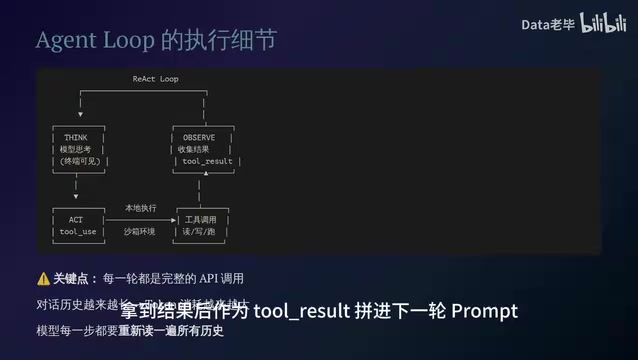
The key point: every round is a complete API call. The entire conversation history keeps growing longer, and Token consumption keeps increasing. This is why complex tasks burn through Tokens so quickly — the model has to re-read all historical records at every step.
This also explains a common source of confusion: why does a seemingly simple task sometimes consume a massive amount of Tokens in Claude Code? Because the input and output of every tool call accumulates in the conversation history, and as interaction rounds increase, the Token count per API call grows linearly. Here's a concrete example: assuming each round of tool calls produces an average of 2K Tokens of input/output, by the 20th round, the tool call history alone has accumulated roughly 40K Tokens. Add the System Prompt, CLAUDE.md, and user conversation, and a single API request can easily exceed 60K Tokens.
Context Window: The Memory vs. Hard Drive Analogy
Claude Code has no database, no vector retrieval, no long-term memory. Its entire "memory" is the current context window — approximately 200K Tokens.
It's worth explaining the technical meaning of 200K Tokens here. A Token is the basic unit by which large models process text. For English text, roughly 1 Token corresponds to 4 characters; for Chinese, approximately 1-2 characters correspond to 1 Token. 200K Tokens is roughly equivalent to 150,000 English words or a 500-page book. By comparison, GPT-4o's standard context window is 128K Tokens. A larger context window means the model can "see" more historical information, but it also brings significantly increased computational costs — the computational complexity of the self-attention mechanism in Transformer architecture is O(n²). Although various vendors have optimized this through sparse attention, sliding window attention, and other techniques, the inference cost for long contexts remains far higher than for short contexts. This is the fundamental technical reason why long tasks in Claude Code burn through Tokens.
What's packed into this window?
- System Prompt + project conventions from
CLAUDE.md - All conversation turns
- Input and output from every tool call
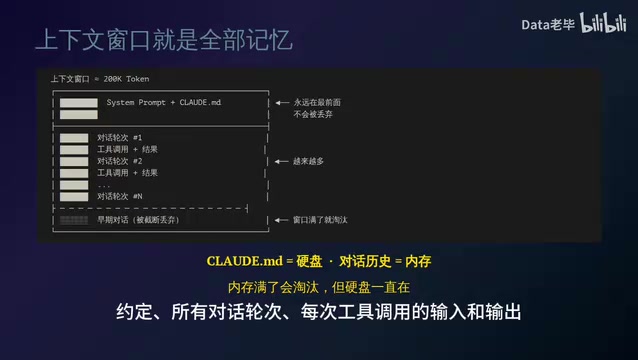
What happens when the window is full? Earlier conversations are gradually discarded, continuously evicting the oldest content. But there's one exception — CLAUDE.md always stays at the front of the window and is never discarded.
The sliding window eviction strategy Claude Code employs is essentially a FIFO (First In, First Out) context management approach. When conversation history exceeds window capacity, the earliest conversation turns are truncated and discarded — similar in concept to page replacement algorithms in operating systems. CLAUDE.md is designed as fixed content "pinned to the window header," analogous to kernel pages marked as "non-swappable" in operating systems. This design is remarkably elegant from an engineering perspective: it doesn't require an additional vector database or RAG (Retrieval-Augmented Generation) pipeline — it achieves a "persistent memory" effect purely through Prompt concatenation priority strategies.
Data老B offered a brilliantly apt analogy:
CLAUDE.mdis the hard drive; conversation history is RAM. RAM gets evicted when full, but the hard drive persists.
This analogy perfectly explains why a well-written CLAUDE.md can double Claude Code's efficiency. It's Claude Code's only "persistent anchor" — the project conventions, coding standards, and architecture descriptions you define in it remain in effect throughout every conversation turn. Meanwhile, content discussed temporarily in conversations will eventually be forgotten as the context window slides forward.
For users, this means every byte of CLAUDE.md is extremely precious — it occupies context space that will never be freed. Therefore, you should only include the most essential and stable project information, avoiding redundant content that would crowd out valuable window capacity.
Claude Code Architecture Summary & Practical Insights
Putting all three layers together, the essence of Claude Code is:
| Layer | Component | Function |
|---|---|---|
| Execution Engine | Local Agent Loop | Cyclically executes Think → Act → Observe |
| Memory Mechanism | 200K Sliding Window | Carries all context; evicts old content when full |
| Persistent Anchor | CLAUDE.md | The "hard drive" configuration that's never discarded |
No magic — the architecture is crystal clear. Once you understand these three layers, many usage-related confusions resolve themselves:
Why does Claude Code sometimes "forget" things?
Because the context window slides — once earlier conversations are evicted, the model loses that information. If you told it an important convention in round 5, by round 50 that information may have already been discarded.
Why does a well-written CLAUDE.md double efficiency?
Because it's the only content that never gets evicted. Writing your project's key information, coding standards, and architecture decisions into CLAUDE.md is like installing a permanent hard drive for Claude Code.
Why do long tasks burn through Tokens so fast?
Because every API call round must carry the complete conversation history. The longer the task, the more history accumulates, and the larger the Token count per call. This is an inherent cost of the ReAct Loop architecture.
Optimization Tips Based on Architecture Understanding
With an understanding of Claude Code's underlying architecture, the following practical tips can help you significantly improve usage efficiency:
- Carefully maintain CLAUDE.md: Put your most important project information here — it's the most reliable communication channel between you and Claude Code. But keep it concise — CLAUDE.md occupies context space that's never freed, and redundant information will continuously crowd out available window capacity
- Break down complex tasks: Rather than completing everything in one ultra-long session, split it into multiple shorter sessions to reduce Token consumption. Each new session starts with a clean context window (containing only the System Prompt and CLAUDE.md), which not only saves costs but also prevents accumulated noise from long conversations from interfering with the model's judgment
- Restate key information promptly: If a convention is important but not suitable for CLAUDE.md, repeat it periodically during long conversations. This is essentially manually fighting against the sliding window's eviction mechanism
- Understand the Token cost structure: Tool call inputs and outputs all count toward the context. Make each tool call as precise and efficient as possible. For example, using exact file paths instead of having the model search the entire directory tree, or specifying line number ranges instead of reading an entire large file, can effectively reduce Token overhead per loop iteration
Understanding a tool's underlying principles is the key to truly mastering it. Claude Code's architecture may be simple, but that "simplicity" is precisely what makes it powerful — one Agent Loop, one sliding window, one persistent anchor. Together, these three components can accomplish complex programming tasks.
Related articles

CodeGraph: The 50K-Star Open-Source Tool That Cuts AI Coding Token Usage in Half
CodeGraph is a 50K-star open-source tool that builds a code knowledge graph so AI coding assistants can locate code instantly—cutting Token usage by 47%, boosting speed by 22%, all running 100% locally.

VibeCoding Beginner's Guide: A Complete Guide to Building Software with Natural Language from Scratch
VibeCoding lets anyone build software through natural language conversations with AI. Learn the core concepts, learning path, and practical methods to get started.

Using UU Accelerator to Speed Up Cursor: A Compliant Solution for Stable AI Coding in China
Learn how to use NetEase UU Accelerator to speed up Cursor AI coding tool in China, with step-by-step setup including node selection and launch configuration.