Cursor Composer 2.5 In-Depth Review: Top-Tier Coding Experience at One-Tenth the Price
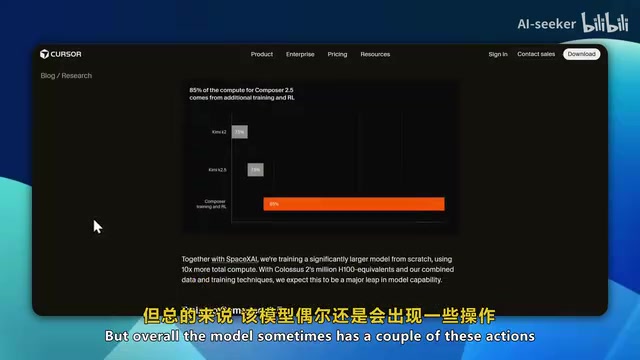
Cursor Composer 2.5 delivers near-top-tier AI coding at one-tenth the price of Opus 4.7.
Cursor's Composer 2.5 ranks as the world's third-best coding agent, just behind Opus 4.7 and GPT 5.5, but at a fraction of the cost—7 cents per task versus $4–5 for Opus. Real-world testing across macOS cloning, frontend design, SVG/3D generation, and game simulation reveals exceptional speed and solid coding ability, though it falls short on creative frontend aesthetics. For rapid iteration and debugging workflows, it offers unmatched value.
Introduction: A New Coding Model with Explosive Value
Cursor's newly released Composer 2.5 is shaking up the AI coding tool market. Ranked the third-best coding agent globally by evaluation firm Artificial Analysis—trailing only Opus 4.7 and GPT 5.5—it comes at an almost unbelievably low price: just 7 cents per task for the standard version, compared to $4–5 per task for Opus. That means you can get near-top-tier coding capabilities at one-tenth the cost or less.
So how does Composer 2.5 actually perform in practice? Can it really go toe-to-toe with Opus 4.7 and GPT 5.5? Through in-depth testing across multiple real-world projects, let's find out.
Composer 2.5's Core Strengths: The Ultimate Balance of Speed and Intelligence
A Commanding Lead in Speed-Intelligence Ratio
Composer 2.5's killer feature isn't raw intelligence alone—it's the Speed-Intelligence Ratio. Across multiple benchmarks including Terminal Bench 2.0, SWE-Bench, and Cursor Bench, its overall performance is exceptional, even surpassing Opus and GPT 5.5 in some tests.
The speed-intelligence ratio is an emerging core metric for evaluating the practical utility of AI coding tools. In real-world development, workflows involve high-frequency iteration—developers need to wait for model responses after virtually every code change. Cognitive science research shows that when AI response times stay under 10 seconds, developers can maintain a flow state, boosting productivity by 3–5x. But once the wait exceeds 30 seconds, flow is broken and productivity gains plummet to below 1.5x. Therefore, a model that responds 3x faster but is only 10% less intelligent often delivers greater real-world productivity—and this is precisely Composer 2.5's design philosophy.
The three major benchmarks mentioned each have different focuses: SWE-Bench, developed by a Princeton University team, extracts tasks from real GitHub issues and requires models to locate problems within complete codebases and generate fix patches—it's widely recognized as the benchmark closest to real software engineering scenarios. Terminal Bench focuses on multi-step task completion in command-line environments. Cursor Bench specializes in code completion, refactoring, and cross-file editing within IDE-integrated scenarios. The fact that Composer 2.5 excels across all three dimensions shows that its capabilities aren't a single-point breakthrough but rather comprehensive engineering optimization.
The model is built on the same open-source base as Composer 2—KimiK 2.5—but after deep training by the Cursor team, it has achieved qualitative leaps in coding, debugging, and reasoning capabilities. KimiK 2.5 is an open-source large model released by Moonshot AI. This "open-source base + proprietary fine-tuning" approach is becoming the dominant paradigm in the AI tools industry. Companies perform domain-specific training on open-source models, avoiding the billions of dollars needed for pre-training from scratch while achieving performance breakthroughs on specific tasks through high-quality code data and RLHF (Reinforcement Learning from Human Feedback). The Cursor team's deep training focused primarily on three areas: code generation, multi-turn debugging conversations, and long-context code comprehension. This explains why Composer 2.5's performance in long-context conversations is surprisingly impressive—a critical factor for continuous iteration in real-world development.
Dramatically Improved MCP Stability
Cursor has finally fixed the widely criticized autonomous research and MCP (Model Context Protocol) stability issues that plagued older versions of Composer.
MCP is an open standard protocol introduced by Anthropic in late 2024. Think of it as the "USB-C port" for the AI application layer—it enables models to access file systems, databases, APIs, and various development tools in a standardized way. In IDE scenarios, MCP stability directly determines whether a model can reliably read project structures, invoke terminal commands, and access documentation. The old Composer's unstable MCP meant the model frequently "lost" project context or failed to correctly call external tools, causing generated code to be severely out of sync with the actual project state—such as referencing nonexistent functions or ignoring files that had already been modified.
If you've used older versions of Composer, you know the pain—the experience in these areas was quite poor. Composer 2.5's improvements in these critical areas make the entire development workflow significantly smoother and more reliable.
Unmatched Price Advantage
Here's a straightforward comparison:
- Composer 2.5 Standard: $0.50 per million input tokens, $2.50 per million output tokens
- Composer 2.5 Fast: $3 per million input tokens, $15 per million output tokens
- Opus 4.7: $4–5 per task
To understand what this pricing means, you need to know how token billing works: a token is the basic unit of text processing for large language models—roughly every 750 English words or 500 Chinese characters corresponds to 1,000 tokens. Input tokens (prompts and context) and output tokens (model-generated responses) are priced separately, with output costing 3–5x more since it requires step-by-step reasoning to generate. Composer 2.5 Standard's pricing of $0.50 per million input tokens means feeding in approximately 500,000 words of code context costs just $0.50—about one-fifteenth of Claude Opus.
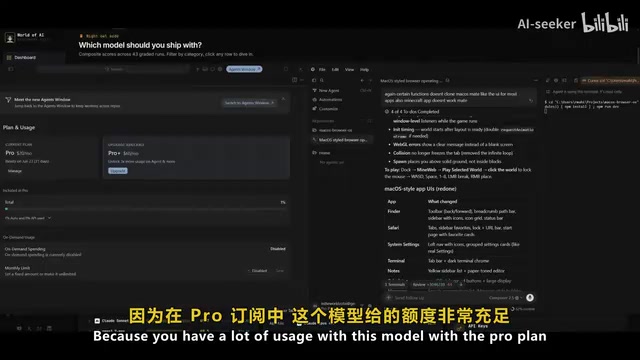
Under the Cursor Pro subscription ($20/month), Composer 2.5 offers extremely generous usage quotas. During testing across an entire video recording session, only 1% of the quota was consumed—whereas the same operations with Claude could exhaust an entire session's quota in just a few prompts.
Real-World Testing: Comprehensive Multi-Scenario Evaluation of Composer 2.5
macOS Interface Clone Test
The first test asked Composer 2.5 to clone the macOS interface and build a browser-based system. The overall result was quite good—it replicated nearly all of macOS's core features. Various apps and folders opened smoothly, including Photos, Notes, Music, Settings, Terminal, and Calculator. It even generated a bonus mini-game, a delightful Easter egg.
There were some flaws, though: the top menu bar wasn't clickable, and the Safari browser implementation was rather rough. Overall, this project scores about 7 out of 10.
Frontend Landing Page Generation Comparison
In the NVIDIA RTX 5090 landing page generation test, the gaps became apparent.
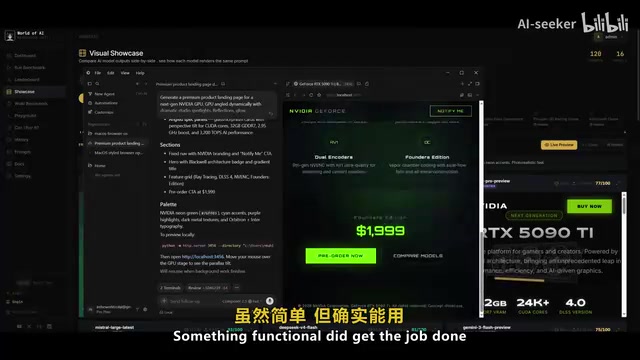
Composer 2.5 did complete the task, but only at a basic level. By comparison, GPT 5.5 produced a stunningly beautiful NVIDIA GPU showcase with polished animations and meticulously crafted page sections. Opus 3.7's output was even more impressive, with nearly every component rendered completely and at high quality.
This is Composer 2.5's most obvious weakness right now—in terms of creative expression and aesthetic quality in frontend design, there's a perceptible quality gap between it and Opus and GPT 5.5.
SVG and 3D Generation Capabilities
Interestingly, Composer 2.5 performed surprisingly well in SVG generation. In testing, it produced a New York City scene complete with bridges, a skyline, moving vehicles, the Statue of Liberty, and even a day-night transition effect. The reviewer considered its SVG generation quality comparable to Sonnet, and in some cases not far behind Opus.
Speed Test: 3D Scene Generated in 10 Seconds
The most impressive demonstration was the speed test. When asked to generate an interactive isometric 3D cozy cottage, Composer 2.5 thought for about 2 seconds before starting to write code, and completed the entire 3D environment in roughly 10 seconds.
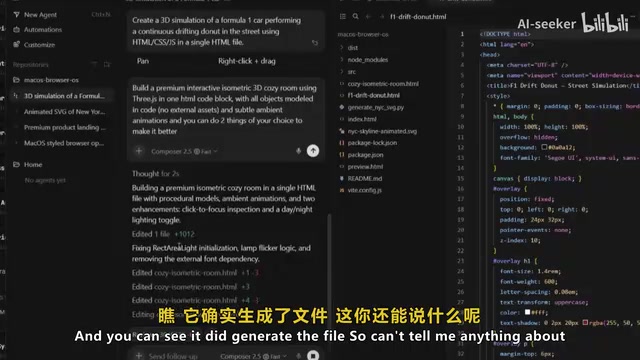
Isometric 3D is a 2.5D visual representation that doesn't use perspective foreshortening, maintaining 120-degree angles between the three coordinate axes. Implementing such scenes in a web environment typically relies on CSS 3D transforms or WebGL libraries like Three.js, requiring simultaneous handling of 3D coordinate calculations, spatial logic for asset placement, lighting and shading, and interaction event binding—a composite task demanding multiple coordinated capabilities. An AI model completing the entire pipeline from understanding requirements to code output in 10 seconds demonstrates not just generation speed, but highly efficient compression of its internal reasoning chain.
The generated isometric room included multiple components like bookshelves and wall art, with the background atmosphere already rendered. While the result wasn't 100% perfect, the speed was genuinely jaw-dropping.
F1 Racing Drift Simulation Test
In the F1 street racing drift simulation test, Composer 2.5 handled the environment and details well, successfully implementing car drifting effects, camera angle switching, and various game logic. While the physics weren't entirely realistic, getting all these complex systems working in a single generation was already quite impressive.
Composer 2.5's Shortcomings
Despite its impressive performance, Composer 2.5 has several issues that need to be acknowledged:
- Weak frontend design aesthetics: In web development and UI design creativity, there's a noticeable gap compared to Opus 4.7 and GPT 5.5
- Occasional execution failures: Sometimes it receives instructions but fails to actually execute them
- Lack of flexibility: Tends to confidently offer a single solution rather than presenting multiple alternative options
- Weaker creative dimension: This is its lowest-scoring dimension in benchmark creative design evaluations
These shortcomings may be related to its training strategy. To achieve advantages in speed and cost, the model likely made certain trade-offs in creative exploration diversity and visual aesthetic refinement—a common capability trade-off in current AI model design: within a fixed parameter budget, strengthening certain capabilities often means concessions in other dimensions.
Recommendations and Conclusion
Who Should Use Composer 2.5?
If your primary needs are rapid iteration, code debugging, and agentic workflows, Composer 2.5 is arguably the best choice available right now. Its performance in these scenarios can even match Opus, at one-tenth the cost.
How to Compensate for Frontend Design Weaknesses?
For frontend design needs, there are two strategies: first, provide more detailed design instructions and aesthetic requirements in your prompts, explicitly describing the visual effects you want to achieve; second, switch to Opus or other creativity-focused models for critical design phases, using Composer 2.5 for subsequent iteration and debugging. This "multi-model collaboration" workflow is becoming standard practice among advanced developers—leveraging different models' strengths to complement each other rather than expecting a single model to cover every scenario.
Final Verdict
Composer 2.5 represents an important trend in AI coding tools—no longer chasing the ceiling of any single capability, but finding the optimal balance between speed, intelligence, and cost. For the vast majority of developers, this balance delivers more practical value than extreme performance in any single dimension.
It's not yet an Opus-level all-rounder, but in terms of value for money, Composer 2.5 has redefined the industry standard. When you can get virtually unlimited high-quality coding assistance for $20 a month, the choice is almost a no-brainer.
Related articles
Freely Switch Between Claude/DeepSeek and Other AI Models in Codex: CPA Deployment Guide
Learn how to use CLI Proxy API (CPA) to aggregate Claude, DeepSeek, Grok, and Gemini models into OpenAI Codex via VPS deployment, Docker setup, and Codex++ integration.
Codex vs Claude Code: An In-Depth Comparison of AI Coding Agents
In-depth comparison of Codex, Claude Code, and Cursor across pricing, features, GitHub integration, and team collaboration to help developers pick the best AI coding agent.

Use Claude Code for Just ¥7.9: A Complete Guide to Affordable Alternatives with Chinese AI Models
Learn how to set up Claude Code with affordable Chinese AI model alternatives. Use providers like SiliconFlow and DeepSeek starting from just ¥7.9, with full environment variable configuration guide.