iOS 27 Should Give Siri AI Home Screen Widgets — Stop Falling Further Behind ChatGPT and Others
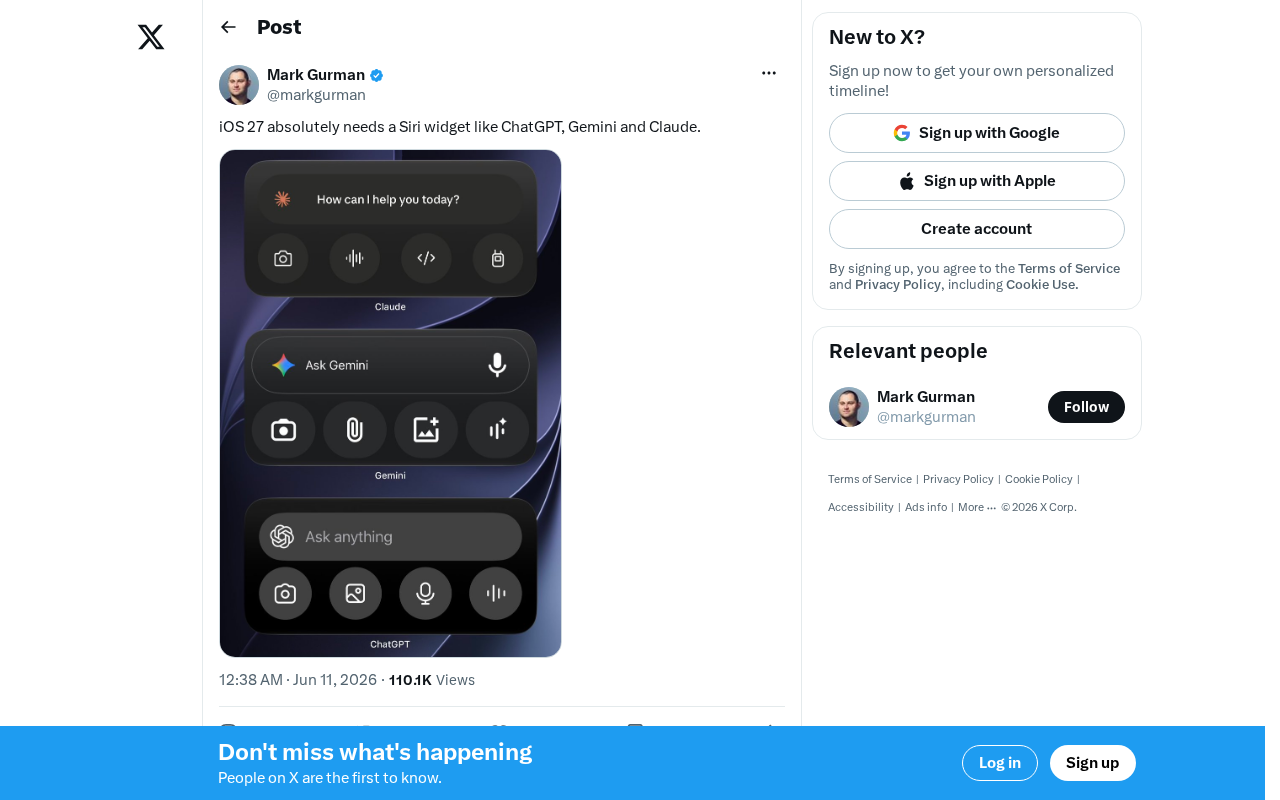
Siri needs an iOS home screen widget to keep up with ChatGPT, Gemini, and Claude in the AI entry point race.
While ChatGPT, Gemini, and Claude have all established home screen widgets on iOS, Apple's Siri still lacks a persistent text-based entry point. This article analyzes why home screen accessibility is critical for AI assistant adoption, what third-party widgets already offer, and what an ideal Siri widget in iOS 27 should look like — leveraging Apple Intelligence for context awareness, multimodal input, and deep system integration.
Siri's Home Screen Dilemma: AI Assistants Are Claiming the Main Screen
While ChatGPT, Gemini, and Claude all have their own home screen widgets on iOS, Apple's own Siri remains stuck in the "long-press the power button to summon" interaction model. This seemingly minor product detail is exposing an uncomfortable reality: in the UX battle among AI assistants, Siri is being comprehensively outpaced by third-party apps.
Recently, the tech community has been buzzing with expectations for iOS 27, and one of the most popular requests is clear — Siri needs a home screen widget like ChatGPT, Gemini, and Claude.
Why Home Screen Widgets Matter So Much for AI Assistants
Accessibility Directly Determines Usage Frequency
On mobile, how often an AI assistant gets used is directly tied to how quickly users can reach it. ChatGPT's home screen widget lets users type questions right from the main screen — no app launch, no voice activation, just one step. Gemini and Claude offer similar quick-access entry points.
This "zero-navigation" design philosophy gives third-party AI assistants a natural advantage in daily use. By contrast, Siri still relies on voice activation or button presses, lacking a persistent text-based interaction point on the home screen.
Text Input Is Replacing Voice Activation
The deeper issue lies in a fundamental shift in interaction paradigms. Traditional Siri was built on a "voice-first" design philosophy, but the reality is that users frequently find themselves in situations where speaking aloud isn't practical — in meetings, at the library, in a bedroom late at night. The text input field provided by home screen widgets fills exactly this gap.
Apps like ChatGPT have proven that text-based interaction in AI conversations isn't a step backward — it's actually more efficient and flexible. From Siri's debut in 2011 to today, voice assistants have undergone a paradigm shift from "voice command executors" to "multimodal AI conversation partners." Early voice assistants relied on Intent Recognition and Slot Filling technologies, essentially functioning as structured command parsing systems. The revolution brought by large language models (LLMs), as represented by ChatGPT, means AI no longer requires users to compress their needs into fixed-format commands — it can understand complex semantics in natural language. This shift has amplified the advantages of text input — users can express their needs with longer, more complex descriptions, while voice input actually becomes less efficient in these scenarios. If Apple continues to ignore this demand, it's effectively handing high-frequency use cases to competitors on a silver platter.
What Third-Party AI Assistant Widgets Already Offer
On the iOS platform today, mainstream AI assistant widgets are already quite mature:
- ChatGPT: Offers widgets in multiple sizes, supporting quick questions, conversation continuation, and even direct photo recognition
- Gemini: Google has deeply integrated it into its search ecosystem, with widgets supporting multimodal input
- Claude: Anthropic has also launched a clean, efficient quick-access widget
These third-party apps are using Apple's own WidgetKit framework, on Apple's own platform, to create AI interaction experiences more convenient than Siri. That in itself is ironic. It's worth noting that WidgetKit was released by Apple at WWDC 2020 alongside iOS 14, replacing the previously limited Today Extension and allowing developers to create interactive widgets that live on the home screen. The framework supports three sizes (small, medium, and large), and starting with iOS 17, it also supports interactive operations — users can tap buttons directly on widgets without jumping into the app. Its core design philosophy is "timeline-driven" — widgets refresh content through preset timelines rather than real-time updates, balancing functionality with battery consumption. It's precisely this framework's openness that has enabled third-party AI apps to establish their presence on the iOS home screen, while Apple's own Siri has failed to leverage this capability.
What Kind of Siri Home Screen Widget Does iOS 27 Need?
More Than Just a Simple Input Box
If Apple introduces a Siri widget in iOS 27, it needs to be more than just a text input field. Combined with Apple Intelligence capabilities, the ideal Siri widget should feature:
- Context awareness: Automatically recommend actions based on time, location, and calendar
- Multimodal input: One-tap sending of text, images, and files
- Deep system-level integration: Direct control of device settings and native app functions
- Conversation continuity: Display recent conversation summaries with quick access to resume previous chats
The Apple Intelligence mentioned here is Apple's on-device AI system announced at WWDC 2024, featuring a hybrid architecture: simple tasks are handled by a small on-device language model, while complex tasks are processed through Apple's proprietary Private Cloud Compute. The core advantage of this system lies in privacy protection — on-device inference doesn't require uploading data to the cloud, and even when cloud computing is used, data is neither stored nor used for model training. Apple Intelligence has already been deployed in writing tools, intelligent photo search, notification summaries, and other scenarios, but its deep integration with Siri has progressed noticeably slower than expected. If a Siri widget could fully leverage Apple Intelligence's on-device inference capabilities, it would establish a unique competitive advantage in both response speed and privacy protection.
Apple's Unique Advantage in Building a Siri Widget
In fact, Apple should have the biggest advantage in doing this. As a system-level application, a Siri widget could access deep permissions that third-party apps simply cannot match — directly reading notifications, controlling system functions, and orchestrating cross-app workflows. The only question is whether Apple is willing to take this step.
Conclusion: The Battle for AI Entry Points Won't Wait
In the AI assistant competition, product capability matters, but how you reach users is equally critical. Every time a user chooses to tap ChatGPT's widget instead of summoning Siri, it's another point lost for Apple in the battle for AI entry points.
Behind the "entry point battle" for AI assistants is a commercial contest over user attention and data traffic. In the mobile internet era, entry points meant traffic distribution power — search engines, app stores, and browsers were all critical gateways. In the AI era, this logic has evolved: whoever becomes the first point of contact between users and the digital world gains control over downstream behaviors like recommendations, search, and transactions. OpenAI, Google, and Anthropic are racing to launch home screen widgets because they're fundamentally competing for the mental positioning of "who users think of first when they have a question." For Apple, if Siri continues to be absent from this battlefield, the monetization potential of its entire services ecosystem could face long-term consequences.
Whether iOS 27 will bring change is something every Apple user should look forward to.
Related articles

Codex VS Claude Code: The Token Economics Behind a 10x Price Gap
Same coding task: Codex costs $15, Claude Code costs $155. Deep dive into the real reasons behind the 10x gap — it's not pricing, it's token volume, output style, and context strategy.

Gemma 4 Open-Source Model Local Deployment Guide: Ollama Installation & Mobile Setup
Step-by-step guide to deploying Google's Gemma 4 open-source model locally with Ollama and running the lightweight version on mobile with tool calling support.
The Decline of Tokenmaxxing: Why Selling Outcomes Matters More Than Selling Tokens
The Tokenmaxxing craze is fading as enterprise AI procurement shifts from chasing Token counts to focusing on actual business outcomes. Learn why outcome-based AI evaluation is the right approach.