Level Up Claude Code: Building an Enhanced Plan Mode with Grill Me

Grill Me enhances Claude Code's Plan Mode by adding structured requirement questioning before planning.
Grill Me is a popular open-source Skill for Claude Code that transforms its Plan Mode by adding a structured Q&A phase before plan generation. Instead of letting the AI guess your requirements, Grill Me prompts Claude Code to act like a rigorous product manager, asking targeted follow-up questions to clarify every detail. This front-loads requirement analysis, producing more accurate plans and significantly reducing rework in complex development tasks.
Why the Default Plan Mode Isn't Enough
Claude Code's Plan Mode is an essential tool for many developers — when implementing larger features, having the AI create a plan before executing step by step can significantly improve code quality and development efficiency.
Plan Mode is a working mode designed by Anthropic for its command-line AI programming assistant. It breaks complex programming tasks into two phases: "planning" and "execution." During the planning phase, the AI analyzes the codebase structure, understands dependencies, and generates a step-by-step implementation plan. During the execution phase, the AI modifies code according to the plan. This mode draws from the classic software engineering methodology of "design before code," avoiding the AI's tendency to try to do everything at once when facing complex tasks — an approach that often leads to missed edge cases or architectural inconsistencies.
But the default Plan Mode has one obvious weakness: the plan is entirely decided by the AI on its own. It relies on "guessing" to infer your requirements — guessing what features you want, guessing how you expect them to be implemented. When your requirement description isn't precise enough, the AI's guesses often deviate from your true intent, leading to plans and code that need repeated revisions.
What Is Grill Me: A Skill That Teaches AI to "Ask Follow-Up Questions"
Grill Me is a popular open-source project with 120K stars, and its core concept is simple but effective: before creating a plan, have Claude Code act like a rigorous product manager, questioning and probing you step by step until it thoroughly understands your actual requirements.
From a technical implementation perspective, Grill Me is a Skill for Claude Code — an extensible custom command mechanism that allows developers to define specific workflows and prompt templates through Markdown files. Skills are essentially preset system prompt fragments that get injected into Claude's context when users invoke them via slash commands, thereby changing the AI's behavior patterns. This design lets the community share and reuse best practices without having to manually type complex prompts every time.
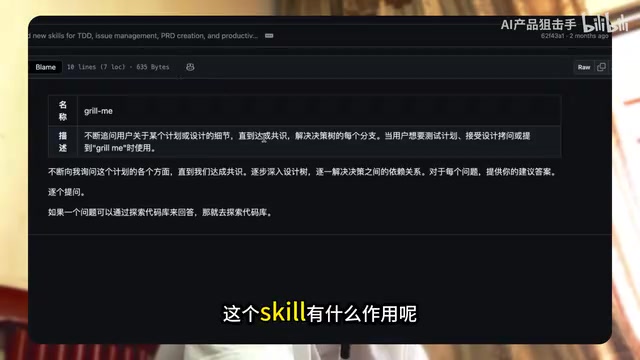
The advantages of this approach include:
- No longer relying on the AI's "guessing" — instead, gathering precise requirements through structured questioning
- Helping developers clarify their own thinking — often our own understanding of requirements is fuzzy too
- Generating plans that better match reality, reducing rework
The follow-up questioning model used by Grill Me has deep theoretical roots in software engineering. Research in requirements engineering shows that approximately 60% of software defects originate from ambiguity or omissions during the requirements phase. Traditional requirements elicitation techniques include interviews, prototyping, use case analysis, and more. Grill Me automates these methodologies — through a preset question framework, it guides developers to fully describe requirements across multiple dimensions including functional scope, technical constraints, exception handling, and performance requirements. In essence, it embeds a product manager's requirements analysis capabilities into the development toolchain.
How to Install and Use Grill Me
The installation process is very straightforward:
- Copy the Grill Me project's GitHub URL
- Paste it directly into Claude Code and let it handle the installation automatically
- Once installed, use the slash command
/grill-meto get started
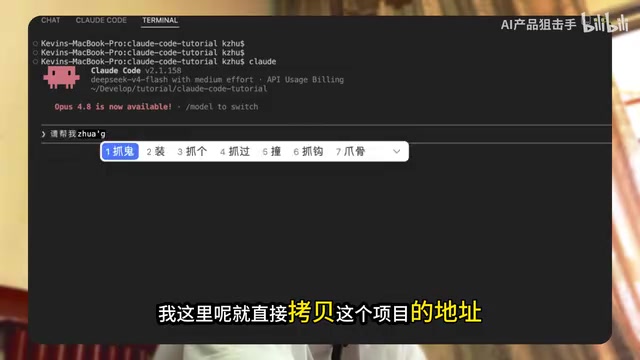
Hands-On Demo: Implementing OAuth Login with Grill Me
Deep-Dive Requirements Clarification
Take implementing a "Boss OAuth Login" feature as an example. When you type /grill-me and describe your requirement, Claude Code won't start planning immediately. Instead, it enters a round of deep questioning:
- Which OAuth providers do you need to support?
- Where should user information be stored after login?
- What's the fallback logic when authorization fails?
- Do you need a token refresh mechanism?
- What does the frontend interaction flow look like?
These questions build on each other progressively, like a thorough interrogation, forcing you to think through every detail.
It's worth noting that OAuth (Open Authorization) itself is a complex protocol involving multiple technical decision points. OAuth 2.0 is the most widely used version, with a core flow that includes: authorization request, user consent, obtaining an authorization code, and exchanging for an access token. Implementing OAuth login requires considering whether to use the authorization code flow or implicit flow, token storage strategy (memory, cookies, or database), refresh mechanism design, multi-provider adaptation, and more. This is precisely why it's particularly well-suited for Grill Me to clarify requirements — if these decision points aren't settled before coding, the AI is likely to make technical choices that don't match your expectations.
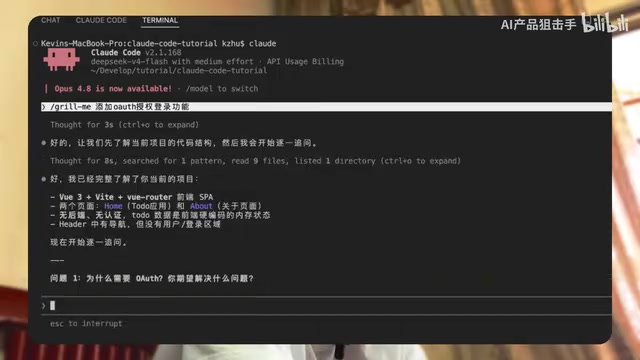
From Vague to Precise Plan Generation
After a complete round of Q&A, Claude Code has grasped your true intent — not through guessing, but through every detail you personally confirmed. The execution plan generated on this foundation is far more accurate than one produced from a single-sentence prompt describing the requirement.
The value of this workflow lies in:
- For the AI: It obtains sufficient contextual information and doesn't need to make assumptions
- For the developer: Requirements analysis is completed before coding, avoiding the "halfway through and realizing the direction is wrong" scenario
Grill Me vs. Default Plan Mode: Why the Questioning Approach Is More Efficient
On the surface, Grill Me adds a Q&A step that seems to slow down the development pace. But in reality, it front-loads the "rework cost caused by unclear requirements."
There's a classic "1-10-100 rule" in software engineering: the cost of finding and fixing a problem during the requirements phase is 1, during development it's 10, and after launch it's 100. Grill Me's design philosophy is based on this principle — by investing a small amount of time in requirements clarification before coding, you avoid multiples of modification cost downstream. This is especially important in AI-assisted programming scenarios, because AI-generated code often has internal consistency. Once the direction is wrong, fixing it may require scrapping the entire implementation rather than simply adjusting a few lines of code.
Traditional workflow: Vague requirements → AI guesses → Generate plan → Execute → Discover deviations → Modify → Execute again
Grill Me workflow: Vague requirements → Structured questioning → Precise requirements → Generate plan → Execute correctly the first time
For simple, small features, using Plan Mode directly is sufficient. But when you're facing complex business logic or multi-module collaboration scenarios, Grill Me's "ask first, then act" approach can save you significant debugging and refactoring time.
Takeaway
Grill Me is essentially an important complement to the Claude Code workflow — it doesn't solve an AI capability problem, but rather a human-AI communication efficiency problem. A good AI tool needs not only strong capabilities but also the ability to "ask the right questions." If you frequently use Claude Code for complex development tasks, this Skill is worth trying.
Key Points
Related articles
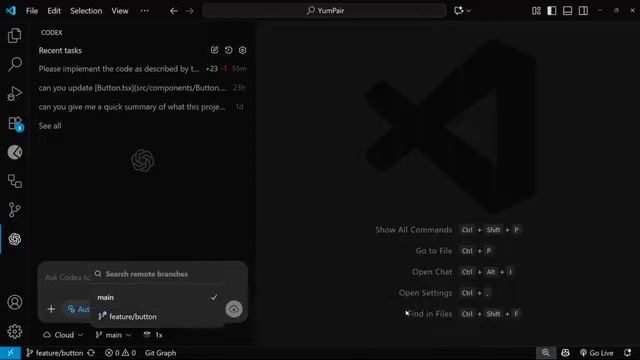
OpenAI Codex Cloud Task Delegation: The Complete Workflow from VS Code to PR
A detailed guide to OpenAI Codex extension's cloud task delegation, covering the complete workflow from initiating cloud coding tasks in VS Code to reviewing changes and creating Pull Requests.
Coze Workflow in Practice: Complete Tutorial for AI One-Click Product Promo Video Generation
Step-by-step guide to building a Coze workflow for AI product promo videos, integrating HappyHours and Jimeng across 12 nodes with nine-grid storyboards and polling loops.
Getting Started with Claude Code: 5 Key Differences from Traditional AI Chatbots
Explore 5 key differences between Claude Code and traditional AI chatbots like ChatGPT, covering interaction, context, execution, memory, and tool integration.