Ponytail Plugin for Claude Code Tested: Dramatically Less Code, 50% Lower Costs

Claude Code plugin Ponytail uses YAGNI principles to cut AI-generated code bloat and reduce costs by 50%.
Ponytail is a Claude Code plugin that injects YAGNI-based decision rules into AI code generation, forcing the agent to exhaust native solutions before writing new code. Real-world tests show it cuts code volume significantly, reduces costs by 47%-77%, and can even improve functional accuracy. While critics note similar results from simple YAGNI prompts, Ponytail adds audit tools and automated rule injection that justify its value.
What Is Ponytail? Making AI Code Like the Laziest Senior Engineer
Imagine that senior developer on your team — ponytail, round glasses, been at the company longer than the version control system. You show him 50 lines of code, he pauses for a moment, then replaces it all with a single line. That's the essence of Ponytail.
Ponytail is a Claude Code plugin with a simple mission: make AI coding agents think like the laziest (but most efficient) senior developer. It eliminates the bloated code that AI agents typically produce, finding the leanest, most efficient solution possible.
It's worth explaining the technical foundation here. Claude Code is Anthropic's terminal-native AI coding agent — developers can chat with Claude directly from the command line, having it read codebases, edit files, and run commands. Unlike Copilot in VS Code, Claude Code is more like an AI colleague with full terminal access. It supports loading external plugins through a hooks mechanism — these plugins are essentially rule sets and toolchains that are automatically injected at specific lifecycle points (such as before each conversation starts or after each code generation). Ponytail leverages this mechanism to inject a strict set of minimalist decision rules before the AI generates any code.
The philosophy is similar to the previously popular Caveman plugin — which saves tokens by making the AI talk less — but Ponytail goes further by streamlining at the code architecture level.
Core Principle: The YAGNI Decision Ladder
Ponytail's core idea comes from a software engineering principle dating back to the 1990s — YAGNI (You Ain't Gonna Need It). The core philosophy: don't build anything until you actually need it. Don't add abstraction layers, don't install libraries, don't write that class — if the problem can be solved without it, then don't use it.
YAGNI didn't appear out of thin air. It was born in the late 1990s from the Extreme Programming (XP) movement driven by Kent Beck and Ron Jeffries. XP emphasizes rapid iteration, continuous feedback, and minimizing waste, with YAGNI being one of its core practices. It sits alongside several other famous principles: KISS (Keep It Simple, Stupid) emphasizes keeping designs as simple as possible; DRY (Don't Repeat Yourself) emphasizes eliminating duplicate code. But YAGNI is more radical — it doesn't just demand clean code, it demands that developers resist the temptation of "we might need this in the future." In traditional development, engineers often build abstraction layers and extension points based on predicted future needs, but YAGNI argues that these predictions are wrong most of the time, and building ahead only increases maintenance burden. Injecting this principle into AI agents is especially meaningful because large language models naturally tend to generate "complete-looking" code, including extensive preventive error handling, abstract encapsulation, and extensible design — all of which are often unnecessary for one-off tasks or prototype development.
Ponytail plants this principle directly into the AI agent through a "decision ladder" that constrains code generation. Before writing any new code, the AI must answer the following questions in order:
- Does this code actually need to exist?
- Can the standard library handle it?
- Is there a native platform feature that can do this?
- Can an already-installed dependency do this?
- Can it be solved in one line of code?
Only when all answers are "no" does it write new code, and even then, it writes only the minimum code needed to make the feature work.
Take a modal dialog as an example: when asked to add a delete confirmation popup, a typical AI agent would immediately install Radix UI, import a React Dialog component, and write out dependencies, Portal, Overlay, triggers, content wrappers, and a whole pile of code — just to display a box with two buttons. Ponytail would say: "The browser has a native <dialog> element. It automatically traps focus, closes on Escape, renders a backdrop overlay with a single CSS selector, and has been supported by all major browsers since 2022." The result: from 30 lines of code plus an npm package, down to 8 lines of code with zero dependencies.
This example reflects an important trend in the web platform in recent years: the dramatic enhancement of native browser capabilities. The HTML <dialog> element achieved full cross-browser support in March 2022 with the release of Safari 15.4. It comes with built-in modal behavior (invoked via the showModal() method), focus trapping (Tab key won't escape the dialog), Escape key dismissal, and backdrop overlay via the ::backdrop pseudo-element. There are many similar examples: <details> and <summary> elements can create JavaScript-free accordion effects; CSS's :has() selector can replace much of the parent-element styling logic that previously required JavaScript; the Popover API can handle popup positioning and stacking. However, because LLM training data is saturated with code examples using React component libraries, AI agents tend to "habitually" choose third-party libraries over native solutions. The "Is there a native platform feature that can do this?" step in Ponytail's decision ladder is precisely a correction for this blind spot.
Even better, Ponytail leaves comments telling you what it skipped and why. If you do eventually need to upgrade to the Radix version, you'll know exactly where to start. Lazy, but not irresponsible.
Performance Benchmarks: 47%-77% Cost Reduction
Ponytail claims to reduce coding costs by 47% to 77%, backed by detailed benchmark data.

The test setup included three methods (no skills, Caveman, Ponytail), three models, and five everyday tasks, with each combination run 10 times using the median. Crucially, the tests also checked correctness — a one-liner that looks great on code line count but produces wrong results would fail the correctness check.
You might have missed an important detail: in the benchmarks, every API call resends the full Ponytail rule set, meaning Ponytail paid an extra cost for its own instructions during testing. In real-world usage, these instructions only need to be paid for roughly once before being cached. Therefore, the 47%-77% cost savings figure is actually a conservative estimate — in real working sessions spanning multiple prompts, the cost advantage would be even greater.
To understand this, you need to know about LLM API token economics. When you call the Claude or GPT API, charges are calculated separately for input tokens and output tokens — input tokens are all the text you send to the model (including system prompts, conversation history, code context), and output tokens are the model's generated response. Taking Claude Sonnet as an example, input tokens cost roughly $3 per million tokens, while output tokens cost roughly $15 per million tokens. Ponytail's rule set, as part of the system prompt, is counted as input tokens on every API call. But Anthropic offers a Prompt Caching mechanism: when the system prompt remains unchanged across consecutive calls, the repeated portion of tokens is charged at only 10% of the original rate. This means that in a real coding session involving dozens of interactions, the cost of Ponytail's rule set becomes nearly negligible. Meanwhile, the reduction in output tokens that Ponytail delivers (leaner code means fewer generated tokens) represents real savings — and considering that output tokens cost 5x more per unit than input tokens, this savings effect is especially significant.
A Thought-Provoking Critique
That said, there's a fair criticism worth noting. Colin Eberhardt pointed out in a blog post that if you replace Ponytail with the simple three words "Follow YAGNI principles," the results nearly perfectly match Ponytail's benchmark scores. Expanding to seven words — "Follow YAGNI principles and one-liner solutions" — even outperformed the benchmark results.
So is Ponytail magic, or just a beautifully packaged prompt? That's a fair question. But the video author argues that the packaging itself is the product — you get the right rules automatically injected across different agents, audit tools, CLI tools, and deferred decision logs. Simply writing "Follow YAGNI" in a system prompt won't give you Ponytail's audit or review functionality.
Real-World Comparison Test: Weather Dashboard App
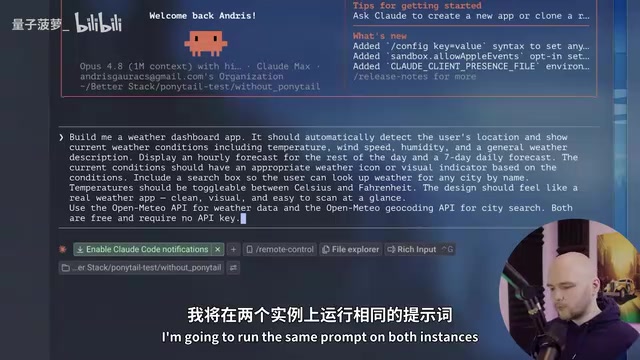
To verify Ponytail's real-world effectiveness, the video author ran a straightforward comparison test: two Claude Code instances open simultaneously, one with the Ponytail plugin installed and the other with default configuration, both given the same prompt — build a weather dashboard app that detects the user's location and displays current weather conditions.
Speed and Code Volume
- Ponytail version: Completed the task in under 1 minute, everything in a single HTML file
- Default version: Took 2 minutes 30 seconds, generated 3 separate files, required a Python server to run
The Ponytail version provided a very concise build overview, clearly explaining what it built and what it chose not to build — maximizing efficiency.
Functional Performance
Surprisingly, the Ponytail version actually came out ahead on functionality:
- The default version had a prettier UI but didn't auto-detect the user's location (despite the prompt explicitly requesting it), defaulting to London instead
- The Ponytail version immediately requested the current location upon opening, then displayed weather information matching that location
While the Ponytail version's UI wasn't as flashy and the app was more stripped-down, it followed the instructions more precisely. This phenomenon actually reveals a common pitfall in AI coding: when an AI agent spends a lot of "attention" building polished UI components, file structures, and error handling, it may actually overlook core functional requirements in the prompt. By forcing the AI to reduce investment in non-core aspects, Ponytail actually lets it focus more on what the user actually asked for.
Cost Comparison

The final data showed that the Ponytail version cost 50% less than the default version, produced far fewer lines of code, and was actually better in terms of functionality.
Caveman + Ponytail Combo Test
Since both Ponytail and Caveman are efficiency tools, what happens if you combine them? The video author ran a further test: both plugins activated simultaneously, running the same prompt.
The result was surprising: the task was still completed within one minute and worked correctly, but the output wasn't significantly different from the Ponytail-only version. More importantly, the Caveman + Ponytail combo actually cost slightly more than Ponytail alone.
This shows that combining the two doesn't yield significant additional improvement. If you have to choose one, based on the benchmark data, Ponytail is the better choice. This result is also intuitive: Caveman primarily saves tokens by reducing the AI's natural language output (explanations, comments, etc.), while Ponytail fundamentally reduces the amount of code generated. When Ponytail has already drastically cut output, there's very little room left for Caveman to compress further, and the overhead of stacking two rule sets actually increases input token costs.
Takeaways and Reflections
Ponytail's performance is genuinely impressive. Its ability to cut code bloat while maintaining or even improving code quality reveals an important truth: much of our coding may be over-engineered — sometimes less really is more.
Over-engineering is an age-old problem in the software industry, but AI coding tools are amplifying it at an unprecedented rate. In traditional development, an engineer writing over-designed code at least needs time and effort, which serves as a natural constraint. But AI agents can generate hundreds of lines of "professional-looking" code in seconds — complete design patterns, exhaustive type definitions, multi-layer abstract encapsulation — and developers often lack the motivation to question whether this auto-generated code is truly necessary. Former Amazon VP Tim Bray once said: "Code is a liability, not an asset." Every line of code means future maintenance costs, potential bugs, and cognitive overhead. When AI makes generating code nearly zero-cost, we need tools like Ponytail even more to remind us: the best code is no code at all.
Of course, the debate over whether Ponytail is just a "beautifully packaged prompt" continues. But from a practical standpoint, it provides out-of-the-box rule injection, audit tools, and decision logging — added value that simple prompts can't replicate. For developers who use Claude Code daily, Ponytail is worth trying — after all, writing less code, spending less money, and getting better results? What's not to like?
Related articles

OpenAI's New Research: Keeping AI Safe During High-Stakes Tasks
OpenAI's new research on "broadly and persistently beneficial" AI explores how to keep models safe in high-stakes scenarios beyond their training distribution.

DeepSeek + Resonix: A Low-Cost AI Coding Solution — 150 Million Tokens for Just $1.10
Real-world test: DeepSeek API + Resonix coding tool consumed 150M tokens for just $1.10. Deep dive into DeepSeek pricing, Resonix's 95% cache hit rate, and honest comparison with GPT models.

LifeSciBench: A Life Science AI Benchmark Built by 173 Scientists
LifeSciBench is a life science AI benchmark developed by 173 biotech and pharma scientists, featuring 750 expert tasks across seven research workflows.