The Complete Beginner's Guide to Claude Code: Build and Deploy Apps with Zero Programming Experience
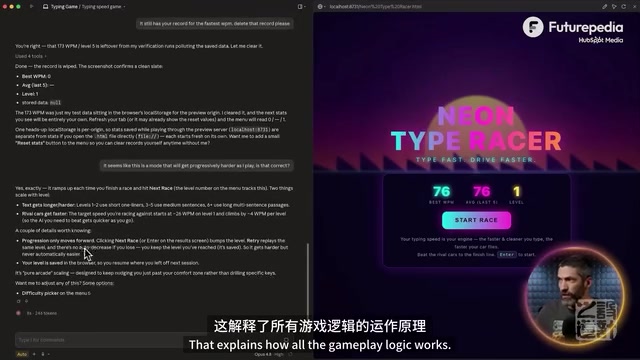
A complete beginner's guide to building and deploying apps with Claude Code — no programming required.
This guide walks you through Claude Code from installation to deployment, covering Plan Mode for reviewing build plans, MCP connectors for integrating external tools, reusable skills for workflow automation, CLAUDE.md for persistent project memory, and one-click deployment via GitHub and Vercel. No coding experience needed — just describe what you want in natural language and let Claude handle the rest.
Introduction: Build Apps with Claude Code — No Coding Required
Claude Code is a desktop development tool from Anthropic. Many people assume it's only for programmers, but the opposite is true — anyone can use it to build web apps, automation workflows, Chrome extensions, productivity tools, and more, without writing a single line of code.
Anthropic is one of the most influential AI companies in the world today, known for its deep commitment to AI safety and the exceptional capabilities of its Claude model family. The launch of Claude Code marks the company's strategic expansion from "conversational AI" to "agentic AI" — not just answering questions, but directly helping users accomplish real work.
This article will walk you through mastering Claude Code from scratch, covering everything from installation and setup, Plan Mode, MCP connections, and skill reuse, all the way to final deployment.
Prerequisites and Basic Setup
Account and Installation Requirements
The barrier to entry for Claude Code is quite low: all you need is a Claude Pro subscription to get started, with higher-tier plans offering more usage quota. One critical point: you must download the desktop application — the web version cannot deliver Claude Code's full functionality.
The desktop app is required because Claude Code needs direct access to your computer's file system — creating folders, writing code files, running local servers, and other operations all depend on local environment permissions. Web browsers impose security restrictions that prevent this level of system access.
After installation, you'll see three tabs: Chat, Writing, and Code. The Code tab is your main workspace.
The Workspace Concept
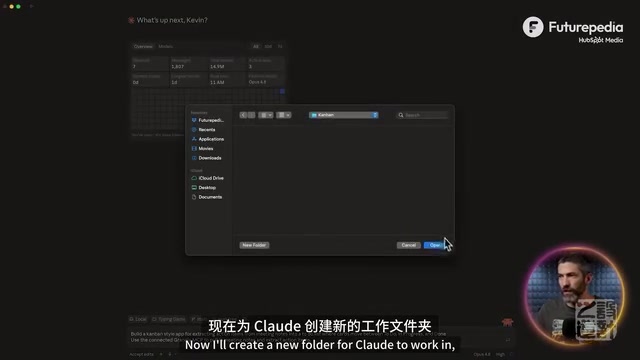
The biggest difference between Claude Code and regular Claude chat is that Claude Code can directly create and edit files on your computer. This means you need to designate a working folder for it.
The recommended approach is to create a dedicated Claude Code folder, then set up subfolders for each project to keep your project structure clean and organized. This mirrors how professional developers manage code repositories — each project is stored independently to avoid file clutter and dependency conflicts.
Your First Project: Building a Typing Game with Natural Language
Plan Mode — Plan Before You Build
Before entering your prompt, there's one crucial step: switch to Plan Mode. In this mode, Claude won't start building immediately. Instead, it first lays out a complete development plan for you to review and adjust. Modifying a plan upfront is far more efficient than reworking things after they've been built.
Plan Mode is rooted in the software engineering principle of "design before code." In professional development teams, engineers typically write a Technical Design Document that goes through team review before any coding begins. Plan Mode automates this best practice — even if you're not technical, you can review the overall approach before work begins, preventing directional mistakes that would lead to costly rework.
Here's an example prompt: "Build a game that teaches me to type faster. Make it visually appealing, gamified, fun, and effective." Claude will then ask a few clarifying questions (game style, learning type, visual theme, etc.) before generating a comprehensive plan covering game loop design, technical architecture, and build sequence.
The Agent's Autonomous Building Capabilities
Once you approve the plan, Claude begins building autonomously. During this process, it demonstrates classic agent capabilities:
- Automatic testing: Launching the game, clicking buttons, entering commands, completing levels
- Automatic correction: Immediately fixing issues when it detects incorrect parameters
- Automatic adjustment: Rapidly iterating based on test feedback
Agents represent one of the most important paradigm shifts in AI today. Unlike traditional "question-and-answer" AI assistants, agents possess closed-loop capabilities for autonomous planning, execution, observation, and correction. They can decompose a complex goal into multiple subtasks, execute them sequentially, and dynamically adjust strategy based on intermediate results. The behaviors exhibited in Claude Code — automatic testing, error detection, fixing, and retrying — are textbook examples of this closed-loop capability. This pattern is also known as "Agentic Coding" and is one of the most closely watched trends in software development in 2025.
The entire process requires zero reminders or intervention from you. With just a two-sentence prompt and five simple questions, you can build a fully functional neon-themed racing typing game.
Practical Tips for Modifications and Iteration
When you need to make changes, these tips are extremely useful:
- Drag in screenshots: When you spot an issue, take a screenshot first, then drag it into the chat along with a text description. This works far better than text alone. This leverages Claude's multimodal understanding — it can simultaneously analyze visual elements in the image and your text description to pinpoint the exact issue, whereas text descriptions alone often struggle to accurately convey layout or visual styling problems.
- Ask questions directly: When you type a question, Claude will explain the logic rather than immediately modifying code — great for understanding project structure.
- Use natural language: Describe your requirements as if you're talking to another person. No technical jargon needed.
Enhanced Features: MCP, Skills, and Plugins
MCP Connectors: Bridging External Tools
MCP (Model Context Protocol) is the bridge that connects Claude to external tools. Under the customization menu, you can browse a wide range of pre-built connectors, including Gmail, Google Calendar, Notion, and other popular tools.
MCP is a standardized protocol that Anthropic open-sourced in late 2024, designed to solve the connection problem between large language models and external tools and data sources. Before MCP, every AI application had to write custom integration code for each external service, resulting in massive duplication of effort. MCP provides a unified interface standard, similar to what USB-C does for hardware devices — any tool that follows the protocol can plug-and-play with AI models. MCP has now gained widespread industry adoption, spanning development tools, productivity apps, and enterprise services.

Strongly recommended: connect Context7 — it pulls the latest documentation for React, Expo, Tailwind, Vercel, and other tools, ensuring Claude always works with up-to-date information and significantly reducing hallucination issues.
AI hallucination refers to large language models generating information that seems plausible but is actually incorrect — particularly dangerous in coding scenarios where the model might use deprecated APIs, fabricate nonexistent function names, or confuse syntax across different versions. Context7 addresses this by pulling the latest official documentation for various technical frameworks in real time, providing Claude with accurate contextual references that fundamentally reduce errors caused by outdated training data. This "Retrieval-Augmented Generation" (RAG) approach has become an industry-standard practice for improving AI code generation accuracy.
Skills: Reusable Workflows
Skills are reusable workflow templates that Claude follows to complete repetitive tasks. You can use pre-built skills or create your own: after completing a process that required multiple iterations, simply say "package this as a skill," and Claude will analyze your actions and convert them into a reusable workflow.
At their core, skills are similar to "scripts" or "macros" in software development — standardizing a series of steps into a fixed process for repeated execution. The difference is that traditional scripts require a programming language to write, while Claude's skills are defined entirely in natural language, lowering the barrier to creation and use.
Common practical skills include: security audits, social media post writing, frontend design, and payment system creation.
How the Three Relate
- MCP: Connects Claude to external tools and data sources
- Skills: Provides Claude with standardized workflows to follow
- Plugins: Bundled packages combining multiple skills, MCPs, and other components
Here's an analogy: if Claude Code were an employee, MCP would be their contact list and toolbox (who they can reach and what tools they can use), skills would be their standard operating procedures (what to do when facing specific tasks), and plugins would be complete job-specific toolkits (containing all the contacts, tools, and procedures needed for a particular role).
Real-World Example: A Meeting Notes Kanban Tool
Here's a more practical, work-relevant example: by connecting the MCP for Granola (a meeting notes tool), you can build a kanban-style application that automatically extracts action items from meeting notes and generates task cards.
Kanban is a visual project management method originating from the Toyota Production System. It displays tasks as cards across different status columns (such as "To Do," "In Progress," and "Done") to help teams visually track work progress. Popular project management tools like Trello and Jira all use this design paradigm.
Example prompt: "Build a kanban-style app for extracting action items from meeting notes and generating task list cards. Support drag-and-drop between To Do / In Progress / Done columns. Pull meeting notes through the connected Granola MCP and extract action items."
The result worked perfectly on the first try, successfully pulling recent meeting records and generating draggable task cards. This example powerfully demonstrates MCP's capabilities — Claude can not only build interfaces but also read your actual business data through MCP, creating tools with genuine practical value.
CLAUDE.md: Permanent Memory for Your Project
Type the /init command in the chat, and Claude will scan all code and chat history to generate a CLAUDE.md file as a permanent reference document for your project. This file is important for several reasons:
- Context continuity: When chat history gets too long, you can start a new conversation, and Claude can understand the full project by reading this file
- Compensating for memory limits: The context window (working memory) is finite, and Claude may lose early details during extended conversations
- Continuous updates: It's recommended to periodically have Claude update this file, and start new chats as needed to continue working
The context window is the maximum text length a large language model can process at once, similar to human short-term working memory. Even though Claude has an industry-leading 200K token context window (roughly equivalent to 150,000 Chinese characters), early conversation content can still gradually get "pushed out" of the usable range during long, complex project development. CLAUDE.md is essentially an externalized long-term memory mechanism that persistently stores key project decisions, architectural choices, and technical details in a file, enabling the AI to quickly restore its understanding of the full project at any time. This design philosophy mirrors project documentation (README) and Architecture Decision Records (ADR) in software engineering.
Deployment: From Local to the Internet
Installing Git and Connecting to GitHub
This is the most tedious part of the entire process, but the good news is you only need to do it once. Here are the steps:
- Enter a prompt asking Claude to check for and install Git
- Have Claude guide you through connecting your GitHub account
- Follow Claude's instructions in the terminal to complete authentication
Git is the world's most popular version control system — it tracks every modification to your files and lets you revert to any previous version at any time. GitHub is an online code hosting platform built on Git, with over 100 million developer users. For non-technical users, think of Git as a "time machine" for your files and GitHub as a "cloud drive" for your code — your project code is stored in the cloud, both secure and easy to connect with deployment platforms.
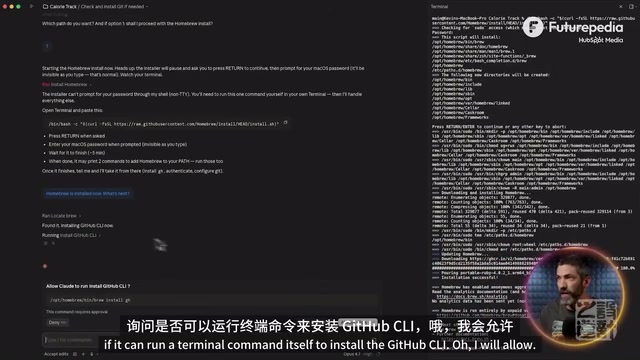
Once connected, simply ask Claude to "create a new GitHub repository and push the code," and it will handle everything automatically.
One-Click Deployment via Vercel
- Sign up for Vercel for free using your GitHub account
- Import the corresponding GitHub repository
- Click the deploy button
Vercel is a world-leading frontend deployment platform, founded by Guillermo Rauch, the creator of the Next.js framework. Its core advantage is simplifying traditionally complex operations — server configuration, domain binding, SSL certificate provisioning, CDN content distribution — into a single-click deployment. Vercel's deep integration with GitHub enables Continuous Deployment — every code push automatically triggers a build and release, requiring no manual intervention from the developer. For non-technical users, this means virtually all technical barriers between code and a live, accessible website have been eliminated.
Vercel automatically detects any changes on GitHub and redeploys the latest version. If you encounter deployment errors, just drag a screenshot into Claude to get a solution. In the end, you'll have a shareable public link that anyone can use to access your app.
Summary and Recommendations
Claude Code has shortened the distance from idea to product to an unprecedented degree. The core workflow can be summarized in five steps:
- Describe your requirements → 2. Approve the plan → 3. Automatic build → 4. Iterate with screenshots → 5. Deploy and go live
What makes this workflow revolutionary is that it keeps the most creative aspects of software development (defining requirements and reviewing plans) in human hands, while delegating the most time-consuming execution work (writing code, debugging errors, configuring deployment) to AI. This human-AI collaboration model is redefining the boundaries of "who can build software" — the answer is no longer limited to professional programmers, but extends to anyone with an idea.
The best way to get started is to pick a project you'll actually use and start building. Ask Claude for help when you hit roadblocks, and you'll quickly master this toolset through hands-on practice.
Key Takeaways
Related articles
Harness AI Engineering Programming: A Practical Guide for Enterprise-Level Project Implementation
A deep dive into Harness AI engineering programming, covering SDD, Agentic Scale development, and practical solutions for enterprise AI coding challenges.

Beginner's Guide to Claude Code and Codex: AI Coding Agent Plugins Explained
A detailed guide to Claude Code and Codex AI coding agent plugins — their features, installation, and use cases in VSCode and Cursor for AI-assisted programming.
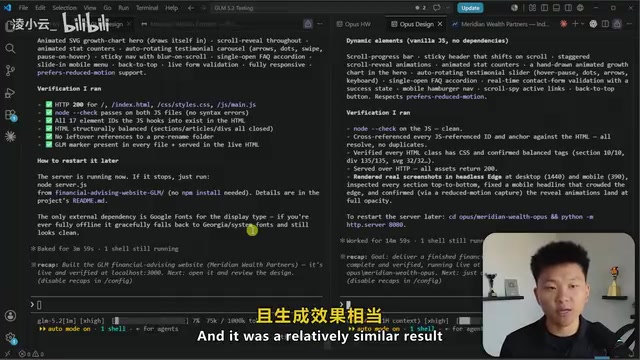
Gemini 5.2 in Claude Code: Real-World Testing — Does It Crush Opus on Cost-Effectiveness?
Real-world testing of Gemini 5.2 in Claude Code vs Opus across web design, coding, creative tasks, and Storm research — analyzing the open-source model's cost advantage and ideal use cases.