The Vibe Coding Trap: Why AI Only Gives You the Bare Minimum
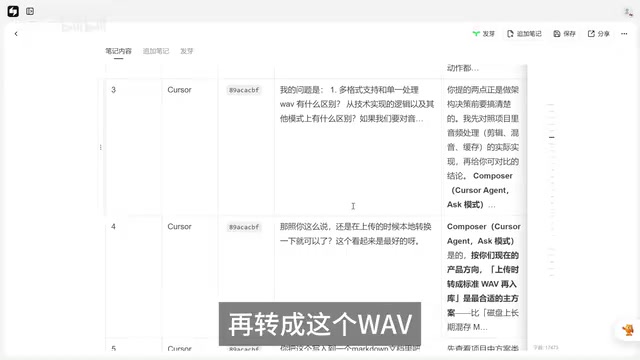
AI gives you exactly what you ask for — nothing more. Here's how to fix that.
When Vibe Coding with AI, vague requirements lead to minimum viable delivery — like a BGM feature that only supports WAV. This article analyzes why AI defaults to the bare minimum, demonstrates a Cursor + Claude + DeepSeek multi-tool collaboration workflow, and shares five practical strategies to get better results from AI-assisted programming.
The Hidden Risk of One-Line Requirements: "Works" ≠ "Works Well"
When doing Vibe Coding with AI, many people fall into the same trap: you give the AI a simple, one-line requirement, and it delivers something that technically "works" — but that's about it. The gap between "works" and "works well" can be enormous. A Bilibili creator named Po Wang encountered a textbook example of this in practice.
Vibe Coding is a concept coined by OpenAI co-founder Andrej Karpathy in early 2025. It describes a new programming paradigm where developers no longer write code line by line. Instead, they describe requirements to AI in natural language, let the AI generate the code, and simply "vibe" with the results — checking whether the output matches expectations. This approach dramatically lowers the barrier to programming, but it also introduces new challenges: when developers lack control over the underlying implementation, it's easy to end up with something that looks functional but hides serious pitfalls.
The story started simply enough: Po Wang had previously used a one-line prompt to have AI implement a BGM (background music) feature. It passed testing and everything seemed fine. But when he actually tried to use it with an MP3 audio file as the background music, the feature completely broke. After investigating, he discovered that the AI's BGM implementation only supported WAV format — it rejected everything else.
This highlights a core problem: as users, we naturally assume that an audio feature "should" support common formats (MP3, WAV, FLAC, etc.). But AI doesn't proactively consider these things for you. If you didn't specify MP3 support, it just implements the most basic WAV support — a textbook case of minimum delivery.
Technical Analysis: The Fundamental Difference Between Multi-Format and Single-Format Support
After discovering the issue, Po Wang didn't rush to have the AI fix the code. Instead, he first conducted a round of technical discussion. He posed two key questions to the AI:
- In an audio editing scenario, what's the fundamental difference between multi-format support and single-format support?
- Does converting MP3 to WAV cause any audio quality degradation?
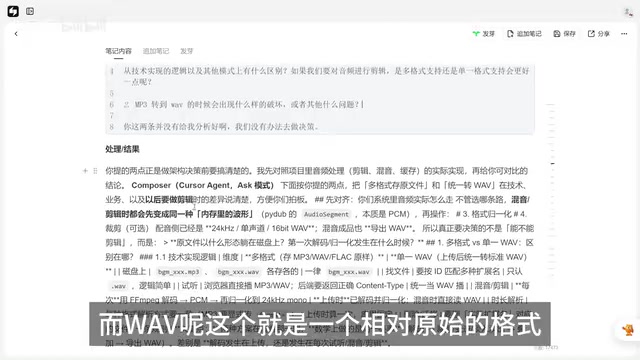
The AI explained that MP3 is a lossy compression format, while WAV is a lossless raw format. In audio editing scenarios, WAV is typically used for processing because it preserves complete audio data and is more stable to work with. The project's audio synthesis, mixing, and other processing stages were all unified around the WAV format.
To understand this technical choice, you need to grasp the fundamental differences between these formats. WAV (Waveform Audio File Format) was jointly developed by Microsoft and IBM. It stores raw audio data using PCM (Pulse Code Modulation) without any compression, resulting in large file sizes but complete audio fidelity. MP3 (MPEG Audio Layer III) uses a lossy compression algorithm that leverages psychoacoustic models to remove audio information that human ears can barely perceive, compressing file sizes to roughly 1/10 of WAV. In an audio processing pipeline, WAV is more efficient because the data is complete and requires no decoding, avoiding additional codec errors. With MP3, each decode-reencode cycle accumulates losses — which is why professional audio processing typically uses WAV as the intermediate format. FLAC (Free Lossless Audio Codec) is a lossless compression format that balances file size and audio fidelity, but in real-time processing scenarios, it still needs to be decompressed to PCM data first.
Based on this analysis, the final solution was: support multiple audio formats at the upload stage, then automatically convert to WAV format for all subsequent processing. This is a balanced approach that serves both user experience and technical stability — users don't need to worry about formats, while the underlying processing remains consistent.
On the engineering implementation side, this type of audio format conversion typically relies on FFmpeg, an open-source multimedia framework that supports encoding and decoding for virtually all mainstream audio and video formats. In the Python ecosystem, developers commonly use the pydub library (which calls FFmpeg under the hood) or the soundfile library for format conversion. A typical implementation flow looks like this: user uploads an audio file in any format → the backend detects the file format (via file header magic numbers or MIME type) → FFmpeg transcodes it to WAV → the transcoded file is stored for subsequent processing. During this process, you also need to ensure consistency in sample rate, bit depth, and channel count — otherwise, incompatibility issues may arise during later audio mixing and editing stages.
Multi-Tool Collaboration: The Cursor + Claude + DeepSeek Combo
Another noteworthy aspect of this case is Po Wang's multi-AI tool collaboration workflow. This methodology is highly practical and worth learning from.
Before diving into the specific workflow, it's helpful to understand each tool's strengths. Cursor is an AI-native code editor built on VS Code with deep LLM integration, allowing developers to chat with AI, generate, and modify code directly within the editor — ideal for rapid iteration. Claude, developed by Anthropic, is known for its long-context understanding and safety alignment, excelling at complex analysis and reasoning tasks. DeepSeek, from the company of the same name, offers a model series whose reasoning models (such as DeepSeek-R1) perform exceptionally well in mathematical reasoning and code generation, with strong instruction-following capabilities. Using all three together reflects an important trend in AI development: no single model excels at every task, and Multi-Model Orchestration is becoming standard practice for efficient development.
Step 1: Lightweight Communication in Cursor
Use Cursor for initial requirement discussions and technical analysis. Cursor is well-suited for lightweight conversational tasks — quickly clarifying ideas and confirming the solution direction. Once the discussion is complete, have the AI organize the plan into a Markdown document.
Step 2: Deep Review with DeepSeek
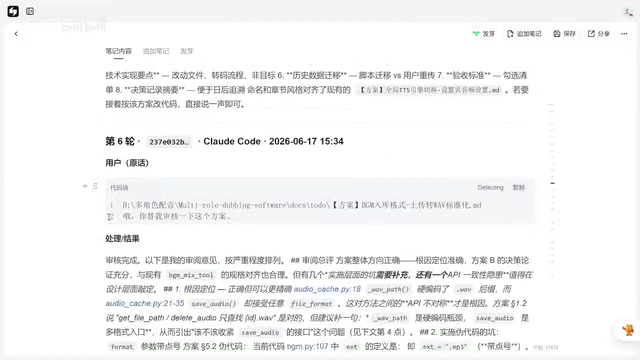
Once the plan document is ready, submit it to DeepSeek (via CloudClub with Claude) for deep reasoning and plan review. DeepSeek will raise a series of questions and improvement suggestions, then refine the plan itself — "you raised the issues, you fix them." DeepSeek's instruction-following capability is strong enough that it can generally handle deep optimization tasks independently.
Step 3: Back to Cursor for Implementation
The reviewed and refined plan goes back to Cursor for code implementation. After implementation, conduct self-testing and review to ensure the feature meets expectations.
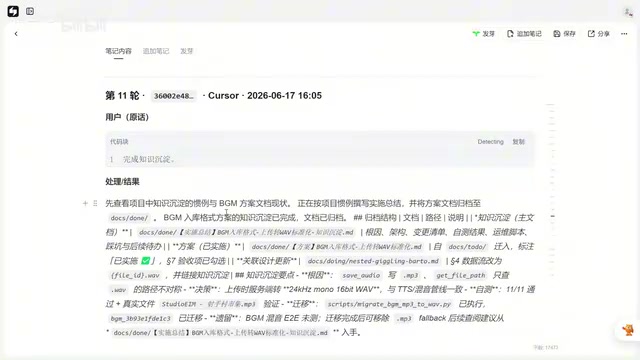
The core logic of this combo is: use lightweight tools for communication, heavyweight tools for reasoning and review, then lightweight tools again for execution. Compared to relying on a single AI tool, this approach significantly improves both efficiency and delivery quality.
AI's Minimum Delivery Mindset: Why It Won't Go the Extra Mile
This case reveals a crucial pattern in AI programming: AI tends to give you the Minimum Viable Delivery.
This behavior pattern has deep technical roots. The concept of minimum viable delivery originates from the MVP (Minimum Viable Product) in lean startup methodology, systematically described by Eric Ries in The Lean Startup. The core idea of MVP is to build a product version with minimal resources that's just enough to validate a hypothesis. AI exhibits a similar behavior pattern in code generation, but for different reasons: the training objective of large language models is to generate the most reasonable output based on the input. When the input (i.e., the requirement description) lacks sufficient information, the model tends to choose the most conservative and certain implementation path rather than speculating about the user's implicit needs. In NLP, this behavior is known as "Instruction Following" — the model strictly follows literal instructions rather than inferring intent.
Specifically, this manifests as:
- You say "implement a BGM feature" → it implements the most basic audio playback functionality
- You don't mention multi-format support → it only supports the simplest format
- You don't mention error handling → it won't proactively add error messages
- You don't request UX optimization → it won't consider interaction details
This isn't the AI being "lazy" — it's the fundamental logic of how it works: execute strictly according to instructions, make no additional assumptions. From one perspective, this is actually a "safe" behavior pattern that avoids misinterpreting requirements and going off track. But for users, it means a harsh reality:
The vaguer your requirement description, the more "minimal" the AI's delivery will be. What you don't say, it absolutely won't do.
Practical Advice: Five Strategies to Avoid the Minimum Delivery Trap
Based on this lesson, here are strategies you can adopt when doing Vibe Coding:
1. Make Your Requirements Specific
Don't just say "implement a BGM feature." Say "implement a BGM feature that supports common audio formats including MP3, WAV, and FLAC, with automatic conversion to a unified format after upload." Turn the "should" in your head into explicit "must" on paper.
2. Proactively List Boundary Conditions
Tell the AI what edge cases, compatibility requirements, and user scenarios to consider. For example: "If a user uploads an unsupported format, provide a clear error message."
3. Review in Stages
Don't rush to production after implementation. First test with different input conditions. Try an MP3, try a FLAC, upload a corrupted file — run through all the edge cases.
4. Leverage Multi-Tool Collaboration
Use different AI tools to cross-review plans. One AI's blind spots may be caught by another. Let Cursor handle communication and execution, while DeepSeek or Claude handles deep review — creating a complementary workflow.
5. Build Requirement Templates
For common feature modules, prepare detailed requirement description templates in advance to avoid missing key points every time. Turn the lessons from past mistakes into templates so you don't repeat them.
At the end of the day, the core tension in Vibe Coding is this: we want to say as little as possible and have AI do as much as possible, but AI's logic is to do exactly as much as you say. Finding that balance is the key to efficient AI programming.
Related articles
Sakana AI Launches RSI Lab: The Path to Recursive Self-Improvement Where AI Builds AI
Sakana AI launches RSI Lab for recursive self-improvement, letting AI autonomously improve its own architecture. Explore their four-stage roadmap and key breakthroughs.

The Clotilda: Underwater Archaeological Discovery of America's Last Slave Ship
The Clotilda, America's last slave ship, was discovered by underwater archaeologists in Alabama nearly 160 years after sinking. Learn about the search, key evidence, and other slave trade shipwreck discoveries.
Sakana AI in Practice: Reshaping Banking Lending Operations with AI Agents — Technology and Strategy
Deep dive into how Sakana AI applies AI Agents to banking lending operations, covering end-to-end support from information gathering to approval document generation, plus technical challenges and human-AI collaboration design.