Trae AI Coding Tool: Complete Guide to Download, Installation, and Getting Started
A complete guide to downloading, installing, and getting started with ByteDance's free Trae AI code editor.
This guide covers ByteDance's Trae AI editor — a free, AI-native code editor with built-in LLMs like Doubao, DeepSeek, and GPT. It walks through Trae's core advantages (free, Chinese-native, no VPN needed, VS Code compatible), step-by-step installation on Windows, Python environment setup, and hands-on AI chat coding. A comparison with Cursor and Claude Codex is also included.
Introduction
In an era where AI coding tools are flourishing, ByteDance's Trae AI editor has rapidly amassed over 6 million registered users thanks to three core advantages: completely free, native Chinese support, and direct access from China without a VPN. Compared to overseas tools like Cursor and Claude Codex, Trae is significantly more accessible for developers based in China. This article provides a detailed overview of Trae's core features, download and installation process, and basic usage to help you quickly get started with this powerful AI coding tool.
What Is Trae AI?
Trae is an AI-native code editor developed by ByteDance, with built-in large language models including Doubao, DeepSeek, and GPT. Unlike traditional code editors, Trae doesn't just autocomplete code — it can understand natural language descriptions, directly generate runnable code, explain complex logic, and even automatically fix bugs.
The term "AI-native" means that Trae was designed from the ground up with AI capabilities as a core feature, rather than bolting them on later through plugins like traditional editors. Traditional editors such as VS Code and Sublime Text were originally built around text editing and syntax highlighting, with AI features added as an extra layer. An AI-native editor deeply integrates LLM reasoning capabilities into every aspect of the workflow — editing, debugging, version management, and more — making AI not just a chat window but an intelligent assistant woven throughout the entire development process. This architectural difference gives AI-native editors inherent advantages in context understanding, code awareness, and multi-file collaboration.
Five Key Advantages
- Fast access from China: No special network configuration needed — use it directly without a VPN.
- Chinese-friendly: Native support for Chinese-language conversations. Users can describe coding requirements in natural Chinese without needing English proficiency.
- Completely free: The China edition comes with built-in LLMs like Doubao and DeepSeek, offering AI coding capabilities at no cost.
- Fully compatible with VS Code: Built on the VS Code architecture, it supports the rich plugin ecosystem with minimal migration effort.
- Data security assurance: ByteDance provides enterprise-grade data security, ensuring code privacy protection.
Regarding the built-in large language models, it's worth understanding how they work for code generation. Models like Doubao, DeepSeek, and GPT are essentially neural networks based on the Transformer architecture, pre-trained on massive code corpora (including GitHub open-source projects, technical documentation, Stack Overflow Q&A, etc.) to learn programming language syntax rules, design patterns, and best practices. When a user inputs a natural language description, the model converts it into a token sequence, understands the semantics through attention mechanisms, and then generates code token by token that fits the context. Different models have different strengths: Doubao excels at Chinese comprehension and China's tech stack, DeepSeek stands out in code reasoning and mathematical logic, while GPT has advantages in versatility and creative tasks. By offering multiple built-in models, Trae lets users choose the most suitable engine for each specific task.
Regarding VS Code compatibility, the technical significance of this point is worth elaborating. VS Code is built on the Electron framework and uses a plugin-based architecture with an Extension API, currently boasting over 50,000 extensions. Trae's choice to be compatible with the VS Code architecture means developers can directly use their existing themes, language support packages, debuggers, Git tools, and other plugins without re-adaptation. Additionally, VS Code's settings.json configuration files, keybindings, and workspace settings can all be seamlessly migrated. This compatibility strategy dramatically reduces switching costs — developers don't need to learn an entirely new editor workflow; they only need to pick up the AI interaction features.
Some Noteworthy Numbers
Trae's real-world performance is quite impressive:
- Personal edition registered users have surpassed 6 million
- Over 92% of engineers within ByteDance are using it
- AI code contribution rate reaches 43% in the Douyin (TikTok) Life Services team
These numbers clearly demonstrate that Trae is not an experimental product but a mature tool validated in large-scale production environments.
The AI code contribution rate metric deserves to be understood in an industry context. AI code contribution rate is a core metric for measuring the practical value of AI coding tools — it refers to the proportion of code that was AI-assisted in generation and ultimately adopted into the codebase relative to total committed code within a given period. Google disclosed in 2024 that its internal AI code contribution rate was approximately 25%, and Microsoft reported that GitHub Copilot users had an average acceptance rate of about 30%. Trae's 43% contribution rate in the Douyin Life Services team is already at an industry-leading level. It's important to note that this metric doesn't mean AI has completely replaced human coding — rather, AI handles boilerplate code, repetitive logic, and standard implementations, while developers focus on architecture design, business logic decisions, and code review. A 43% contribution rate means developers can offload a significant amount of mechanical coding work to AI, freeing them to concentrate on more creative tasks — a revolutionary improvement in development efficiency.
Trae Download and Installation Guide
Trae supports three major operating systems: Windows, macOS, and Linux. Below, we'll use Windows as an example to demonstrate the complete installation process.
Step 1: Download the Trae Installer
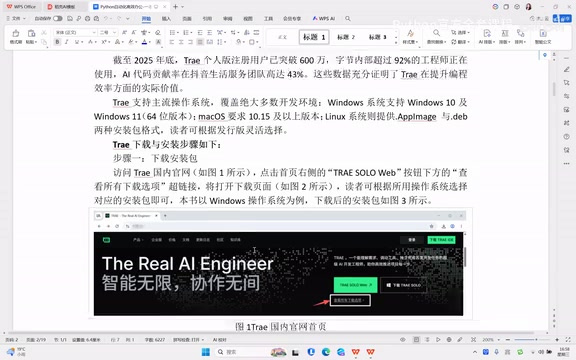
Visit Trae's official website, where you'll see a green download button on the right side of the page. Click "View all download options" below it to select the appropriate version for your operating system.
Step 2: Run the Installation
Once the download is complete, double-click the installer to begin. The installation process is very straightforward:
- Accept the user agreement and click "Next"
- Choose the installation directory — it's recommended to select a partition with ample disk space
- Follow the wizard, clicking "Next" until the installation is complete
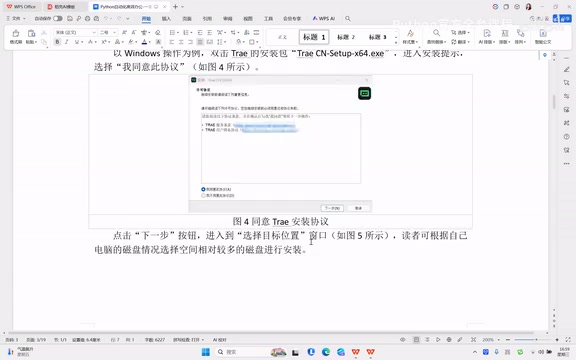
The entire installation process is nearly identical to VS Code, so developers with prior editor experience will find it completely intuitive.
First Launch and Initial Configuration
Initial Setup
After installation, a Trae shortcut icon will appear on your desktop. Double-click to launch it, and you'll enter the initialization wizard:
- Choose a theme: Light and dark themes are available — pick based on personal preference
- Preference settings: The default configuration works fine
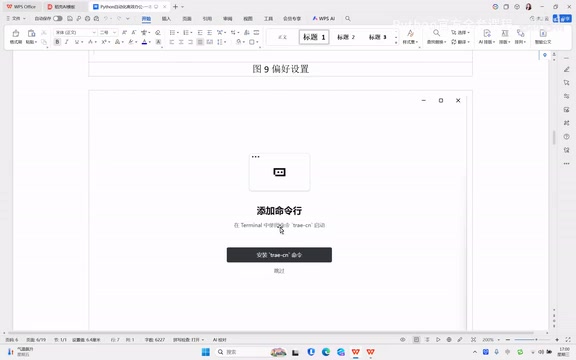
- Install command-line tools: Click "Install Trae Command" for convenient terminal access later
- Select user type: Choose "Personal User"
- Register and log in: Sign up and log in using your phone number
Interface Layout Overview
After logging in, Trae's main interface is divided into three core areas:
- Left Activity Bar: Vertically arranged function icons including file explorer, search, extension marketplace, etc.
- Center Code Editing Area: The main code writing area with multi-tab support
- Right AI Chat Panel: The AI conversation panel — this is what fundamentally sets Trae apart from traditional editors
This layout design allows developers to interact with AI at any time while writing code, without switching windows, creating a very smooth workflow.
Setting Up the Python Development Environment
Before using Trae for AI-assisted programming, you'll need to configure your development environment. Here's how to do it with Python:
Install the Python Extension
- Find the Extensions icon (the icon made of four squares) in the left activity bar
- Type "Python" in the search box
- Install the official Python extension, then restart the editor
Configure the Python Interpreter
After restarting, press Ctrl + Shift + P to open the Command Palette and type:
Python: Select Interpreter
The system will automatically detect installed Python versions. Select the version you need to complete the configuration.
It's important to understand why Python interpreter configuration matters. The Python interpreter is the program that converts Python source code into machine-executable instructions. A single computer may have multiple Python versions installed simultaneously (e.g., Python 3.8, 3.10, 3.12), along with virtual environments created through Anaconda, pyenv, or virtualenv. Correctly selecting the interpreter in your IDE is crucial because it determines the Python version used at runtime, the available standard library version, and the search path for third-party packages installed via pip. An incorrect interpreter selection is one of the most common root causes of the "ModuleNotFoundError" issue that beginners frequently encounter. It's recommended to create an independent virtual environment for each project to avoid dependency conflicts between different projects.
Install Dependencies Using the Terminal
In Trae, you can open the integrated terminal directly (Menu Bar → Terminal → New Terminal) and use pip install commands to install third-party libraries without switching to an external command-line tool.
Hands-On: Writing Code with Trae AI Chat
Once configuration is complete, you can experience Trae's core AI coding capabilities.
Create a File and Start an AI Conversation
- Right-click in the file explorer, select "New File," and create a
.pyfile - In the AI chat panel on the right, describe your requirements in natural language
For example, type:
"Write a Python function that takes a name as a parameter and prints 'Hello, welcome to learning'"
After clicking send, Trae will invoke its built-in LLM to generate the corresponding code. The generated code can be directly inserted into the editor and run.
Tips for AI-Assisted Programming
- Be as specific as possible: The more detailed your requirement description, the higher the quality of AI-generated code
- Leverage context: Trae understands the context of your current file and can supplement or modify existing code accordingly
- Iterate and refine: If the first generated result isn't satisfactory, continue the conversation to have the AI make adjustments
Trae vs. Other AI Coding Tools
The current mainstream AI coding tools include Cursor, Claude Codex, GitHub Copilot, and others. Trae's differentiated positioning is very clear:
| Feature | Trae | Cursor | Claude Codex |
|---|---|---|---|
| Price | Free | Paid (with free tier) | Paid |
| Chinese Support | Native | Limited | Limited |
| Access from China | Direct | Requires VPN | Requires VPN |
| Built-in Models | Doubao/DeepSeek/GPT | Claude/GPT | Claude |
| VS Code Compatible | Fully compatible | Fully compatible | Standalone product |
To better understand the differences between these tools, it helps to know the technical positioning of Cursor and Claude Codex. Cursor is developed by Anysphere and is also built on the VS Code architecture. Its key differentiator is the deep integration of models like Claude and GPT-4, along with advanced features such as Tab completion, multi-file editing (Composer), and codebase indexing, at a monthly cost of approximately $20. Claude Codex, on the other hand, is an AI coding agent from Anthropic that uses a sandboxed execution environment capable of autonomously completing the entire development workflow — from requirement analysis to code writing and test execution — making it closer to an Autonomous Coding Agent. These three tools represent different evolutionary directions for AI coding tools: Trae focuses on accessibility and localization, Cursor targets deep assistance for professional developers, and Claude Codex explores the boundaries of autonomous AI development.
For developers in China, especially beginners and small-to-medium teams, Trae's zero-cost, zero-barrier advantage is extremely compelling. However, for professional developers who need cutting-edge model capabilities, Cursor and Claude Codex may still hold certain advantages in model reasoning power.
Conclusion
As a flagship product from ByteDance, Trae AI occupies a unique position in China's AI coding tool market. With 6 million users and a 92% adoption rate among ByteDance's own engineers, its practical value is well-proven. For developers looking to experience AI-assisted programming at zero cost, Trae is undoubtedly one of the most worthwhile options to try right now.
We recommend starting with simple code generation and autocompletion, then gradually exploring Trae's capabilities in advanced scenarios such as code review, bug fixing, and unit test generation — truly making AI your coding partner.
Related articles
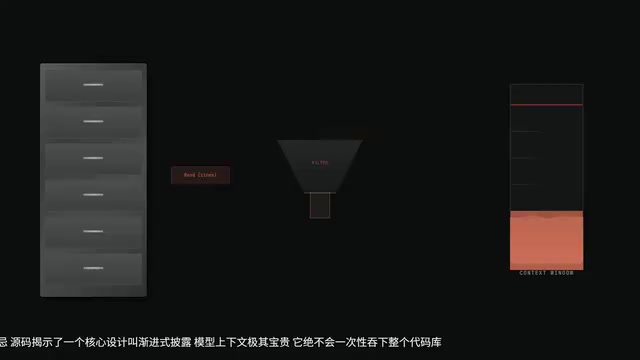
Claude Code Source Leak Revealed: The 5-Step AI Coding Agent Mechanism & Practical Pitfall Guide
Deep dive into Claude Code's leaked source revealing the 5-step AI coding Agent mechanism: progressive disclosure, precise indexing, surgical edits, auto-verification & graceful termination.

Deep Dive into the 198-Page Codex Chinese Manual: A Complete Guide from Beginner to Advanced
Deep breakdown of ByteDance's internal 198-page Codex Chinese manual covering installation, Commands, MCP workflows, Skills templates, multi-Agent collaboration, and background task scheduling.
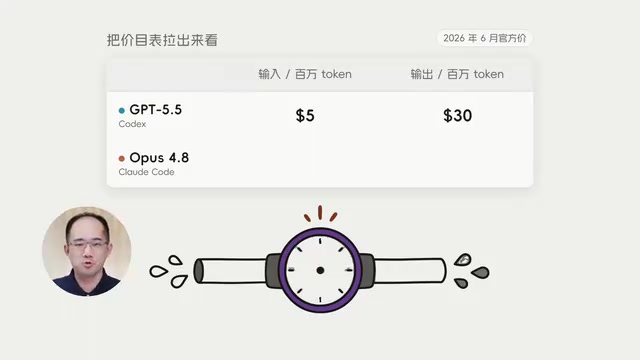
Codex vs Claude Code Cost Comparison: Breaking Down the Real Reasons Behind the 10x Price Gap
Codex costs $15 vs Claude Code's $155 for the same task. We break down the 10x price gap across Token pricing, consumption, and work patterns with practical tips.