Codex Hands-On Tutorial: From Installation and Configuration to Enterprise-Level Project Development
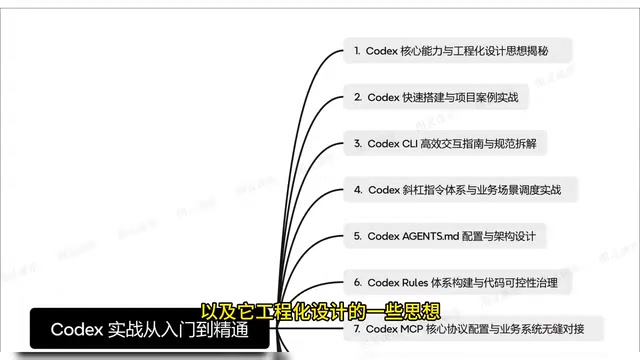
A complete learning path for OpenAI Codex from setup to enterprise-level AI-powered development.
This article provides a systematic guide to OpenAI Codex, covering everything from installation and CLI interaction to advanced topics like agents.md configuration, the Rules code governance system, MCP protocol integration, and multi-agent collaboration. It includes a hands-on RAG intelligent customer service project that ties all concepts together, helping developers master AI-powered engineering workflows.
Introduction: An Essential Skill for the AI Programming Era
OpenAI's Codex is profoundly changing the way programmers work. As the industry saying goes — "AI won't replace programmers, but it will replace programmers who don't use AI." As a powerful AI programming assistant, Codex has evolved from simple code completion into a full-fledged engineering tool capable of supporting complete project development.
OpenAI Codex was originally fine-tuned from GPT-3, specifically optimized for code generation tasks. Its training data includes billions of lines of public code from GitHub, covering dozens of programming languages. The new version of Codex released in 2025 is no longer a simple code completion model — it's a cloud-based software engineering agent built on codex-1 (a variant of OpenAI's o3 model fine-tuned with reinforcement learning). It can execute multiple tasks in parallel within isolated sandbox environments, including writing functional code, fixing bugs, answering codebase-related questions, and generating Pull Requests for review. This evolution marks the transition of AI programming tools from the "assisted input" phase to the "autonomous engineering" phase.
This article is based on a systematic Codex hands-on tutorial series on Bilibili, outlining the complete learning path from beginner installation to enterprise-level project deployment, helping developers quickly build a comprehensive understanding of Codex.
Codex Core Capabilities and Engineering Design Philosophy
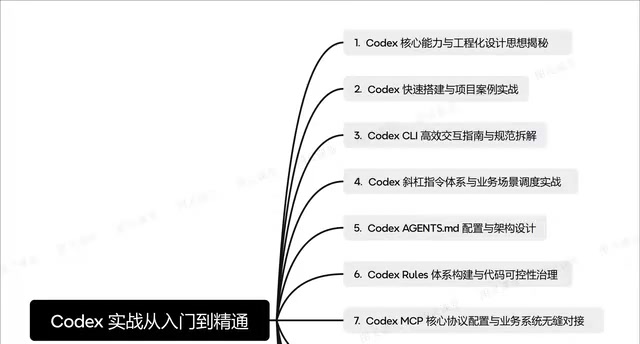
Codex is more than just a code generation tool — it's backed by a complete engineering design philosophy. The tutorial breaks down its core capabilities into several layers:
- Code Understanding and Analysis: Deep comprehension of existing codebase structure and logic
- Bug Fixing and Optimization: Automatic problem identification and fix recommendations
- Project-Level Development: Building complete projects from scratch
Understanding the boundaries and applicable scenarios of these core capabilities is a prerequisite for using Codex effectively. Many beginners fall into the trap of "letting AI write all the code." In reality, Codex works best as an efficient collaborative partner rather than a complete replacement for human thinking. Codex's engineering design emphasizes "human-AI collaboration" — developers handle architectural decisions, business logic design, and code review, while Codex handles implementation details, boilerplate code generation, and repetitive tasks. Each plays its role to maximize overall effectiveness.
Quick Installation and Environment Setup
The second part of the tutorial focuses on setting up the Codex development environment. Codex CLI (Command Line Interface) is the core entry point for the entire workflow — once installation and configuration are complete, you can move into the project development phase.
Codex CLI is an open-source command-line tool that runs in your local terminal, bringing the power of large language models directly into the developer's most familiar working environment. Unlike the web-based Codex, the CLI version executes code and shell commands directly on your local machine, reading and modifying project files in your local file system. It supports multiple operating modes — from the read-only suggest mode to the fully automated full-auto mode — allowing developers to flexibly control the AI's operational permissions based on their level of trust. The CLI tool's design philosophy is "terminal as IDE," which aligns with the Unix philosophy of "combining small tools to accomplish complex tasks," enabling Codex to work seamlessly with traditional command-line tools like grep, git, make, and more.
The key to this step is ensuring seamless integration between your development environment and Codex, including API key configuration, local development environment adaptation, and integration with existing project structures. For beginners, this is often the biggest hurdle, but once you get past it, the subsequent learning curve flattens significantly.
Codex CLI Interaction Guide and Slash Command System
Efficient Interaction Standards
Codex CLI provides an efficient interaction model, and mastering the correct interaction approach can dramatically boost development efficiency. This includes not only how to issue precise instructions but also how to organize contextual information so Codex better understands your intent. The core principle of efficient interaction is "provide sufficient context and give clear constraints" — vague instructions lead to uncertain model outputs, while precise context descriptions significantly improve code generation accuracy and first-pass success rates.
Built-in Slash Commands Explained
Codex comes with a comprehensive slash command system — a powerful feature that many developers tend to overlook. These commands cover multiple dimensions including code analysis, file operations, and project management, and can be deeply integrated with specific business scenarios.
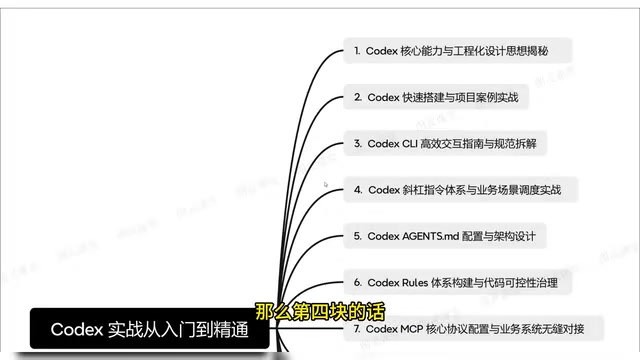
Mastering these commands is equivalent to having a standardized AI programming workflow, eliminating the need to describe requirements from scratch every time. The slash command design draws from the interaction paradigms of collaboration tools like Slack and Discord, using short command prefixes to quickly trigger specific functions and minimizing the interaction cost of common operations.
agents.md Configuration and Architecture Design
agents.md is a critically important configuration file in Codex projects that defines the AI assistant's behavioral guidelines and project context. The tutorial dedicates an entire chapter to designing and writing high-quality agents.md files.
agents.md is essentially a structured, system-level Prompt engineering practice. In large language model interactions, effective utilization of the context window directly determines output quality. agents.md solves the problem of repeatedly describing project background in every conversation by persisting the project's tech stack, architectural conventions, coding standards, and other information into a standard file. Codex automatically reads AGENTS.md files from the project root directory and subdirectories at startup, injecting their content into the system prompt. This mechanism is similar to Cursor's .cursorrules or GitHub Copilot's instruction files, but Codex's implementation supports hierarchical configuration — the root directory's AGENTS.md defines global standards, while subdirectory AGENTS.md files can add module-specific instructions, achieving modular configuration management.
A well-crafted agents.md should include:
- Project tech stack and architecture description
- Coding standards and naming conventions
- Key concepts in the business domain
- Behavioral constraints for the AI assistant
This is essentially "teaching" Codex to understand your project — the more precise the configuration, the higher the quality of Codex's output.
Code Controllability Governance and the Rules System
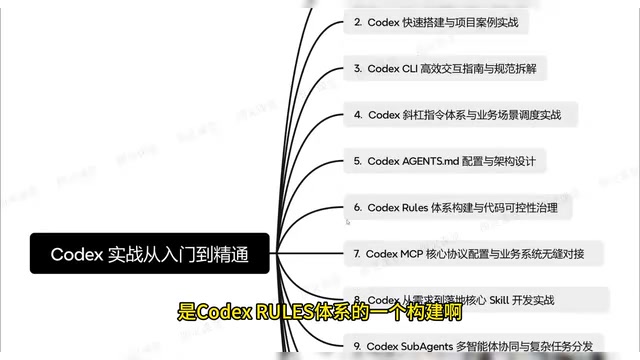
Controllability of AI-generated code has always been a core concern for enterprise-level applications. The tutorial proposes a code governance approach based on the Codex Rules system, ensuring that AI-generated code meets team standards and quality requirements.
In traditional software engineering, code quality is typically ensured through Code Review, linting tools (such as ESLint, Pylint), and automated checks in CI/CD pipelines. The Codex Rules system shifts this quality control upstream to the code generation stage — rather than checking and modifying code after it's written, constraints are applied during generation to ensure output quality at the source. This "Shift Left" quality management philosophy has been widely validated in the DevOps field, and Codex applies it to AI code generation scenarios.
Specifically, this includes:
- Code Style Consistency: Constraining output format through Rules
- Security Checks: Preventing generation of code with security vulnerabilities, such as common vulnerability patterns like SQL injection and XSS attacks
- Maintainability Assurance: Ensuring the readability and maintainability of generated code
This section is particularly important for team collaboration and enterprise-level projects — it's the key step in upgrading Codex from a "personal toy" to a "productivity tool."
MCP Protocol and Business System Integration
Codex MCP (Model Context Protocol) is the core protocol for achieving seamless integration between AI and existing business systems.
Model Context Protocol is a standardized protocol proposed and open-sourced by Anthropic in late 2024, designed to solve interoperability issues between large language models and external data sources and tools. MCP uses a client-server architecture: AI applications (like Codex) act as MCP clients, communicating with MCP servers through the standardized JSON-RPC protocol, while MCP servers encapsulate the access logic for specific data sources or APIs. This design is similar to what the USB protocol does for hardware devices — it provides a unified interface standard so that AI tools don't need to write specialized integration code for each external system.
Through MCP configuration, Codex can:
- Access internal APIs and data sources
- Understand enterprise-specific business logic
- Integrate with existing CI/CD workflows
Once MCP is configured in Codex, AI agents can dynamically invoke external tools during task execution, such as querying databases, calling internal APIs, and operating project management systems, greatly expanding the AI's capability boundaries. This means Codex is no longer an isolated tool but an integral part of the enterprise development workflow.
Multi-Agent Collaboration and Advanced Applications
Sabor Agents Multi-Agent Collaboration
The advanced section of the tutorial introduces Codex Sabor Agents' multi-agent collaboration mechanism. When facing complex tasks, a single Agent often falls short, while multi-agent collaboration enables intelligent task distribution and parallel processing, significantly improving development efficiency for complex projects.
Multi-Agent collaboration is a cutting-edge direction in the current AI engineering field. Its core concept originates from distributed systems and microservice architecture — decomposing a complex task into multiple subtasks, having different specialized Agents handle them separately, and then aggregating the results. In Codex's implementation, each Agent runs in an independent sandbox container with its own execution environment and context. The main Agent handles task planning and distribution, while sub-Agents focus on their respective subtasks (such as frontend development, backend logic, test writing, etc.), coordinating through message-passing mechanisms. The advantages of this architecture are twofold: on one hand, it achieves true parallel processing where multiple Agents can work simultaneously; on the other hand, it reduces the cognitive burden on each individual Agent through responsibility isolation, improving the completion quality of each subtask.
Plugin Ecosystem and Development Workflow
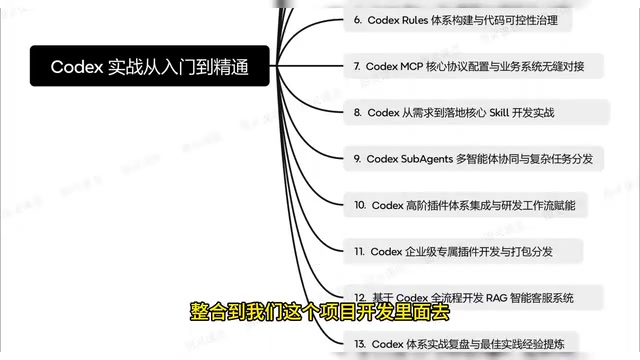
Codex supports a rich plugin ecosystem, including:
- Advanced Plugin Integration: Connecting third-party tools and services to Codex
- Enterprise-Specific Plugin Development: Customized development for specific business scenarios
- Plugin Packaging and Distribution: Sharing developed plugins with teams or the community
This plugin system gives Codex exceptional extensibility, enabling it to adapt to various development scenarios. The plugin architecture's design philosophy is similar to VS Code's extension ecosystem — the core platform provides foundational capabilities and standard interfaces, while specific feature enhancements are implemented through plugins, satisfying diverse needs while keeping the platform lightweight.
Hands-On Project: RAG Intelligent Customer Service System Development
The tutorial's final hands-on project is building a RAG (Retrieval-Augmented Generation) intelligent customer service system from scratch.
RAG (Retrieval-Augmented Generation) is an architectural paradigm proposed by Meta AI's research team in 2020, designed to address the knowledge timeliness and hallucination issues of large language models. The RAG system workflow consists of three stages: first, documents from the enterprise knowledge base are converted into vector representations through an Embedding model and stored in a vector database (such as Pinecone, Milvus, FAISS, etc.); second, when a user asks a question, the system converts the question into a vector as well and retrieves the most relevant document fragments from the vector database; finally, the retrieved document fragments are fed as context along with the user's question into the large language model to generate answers based on real data. Compared to approaches that rely purely on model parametric knowledge, RAG significantly reduces hallucination rates and can reflect the latest information in real-time by updating the knowledge base, without the need to retrain the model.
This project comprehensively applies knowledge from all previous chapters:
- Using Codex for project architecture design
- Configuring project context based on agents.md
- Connecting to knowledge base data sources through MCP
- Leveraging multi-agent collaboration to handle complex Q&A logic
- Completing system testing and deployment
RAG systems are one of the hottest directions for AI application deployment today, offering both sufficient technical depth and clear commercial value, making it a highly representative comprehensive hands-on project.
Conclusion: Three Levels of Mastering Codex
Codex is evolving from a code completion tool into a complete AI programming platform. Based on the content structure of this tutorial, truly mastering Codex requires understanding three levels:
- Tool Level: Basic operations including installation and configuration, CLI interaction, and slash commands
- Engineering Level: Engineering practices including agents.md design, the Rules system, and MCP protocol
- Architecture Level: Advanced applications including multi-agent collaboration, plugin ecosystem, and enterprise-level project deployment
The progressive relationship between these three levels also reflects the penetration path of AI programming tools in software engineering — from individual productivity improvement, to team collaboration standardization, to comprehensive transformation of enterprise-level development workflows. Each level crossed represents a deeper understanding of AI programming and corresponds to greater productivity gains.
For programmers, the sooner you master these AI programming tools, the greater your advantage in future technology competition. Codex isn't meant to replace programmers' thinking ability — it's meant to amplify programmers' productivity — provided you truly learn how to harness it.
Related articles
Claude Code's Hidden Advantages Explained: Design Choices Every AI Coding Tool Should Copy
Deep dive into Claude Code's leading design in agentic coding: skill script execution, CLAUDE.md imports, remote control, dynamic workflow orchestration, and why Cursor, Codex and others should adopt these features.

Agent Harness: The Paradigm Leap from Prompt Engineering to Harness Engineering
Deep dive into Agent Harness: tracing the paradigm evolution from Prompt Engineering to Context Engineering to Harness Engineering, and how loop-based architectures solve context loss in AI coding agents.
OpenAI Codex CLI Practical Guide: From Installation and Configuration to Enterprise-Level Development
A deep dive into OpenAI Codex CLI's core capabilities and practical usage, covering setup, agents.md configuration, slash commands, MCP protocol, multi-agent collaboration, and RAG system development.