Replicating Slay the Spire with AI and Zero Code: A Complete Walkthrough from Architecture to Art
A complete zero-code replication of Slay the Spire using Godot engine and AI tools for both code and art.
A Bilibili content creator replicated the classic roguelike card game Slay the Spire using Godot engine and AI tools without writing a single line of code. The workflow emphasizes architecture documentation before coding, iterative AI-driven development, and batch art asset generation with style consistency control. The project is fully open-sourced.
When AI Meets Indie Game Development: How Far Can Zero Code Go?
Can a game involving complex technical concepts like state machines, card systems, and roguelike mechanics be developed without writing a single line of code? A Bilibili content creator used the Godot engine paired with an AI toolchain to replicate the classic card-based roguelike Slay the Spire from scratch — without manually writing a single line of code — and has open-sourced the entire project.
It's worth explaining the technical depth behind these terms. A State Machine is a core design pattern in game development for managing object behavior. It divides a character's or system's behavior into discrete states (e.g., idle, attack, defend, death) and defines the transition conditions between them. In Slay the Spire, battle flow, turn management, and enemy AI intent switching all rely on state machines. The card system involves a series of interconnected subsystems including deck building, draw/discard/exhaust pile management, and card effect parsing and execution. Roguelike mechanics are characterized by procedurally generated level maps, permadeath, random drops, and build strategy — requiring developers to implement random map generation algorithms, seed systems, and a large number of combinable game elements. The intersection of these three makes the project far more complex than a typical small game — which is exactly why this "zero code" case is so remarkable.
This case demonstrates an extreme but effective workflow for AI-assisted game development: let AI handle code architecture and implementation, let AI image generation tools handle all art assets, and the developer only needs to play the roles of "product manager" and "QA tester."
Code Development: Architecture Documentation First, Iterative Progress
Why Godot Engine?
The choice of engine is worth mentioning. Godot is a completely free and open-source cross-platform game engine released under the MIT license. Developers can use it freely without paying any fees or royalties — a stark contrast to Unity's controversial runtime fee policy in recent years. Godot uses its own GDScript scripting language (with Python-like syntax and a gentle learning curve), while also supporting C# and C++. Its scene system uses a Node Tree architecture where all game objects are compositions of nodes, a design naturally suited for modular development. Godot's lightweight nature (the editor itself is only about 40MB) and active community ecosystem make it a popular choice for indie developers, and its clean code structure and thorough documentation make it an ideal target engine for AI-assisted programming.
Output Architecture Documentation Before Writing Any Code
The creator emphasized a common pitfall that many AI programming beginners fall into: asking AI to start writing code immediately. The correct approach is to have AI produce a complete architecture document first. For a project like Slay the Spire that involves card systems, state machines, battle logic, and multiple other complex modules, diving in without clear architectural planning will inevitably lead to chaos and a swamp of bugs.
Why is architecture documentation so critical in AI programming? In traditional software engineering, architecture documents describe a system's high-level structure, module divisions, data flows, and interface definitions. But in the context of AI-assisted programming, their role is amplified even further: architecture documentation essentially serves as the AI's "long-term memory" and "global context." Large language models have limited context windows, and when project code grows to thousands of lines, the AI can't "see" all the code simultaneously. Architecture documentation provides a compressed global view, allowing the AI to understand any single module's position and responsibilities within the overall system. Without this document, the AI tends to produce interface conflicts between modules, naming inconsistencies, and duplicate implementations during later development, ultimately causing the project to spiral into a vicious cycle of "the more you fix, the messier it gets."
Here's the specific workflow:
- Ask the AI: "How do I replicate a Slay the Spire project from scratch?"
- The AI provides a complete architectural plan
- Have the AI formalize the plan into an architecture document
- Develop step by step according to the document
Accept Imperfection, Fix Through Multiple Iterations
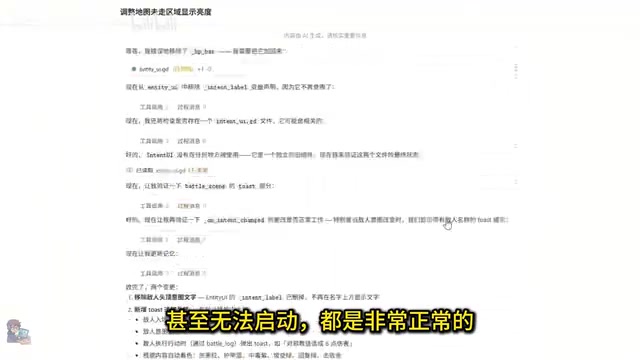
The creator was candid: don't expect AI to get everything right on the first try. Initial versions often have crude interfaces, missing features, and are riddled with bugs — they might not even launch — and that's all normal. The developer's core job is "finding and filling gaps": discover issues, describe them, have AI fix them, and after multiple rounds of conversation, arrive at a prototype with a complete gameplay loop.
The "Gameplay Loop" mentioned here is a fundamental concept in game design, referring to the core chain of behaviors that players repeatedly experience. In Slay the Spire, the micro-level gameplay loop is the battle turn cycle of "draw cards → play cards → end turn → enemy acts"; the macro-level loop is the exploration cycle of "choose a path → enter battle/event → receive rewards → upgrade deck → challenge the next floor." As long as a prototype successfully runs through the core gameplay loop, even with rough visuals and sparse content, it has the basic conditions to validate the game's fun factor. This reflects the game industry's common development philosophy of "make it fun first, make it pretty later."
This "rough draft" may look crude, but it already implements core mechanics like card drawing, battle turns, and enemy AI, laying a solid foundation for the subsequent art "renovation."
Art Production: Systematic Use of AI Image Generation Tools
Main Menu Design Workflow
The art phase used Hallopix's free canvas feature. The creator broke the main menu down into three element categories: background image, game logo, and button group.
- Background image: Have AI generate the prompt, then one-click image generation
- Game logo: Use the "game logo design" template, fill in the name, and use the background image as a style reference to ensure visual consistency
- Buttons: Use the logo as a style reference, with the prompt "design game buttons in the same style"
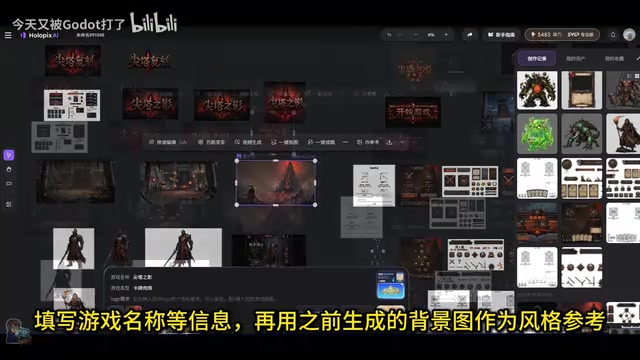
After generation, assets are processed with one-click background removal. Multiple images can be grouped and exported together as a compressed archive, significantly improving asset management efficiency.
The Three-Step Conversion Method for UI Design
The character selection page design showcased an efficient workflow:
- Screenshot → Wireframe: Use a screenshot of the original page as reference, and use the "UI to wireframe" template to generate a wireframe
- Wireframe → UI mockup: Use the wireframe as reference image 1 and the main menu background as reference image 2, then use the "wireframe to UI" template to ensure style consistency
- UI mockup → Sprites: Use the result as a reference image, select the "UI element" template to split it into usable sprites, then one-click background removal
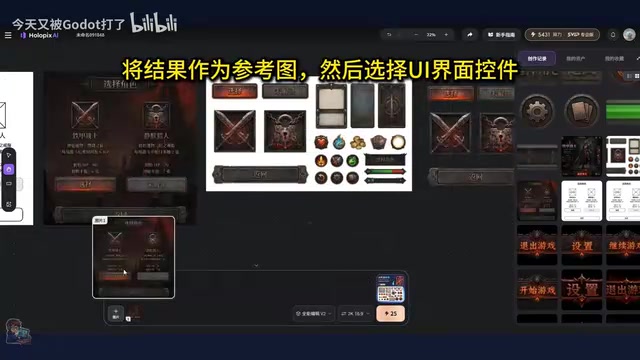
The concept of sprites deserves explanation here. Sprites are the most basic visual units in 2D games — independent image elements cropped from a complete scene with transparent backgrounds. In a game engine, every UI button, character portrait, and card icon is an individual sprite, and the engine uses code to control their position, scale, layer order, and interactive behavior. Traditional game art pipelines require artists to manually slice, name, and export each element in Photoshop, then have programmers manually configure coordinates and anchor points in the engine — a tedious and error-prone process.
Even more cleverly, the creator didn't handle sprite importing and positioning manually. Instead, they sent both the UI mockup and the sprites to the AI, letting it implement the interface layout directly in code. This essentially uses AI to automate the traditional pipeline of "design mockup → slice assets → engine integration," compressing what traditionally required close collaboration between artists and programmers into a conversation between one person and AI. While it probably won't work perfectly on the first try, iterating through a few rounds is still much faster than doing it manually.
Batch Generation of Characters and Cards
The core assets for the battle page are characters and cards. To ensure style consistency, the creator adopted a batch strategy:
- Characters: First have AI batch-produce image generation prompts for all characters, then batch-generate the images
- Cards: Use unified template prompts and reference images — the reference image is key to ensuring detail consistency
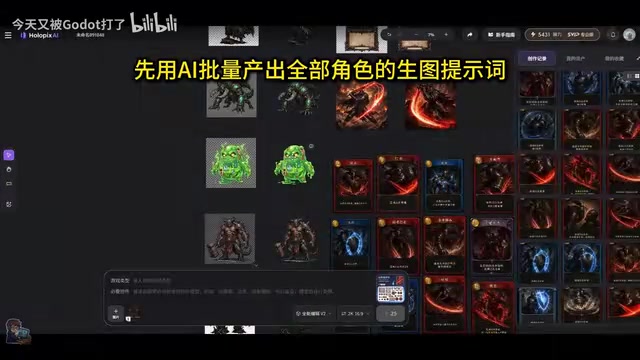
Regarding style consistency control, this is a core challenge in AI image generation. Because diffusion models involve random noise sampling in each generation, even with identical prompts, results will vary in color tone, brushwork, and detail style. The creator's "reference image" strategy essentially leverages Image-to-Image generation technology: feeding existing style-consistent images into the model as visual anchors to constrain the style space of generated results. This approach is more effective than relying solely on text prompts, because visual characteristics (such as color schemes, lighting styles, and line weights) are difficult to describe precisely in language but can be directly conveyed through reference images. Using the same reference image and template consistently during batch generation is currently one of the best practices for ensuring asset consistency in AI art workflows.
After generation, assets are exported as compressed archives via grouping. After extraction, the folders are dragged directly into Godot's resource directory, and the file paths are copied to the AI to complete resource replacement. The entire workflow forms a complete closed loop from generation to integration.
Key Methodology Summary
The Transformation of the Developer's Role
In this project, the developer's role shifted from "programmer + artist" to four directions:
- Architect: Overseeing the overall direction and module division
- QA Tester: Finding bugs and precisely describing issues
- Product Manager: Breaking down requirements and planning workflows
- Asset Manager: Organizing and integrating AI-generated assets
Reusable Workflow Patterns
- Architecture documentation first to avoid late-stage chaos
- Embrace iteration — don't aim for perfection on the first try
- Art assets follow the pipeline of decompose → batch generate → unify style → auto-integrate
- Let AI handle the "last mile" whenever possible, such as sprite importing, path replacement, and other repetitive tasks
Conclusion
This project demonstrates a clear trend: AI toolchains are dramatically lowering the barrier to indie game development. Of course, "zero code" doesn't mean "zero skill" — developers still need architectural thinking, problem decomposition abilities, and an understanding of game design. AI replaces the execution-level work of coding and illustration, but design decisions and quality control still require human intelligence.
The project is fully open-sourced. Interested developers can reference this workflow and try using AI to replicate their favorite games.
Related articles
Claude Fable 5 Global Ban: Deep Analysis of the AI Economic Chain Fracture Crisis
Claude Fable 5 banned globally just 3 days after launch. Deep analysis of the jailbreak controversy, AI supply chain fracture risk, Anthropic's fear marketing backfire, and local AI deployment strategies.
Claude Fable 5 Hands-On: Is Doubling the Tokens Worth It? A Rust Programming Comparison with Opus 4.8
Hands-on Rust project comparison of Claude Fable 5 vs Opus 4.8. Fable 5 uses 2x tokens for only marginal quality gains and has stability issues.

Compile First: Using AI to Revive the Dormant Files on Your Hard Drive
Explore how the open-source LLM Wiki project uses a compile-first paradigm to turn dormant local files into a searchable AI knowledge base, compared with traditional RAG approaches.